

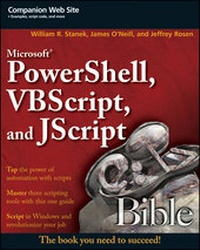
Microsoft PowerShell, VBScript and JScript Bible
Description

More details
Other editions
Additional editions
Persons
William R. Stanek has over 20 years of business and technology experience. He is a leading network technology expert and an award-winning author for MS Press and O'Reilly. Over the years, his practical advice has helped millions of programmers, developers and network engineers all over the world. In the late 90's was a regular contributor to leading publications like PC Magazine and Dr. Dobbs. Stanek has written over 70 books, which are sold all over the world and have been translated in many languages.
Content
Introduction
PowerShell, VBScript, and JScript Bible is a work in progress, just like the Windows operating system itself and the body of work that’s grown up around it. It is quite likely that errors will make themselves apparent after this book has gone to press and found its way onto your desktop. I very much appreciate the efforts of readers who go to the trouble of pointing out mistakes in the text so I can fix them in future editions. Even more, I am grateful for readers who offer their own hints, tricks, code, and ideas to me for inclusion in future editions of this book.
I truly hope you find that PowerShell, VBScript and JScript Bible provides everything you need to perform essential scripting tasks. You can contact me through e-mail at williamstanek@aol.com. You’re always welcome to write me with ideas, suggestions, improvements, or questions. If you provide an example that’s used in a future edition of this book, I’ll be especially grateful for your help and will credit you in that edition. I also have a Web site, which contains support material for this book, among other things. Point your browser to www.williamstanek.com/scripting/ for corrections, enhancements, news, and additional thoughts. I’ll post the source code from this book as well.
Thank you!
William R. Stanek
The best introduction to a book I ever saw was from Machiavelli’s The Discourses, where he says something like, “I’m sending you something, and if it doesn’t meet the obligations I owe you, is at any rate the best I can send. For in it I have set down all I know from long experience and constant reading…you may perhaps lament my lack of skill should my narratives be thin and also errors of judgment if I have made mistakes.”
The longer the piece that I write, the more likely I am to think of that. The experience I have in PowerShell builds on decades of seeing different scenarios and using different tools: and that experience has been gained working with people who don’t think of themselves as Programmers. Graphical management tools make it easy to find how to do a one-off task, but some repetitive tasks aren’t efficient with the GUI. Some information can’t be extracted easily from a graphical tool: some tasks just weren’t anticipated by the Programmer who wrote it. UNIX system administrators have known for a long time that there is an area, which isn’t Programming in the customary sense, of creating a large beast, with considerations such as user interface design to be taken into account. It produces something that a dictionary would define as a program—a sequence of instructions to be followed by the computer. A script is a program but not a Program (the capitalization is deliberate). Scripts are written mostly by people who are not Programmers, but just know the job they need to get done. And, usually a script will involve less time to create than a “proper” Program and will pay back the time that went into it very quickly. Want to know which of the servers you manage don’t have a key patch on them—without logging onto each one? It’s a few lines of script; a system administrator can put it together in a couple of minutes. A Programmer (capital P) won’t have fired up Visual Studio and roughed out the user interface in that time.
Better still for the Windows system administrator, most of the work has been done by someone else. Want a list of your servers? A couple of lines of script will get it from Active Directory. Want the installed patches on each of those servers? One line of PowerShell will get that. Most of the knowledge needed isn’t of a programming or scripting language—whether you use PowerShell, VBScript, or any other environment, it is a question of understanding the task and the objects that you can call on from that environment. PowerShell has all of .NET, WMI, AD, and ActiveX/COM at its disposal. It needs a whole bookshelf to explain all of those things, so what we do in this book is to try to equip you, the reader, with the skills you need to use them—which is why I worry that my narratives may be thin.
Who Should Read This Book
If you are someone who is interested in any of the previously mentioned technologies, PowerShell, VBScript and JScript Bible is definitely a book you should read. This comes with several caveats. This book is designed for:
- Administrators who support Windows systems
- Developers who create scripts or programs for Windows systems
- Advanced users working with Windows systems
To pack in as much information as possible, We had to assume that you have basic networking skills, a basic understanding of Windows, and that Windows is already installed on your systems. With this in mind, we don’t devote entire chapters to understanding, installing, or using Windows. Beyond the introductory information in Chapters 1, 2, and 3, we don’t cover scripting basics either. We do, however, cover every facet of Windows scripting, so if you want to learn Windows scripting inside and out—including techniques not published elsewhere—you’ve come to the right source.
Although the book highlights the latest and greatest features of Windows Vista and Windows Server 2008, just about everything you learn in this book can also be applied to script Windows XP. Keep in mind that if you are using a pre–Windows Vista system, however, you may need to check your scripts to ensure they are fully compatible.
How This Book Is Organized
Learn the basics of what goes into Windows and you will be able to use all sorts of devices and computers in the future. The book is organized in a way that enables you to start off at the very beginning with Windows, but still grow to the point where you can get going with some powerful server and programming features, if you care to.
Part I assumes that someone has set up a Windows system in front of you. After being introduced to Windows script in Chapter 1, you learn the basics of how to:
- VBScript Essentials (Chapter 2)
- JScript Essentials (Chapter 3)
- PowerShell Essentials (Chapter 4)
In Part II, you learn how to:
- Creating Scripts and Scripting Files (Chapter 5)
- VBScript and JScript Scripting Basics (Chapter 6)
- Input, Output, and Error Handling with VBScript and JScript (Chapter 7)
- Working with Files and Folders in VBscript and JScript (Chapter 8)
- Reading and Writing Files (Chapter 9)
- Managing Drives and Printers with VBScript and JScript (Chapter 10)
- Configuring Menus, Shortcusts, and Startup Applications (Chapter 11)
- Working with the Windows Registry and Event Logs (Chapter 12)
In Part III, you learn network and directory service scripting:
- Scheduling One-time and Recurring Tasks (Chapter 13)
- Managing Computer and User Scripts (Chapter 14)
- Introducing Active Directory Service Interfaces (Chapter 15)
- Using Schema to Master ADSI (Chapter 16)
- Managing Local and Domain Resources with ADSI (Chapter 17)
- Service and Resource Administration with ADSI (Chapter 18)
- Maintaining Shared Directories, Printer Queues, and Print Jobs (Chapter 19)
- Managing Active Directory Domain Extensions (Chapter 20)
In Part IV, you learn Windows PowerShell:
- Input, Output and Error Handling in PowerShell (Chapter 21)
- Working with Files and Registry in Powershell (Chapter 22)
- Event Logging, Services, and Process Monitoring with PowerShell (Chapter 23)
- Working with Active Directory Using ADSI and PowerShell (Chapter 24)
- Working with WMI and PowerShell (Chapter 25)
In Part V, you develop a set of programming libraries:
- Library: File-System Utilities (Chapter 26)
- Library: I/O Utilities (Chapter 27)
- Library: Network Resource Utilities (Chapter 28)
- Library: Account Management Utilities (Chapter 29)
- Library: Building a PowerShell Library (Chapter 30)
In Part VI, you’ll learn more about:
- Windows Scripting API (Appendix A)
- Core ADSI Reference (Appendix B)
- Essential Command-Line Utilities for Use with WSH (Appendix C)
Conventions and Features
As with most computer books, you’ll see that some text is highlighted by special formatting or with special icons. Here’s a field guide to the things you’ll see.
Notes provide additional details and often contain information that you should read before trying to implement a referenced technique.
Cross-references tell you where you can find more information on a particular topic.
Tips inform you of little factoids that may be useful to you as you work with Windows scripting. Tips provide helpful information that isn’t always essential to getting things to work correctly. Rather, Tip material can be used to make things run better.
Cautions provide a specific warning about things you should watch out for, or things you shouldn’t do. You should pay particular attention to Cautions when reading the text.
Source-Code Formatting
The text contains source-code listings as well as in-text references to objects, methods, properties, and other source-code elements. In order to minimize line wrapping and formatting issues, we generally use in-line code lists for code examples. For...
