

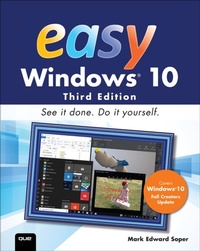
Easy Windows 10
2nd Edition
Published on 12. February 2018
576 pages
978-0-13-485700-8 (ISBN)
Description

Visual, step-by-step hands-on tutorials for the most common tasks a user needs to perform.
Updated for the 2017 Spring and Fall Creator releases of Windows 10.
See it done. Do it yourself. It's that Easy! Easy Windows 10 teaches you the fundamentals to help you get the most from Windows 10.
Fully illustrated steps with simple instructions guide you through each task, building the skills you need to perform the most common tasks with Windows. No need to feel intimidated; we'll hold your hand every step of the way.
Learn how to...
* Use the improved Windows 10 Fall Creators Update Start menu in Desktop and Tablet mode versions
* Discover exciting new 3D and mixed reality apps
* Share your wireless Internet connection with smartphones, tablets, and PCs
* Use Cortana with more apps and new Cortana-enabled speakers
* Use the new OneDrive Files on Demand feature for easy access to files stored in the cloud
* Use Windows Ink to enhance your photos and make map directions more powerful
* Touchscreen, keyboard, or mouse-use Windows 10 your way!
Updated for the 2017 Spring and Fall Creator releases of Windows 10.
See it done. Do it yourself. It's that Easy! Easy Windows 10 teaches you the fundamentals to help you get the most from Windows 10.
Fully illustrated steps with simple instructions guide you through each task, building the skills you need to perform the most common tasks with Windows. No need to feel intimidated; we'll hold your hand every step of the way.
Learn how to...
* Use the improved Windows 10 Fall Creators Update Start menu in Desktop and Tablet mode versions
* Discover exciting new 3D and mixed reality apps
* Share your wireless Internet connection with smartphones, tablets, and PCs
* Use Cortana with more apps and new Cortana-enabled speakers
* Use the new OneDrive Files on Demand feature for easy access to files stored in the cloud
* Use Windows Ink to enhance your photos and make map directions more powerful
* Touchscreen, keyboard, or mouse-use Windows 10 your way!
More details
Series
Edition
2nd edition
Language
English
Place of publication
Boston
United States
Publishing group
Pearson Education (US)
Target group
College/higher education
ISBN-13
978-0-13-485700-8 (9780134857008)
Copyright in bibliographic data and cover images is held by Nielsen Book Services Limited or by the publishers or by their respective licensors: all rights reserved.
Schweitzer Classification
Other editions
Additional editions
Mark Soper
Easy Windows 10
Book
03/2018
3rd Edition
Que Corporation,U.S.
€44.75
Shipment within 3-4 weeks
Mark Soper
Easy Windows 10
Book
03/2017
2nd Edition
Que Corporation,U.S.
€44.75
Article exhausted; check for reprint
Person
Mark Edward Soper has been using Microsoft Windows since version 1.0, and since 1992 he has taught thousands of computer troubleshooting and network students across the country how to use Windows as part of their work and everyday lives. Mark is the author of Easy Windows 10, Easy Windows 8.1, Easy Windows 8, Easy Microsoft Windows 7, Teach Yourself Windows 7 in 10 Minutes, and Using Microsoft Windows Live. Mark also has contributed to Que's Special Edition Using series on Windows Me, Windows XP, and Windows Vista, as well as Easy Windows Vista and Windows 7 In Depth. In addition, he has written two books about Windows Vista: Maximum PC Microsoft Windows Vista Exposed and Unleashing Microsoft Windows Vista Media Center.
When he's not teaching, learning, or writing about Microsoft Windows, Mark stays busy with many other technology-related activities. He has written three books on computer troubleshooting, including The PC and Gadget Help Desk: A Do-It-Yourself Guide to Troubleshooting and Repairing. He is a longtime contributor to Upgrading and Repairing PCs, working on the 11th through 18th, 20th, and subsequent editions. Mark has co-authored Upgrading and Repairing Networks, Fifth Edition, written several books on CompTIA A+ Certification (including two titles covering the 2016 exams), a guest column on certification for Computerworld.com, and two books about digital photography: Easy Digital Cameras and The Shot Doctor: The Amateur's Guide to Taking Great Digital Photos. Mark also has become a video content provider for Que Publishing and InformIT and has posted many blog entries and articles at InformIT.com, MaximumPC.com, and other websites. In addition, Mark has taught digital photography, digital imaging, and Microsoft Office for Ivy Tech Corporate College's southwest Indiana campus in Evansville, Indiana, and Windows and Microsoft Office for the University of Southern Indiana's continuing education department.
When he's not teaching, learning, or writing about Microsoft Windows, Mark stays busy with many other technology-related activities. He has written three books on computer troubleshooting, including The PC and Gadget Help Desk: A Do-It-Yourself Guide to Troubleshooting and Repairing. He is a longtime contributor to Upgrading and Repairing PCs, working on the 11th through 18th, 20th, and subsequent editions. Mark has co-authored Upgrading and Repairing Networks, Fifth Edition, written several books on CompTIA A+ Certification (including two titles covering the 2016 exams), a guest column on certification for Computerworld.com, and two books about digital photography: Easy Digital Cameras and The Shot Doctor: The Amateur's Guide to Taking Great Digital Photos. Mark also has become a video content provider for Que Publishing and InformIT and has posted many blog entries and articles at InformIT.com, MaximumPC.com, and other websites. In addition, Mark has taught digital photography, digital imaging, and Microsoft Office for Ivy Tech Corporate College's southwest Indiana campus in Evansville, Indiana, and Windows and Microsoft Office for the University of Southern Indiana's continuing education department.
Content
CHAPTER 1 What's new and improved in Windows 10 Creators Update
CHAPTER 2 Upgrading to Windows 10 Creators Update
CHAPTER 3 Logging in starting up and shutting down Windows 10 with a touchscreen
CHAPTER 4 Logging into Windows 10 and customising the start menu
CHAPTER 5 Using Cortana for search and more
CHAPTER 6 Running Apps
CHAPTER 7 Web browsing with Microsoft Edge
CHAPTER 8 Playing and creating music and audio
CHAPTER 9 Taking, editing and sharing photos and videos
CHAPTER 10 Enjoying videos, tv and movies
CHAPTER 11 Connecting with friends
CHAPTER 12 News, weather, sports and money
CHAPTER 13 Using Windows Ink
CHAPTER 14 Storing and finding your files
CHAPTER 15 Discovering and using Windows 10 Tools and Accessories
CHAPTER 16 Using the Windows store
CHAPTER 17 Gaming
CHAPTER 18 Printing and scanning
CHAPTER 19 Managing Windows 10
CHAPTER 20 Networking your home
CHAPTER 21 Customising windows
CHAPTER 22 Aadding and managing users
CHAPTER 23 Protecthing your system
CHAPTER 24 System maintenance and performance
Glossay
CHAPTER 2 Upgrading to Windows 10 Creators Update
CHAPTER 3 Logging in starting up and shutting down Windows 10 with a touchscreen
CHAPTER 4 Logging into Windows 10 and customising the start menu
CHAPTER 5 Using Cortana for search and more
CHAPTER 6 Running Apps
CHAPTER 7 Web browsing with Microsoft Edge
CHAPTER 8 Playing and creating music and audio
CHAPTER 9 Taking, editing and sharing photos and videos
CHAPTER 10 Enjoying videos, tv and movies
CHAPTER 11 Connecting with friends
CHAPTER 12 News, weather, sports and money
CHAPTER 13 Using Windows Ink
CHAPTER 14 Storing and finding your files
CHAPTER 15 Discovering and using Windows 10 Tools and Accessories
CHAPTER 16 Using the Windows store
CHAPTER 17 Gaming
CHAPTER 18 Printing and scanning
CHAPTER 19 Managing Windows 10
CHAPTER 20 Networking your home
CHAPTER 21 Customising windows
CHAPTER 22 Aadding and managing users
CHAPTER 23 Protecthing your system
CHAPTER 24 System maintenance and performance
Glossay
