

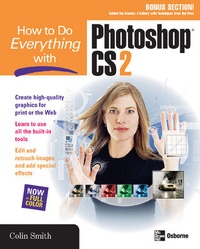
How to Do Everything with Photoshop CS2
1st Edition
Published on 16. June 2005
434 pages
978-0-07-148356-8 (ISBN)
Description

In this full-color, easy-to-use book, award-winning designer and best-selling author Colin Smith teaches the fundamentals of Photoshop then covers the more advanced features the software has to offer. Learn to use traditional drawing and painting tools ranging from pencils to airbrushes, then discover how to add and manipulate text, retouch photos, create special effects, and more. The techniques professional artists apply to their work are revealed in a special "Behind the Scenes" section.
More details
Other editions
Additional editions
Colin Smith
How to Do Everything with Photoshop CS2
Book
06/2005
2nd Edition
McGraw-Hill Professional
€18.56
Article exhausted; check different version
Person
Content
- Intro
- Contents
- Acknowledgments
- Introduction
- Part I: Get to Know Photoshop CS2
- Chapter 1 Photoshop CS2 Primer
- The Photoshop Workspace
- Palettes
- The Toolbox
- Options Bar
- Rulers, Guides, and Grids
- Working with Windows
- Preset Workspaces
- Custom Shortcuts and Workspace
- Preset Manager
- Preferences
- Common Color Modes
- Common File Types
- Status Bar
- Chapter 2 Documents, Organization, and Resolution
- Creating a New Document
- Opening Documents
- Working with Images
- Using Adobe Bridge
- Changing Views
- Rating Images
- Understanding Image Resolution
- Resizing
- Chapter 3 Draw, Paint, and Artistry
- Choosing Colors
- Drawing Tools
- Gradient Tools
- Shape Tools
- Transform Tool
- Patterns
- History
- Part II: Beyond the Basics
- Chapter 4 Use Layers in Photoshop
- Layers Explained
- Using Layers in the Layers Palette
- Working with Multiple Layers
- Aligning and Evenly Distributing Objects
- Managing Layers
- Chapter 5 Work with Advanced Layer Techniques
- Special Layer Types
- Advanced Layer Features
- Chapter 6 Demystify Channels
- Channels Explained
- Spot Colors
- Chapter 7 Create and Understand Paths
- Apples and Oranges: Raster vs. Vector Graphics
- Paths Explained
- Editing Paths
- Working with Paths and Shapes
- Creating Custom Shapes
- Chapter 8 Create and Manipulate Text
- Creating Text
- Formatting Text
- Using Anti-Aliasing
- Formatting Paragraph Text
- Using Warp Text
- Typing on a Path
- Filling a Shape with Type
- Chapter 9 Save Time with Automation
- Creating and Using Tool Presets
- Working with Actions
- Processing Multiple Images at Once
- Part III: The Fun Stuff
- Chapter 10 Make Selections
- Understanding Selections
- Using Selection Tools
- Transforming Selections
- Applying Quick Mask
- Eliminating Matting
- Chapter 11 Make Images Pop with Special Effects
- Filters
- Layer Effects
- Layer Styles
- Part IV: The Real World
- Chapter 12 Enhance Your Photographs
- Tonal Adjustments
- Color Correction
- Camera Raw
- Sharpening
- Cropping
- Repairing Images
- Chapter 13 Take It to the Web
- The Work Flow
- Slicing Images
- Optimizing
- Setting Image Maps
- Creating Rollovers
- Exporting a Web Page
- Using Transparent GIFs
- Using Animated GIFs
- Chapter 14 Print Your Masterpiece
- Printing in Photoshop
- Printing Options
- Color Management for Predictable Results
- Behind the Scenes: A Gallery with Techniques from the Pros
- Index
- A
- B
- C
- D
- E
- F
- G
- H
- I
- J
- K
- L
- M
- N
- O
- P
- Q
- R
- S
- T
- U
- V
- W
- Z
