

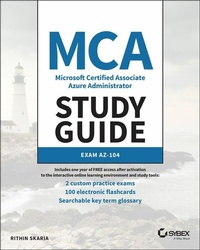
MCA Microsoft Certified Associate Azure Administrator Study Guide
Exam AZ-104
1st Edition
Published on 13. April 2022
592 pages
978-1-119-70520-8 (ISBN)
Description

Learn what it takes to be an Azure Administrator and efficiently prepare for Exam AZ-104 with this authoritative resource
MCA Microsoft 365 Azure Administrator Study Guide: Exam AZ-104 prepares readers to take the AZ-104 Exam and to fully understand the role of a Microsoft 365 Azure Administrator. The book takes a practical and straightforward approach to Microsoft Azure, ensuring that you understand both the realities of working as an Administrator and the techniques and skills necessary to succeed on the AZ-104 Exam.
In addition to providing you with access to the online Sybex test bank that includes hundreds of practice questions, flashcards, and a glossary of terms, the study guide comprehensively explains all the following topics:
* How to manage Azure subscriptions and resources
* Implementing and managing storage
* Deploying and managing virtual machines
* Managing and configuring virtual networks
* How to Manage identities
Perfect for anyone considering a career as a Microsoft Azure Administrator or preparing for the AZ-104 Exam, MCA Microsoft 365 Azure Administrator Study Guide: Exam AZ-104 also belongs on the bookshelves of practicing administrators who wish to brush up on the fundamentals of their profession.
MCA Microsoft 365 Azure Administrator Study Guide: Exam AZ-104 prepares readers to take the AZ-104 Exam and to fully understand the role of a Microsoft 365 Azure Administrator. The book takes a practical and straightforward approach to Microsoft Azure, ensuring that you understand both the realities of working as an Administrator and the techniques and skills necessary to succeed on the AZ-104 Exam.
In addition to providing you with access to the online Sybex test bank that includes hundreds of practice questions, flashcards, and a glossary of terms, the study guide comprehensively explains all the following topics:
* How to manage Azure subscriptions and resources
* Implementing and managing storage
* Deploying and managing virtual machines
* Managing and configuring virtual networks
* How to Manage identities
Perfect for anyone considering a career as a Microsoft Azure Administrator or preparing for the AZ-104 Exam, MCA Microsoft 365 Azure Administrator Study Guide: Exam AZ-104 also belongs on the bookshelves of practicing administrators who wish to brush up on the fundamentals of their profession.
More details
Other editions
Additional editions
Book
06/2022
1st Edition
Sybex Inc.,U.S.
€59.00
Shipment within 15-20 days
Person
RITHIN SKARIA is a cloud evangelist, speaker, consultant, and a published author with an interest in cloud architecture design and optimization. With a decade of experience managing, implementing, and designing IT infrastructure solutions for public and private clouds, he is currently working with Microsoft as a Customer Engineer, focusing on Azure solutions. Rithin has over 18 certifications in different technologies such as Azure, Linux, Microsoft 365, and Kubernetes; he is also a Microsoft Certified Trainer. Rithin has been recognized has one of the engagement leads for his contributionsto the Microsoft Worldwide Open Source Community. He has presented at various events and conferences, including Microsoft Spark.
Content
Introduction xxiii
Assessment Test xxx
Chapter 1 Identity: Azure Active Directory 1
Chapter 2 Compliance and Cloud Governance 49
Chapter 3 Virtual Networking 109
Chapter 4 Intersite Connectivity 153
Chapter 5 Network Traffic Management 203
Chapter 6 Azure Storage 245
Chapter 7 Azure Virtual Machines 307
Chapter 8 Automation, Deployment, and Configuration of Resources 349
Chapter 9 PaaS Compute Options 387
Chapter 10 Data Protection 445
Chapter 11 Monitoring Resources 475
Appendix Answers to the Review Questions 515
Chapter 1: Identity: Azure Active Directory 516
Chapter 2: Compliance and Cloud Governance 517
Chapter 3: Virtual Networking 519
Chapter 4: Intersite Connectivity 520
Chapter 5: Network Traffic Management 521
Chapter 6: Azure Storage 522
Chapter 7: Azure Virtual Machines 524
Chapter 8: Automation, Deployment, and Configuration of Resources 526
Chapter 9: PaaS Compute Options 528
Chapter 10: Data Protection 529
Chapter 11: Monitoring Resources 530
Index 533
Table of Exercises
Exercise 1.1 Viewing Users in Your Directory 9
Exercise 1.2 Creating Users in Azure AD 14
Exercise 1.3 Modifying and Deleting Users 16
Exercise 1.4 Performing Bulk Operations 20
Exercise 1.5 Viewing Groups in Azure AD 27
Exercise 1.6 Adding Security Groups to Azure AD 29
Exercise 1.7 Adding Microsoft 365 Groups in Azure AD 32
Exercise 2.1 Creating a Resource Group from the Azure Portal 61
Exercise 2.2 Listing Resource Groups from the Azure Portal 63
Exercise 2.3 Deleting Resource Groups from the Azure Portal 64
Exercise 2.3 Implementing a Custom Policy . 73
Exercise 2.4 Creating a Custom Role Using PowerShell 87
Exercise 2.5 Assigning Roles from the Azure Portal 91
Exercise 3.1 Creating Virtual Networks 114
Exercise 3.2 Creating Virtual Networks Using Azure PowerShell 116
Exercise 3.3 Creating Public IP Addresses 117
Exercise 3.4 Creating a Route Table 121
Exercise 3.5 Creating a Custom Route 122
Exercise 3.6 Associating a Routing Table to a Subnet 124
Exercise 3.7 Creating an Azure DNS Zone 130
Exercise 3.8 Adding Records to an Azure DNS Zone 132
Exercise 3.9 Creating a Private DNS Zone and Validating Resolution 134
Exercise 3.10 Creating NSG and NSG Rules 139
Exercise 4.1 Implementing Virtual Network Peering in the Azure Portal 159
Exercise 4.2 Implementing the Virtual Network to Virtual Network VPN in the Azure Portal 173
Exercise 4.3 Implementing a P2S VPN in the Azure Portal 183
Exercise 5.1 Implementing Load Balancing in Azure 215
Exercise 5.2 Implementing Azure Application Gateway 227
Exercise 6.1 Uploading Blobs 262
Exercise 6.2 Working with SAS Keys 273
Exercise 6.3 Working with AzCopy 294
Exercise 7.1 Creating a Windows Virtual Machine 316
Exercise 7.2 Connecting to a Windows VM Using RDP 321
Exercise 7.3 Connecting to a Linux VM Using a Password 325
Exercise 7.4 Connecting to Linux VM Using SSH Keys 327
Exercise 7.5 Connecting to Linux VM Using SSH Keys 329
Exercise 8.1 Composing an ARM Template 362
Exercise 9.1 Creating an App Service Plan 392
Exercise 9.2 Creating an App Service Plan 397
Exercise 9.3 Building and Running Containers in Azure 416
Exercise 9.4 Running Applications in an AKS Cluster 435
Exercise 10.1 Implementing a VM Backup 455
Exercise 11.1 Creating Alerts 486
Exercise 11.2 Ingesting Logs to the Log Analytics Workspace 497
Assessment Test xxx
Chapter 1 Identity: Azure Active Directory 1
Chapter 2 Compliance and Cloud Governance 49
Chapter 3 Virtual Networking 109
Chapter 4 Intersite Connectivity 153
Chapter 5 Network Traffic Management 203
Chapter 6 Azure Storage 245
Chapter 7 Azure Virtual Machines 307
Chapter 8 Automation, Deployment, and Configuration of Resources 349
Chapter 9 PaaS Compute Options 387
Chapter 10 Data Protection 445
Chapter 11 Monitoring Resources 475
Appendix Answers to the Review Questions 515
Chapter 1: Identity: Azure Active Directory 516
Chapter 2: Compliance and Cloud Governance 517
Chapter 3: Virtual Networking 519
Chapter 4: Intersite Connectivity 520
Chapter 5: Network Traffic Management 521
Chapter 6: Azure Storage 522
Chapter 7: Azure Virtual Machines 524
Chapter 8: Automation, Deployment, and Configuration of Resources 526
Chapter 9: PaaS Compute Options 528
Chapter 10: Data Protection 529
Chapter 11: Monitoring Resources 530
Index 533
Table of Exercises
Exercise 1.1 Viewing Users in Your Directory 9
Exercise 1.2 Creating Users in Azure AD 14
Exercise 1.3 Modifying and Deleting Users 16
Exercise 1.4 Performing Bulk Operations 20
Exercise 1.5 Viewing Groups in Azure AD 27
Exercise 1.6 Adding Security Groups to Azure AD 29
Exercise 1.7 Adding Microsoft 365 Groups in Azure AD 32
Exercise 2.1 Creating a Resource Group from the Azure Portal 61
Exercise 2.2 Listing Resource Groups from the Azure Portal 63
Exercise 2.3 Deleting Resource Groups from the Azure Portal 64
Exercise 2.3 Implementing a Custom Policy . 73
Exercise 2.4 Creating a Custom Role Using PowerShell 87
Exercise 2.5 Assigning Roles from the Azure Portal 91
Exercise 3.1 Creating Virtual Networks 114
Exercise 3.2 Creating Virtual Networks Using Azure PowerShell 116
Exercise 3.3 Creating Public IP Addresses 117
Exercise 3.4 Creating a Route Table 121
Exercise 3.5 Creating a Custom Route 122
Exercise 3.6 Associating a Routing Table to a Subnet 124
Exercise 3.7 Creating an Azure DNS Zone 130
Exercise 3.8 Adding Records to an Azure DNS Zone 132
Exercise 3.9 Creating a Private DNS Zone and Validating Resolution 134
Exercise 3.10 Creating NSG and NSG Rules 139
Exercise 4.1 Implementing Virtual Network Peering in the Azure Portal 159
Exercise 4.2 Implementing the Virtual Network to Virtual Network VPN in the Azure Portal 173
Exercise 4.3 Implementing a P2S VPN in the Azure Portal 183
Exercise 5.1 Implementing Load Balancing in Azure 215
Exercise 5.2 Implementing Azure Application Gateway 227
Exercise 6.1 Uploading Blobs 262
Exercise 6.2 Working with SAS Keys 273
Exercise 6.3 Working with AzCopy 294
Exercise 7.1 Creating a Windows Virtual Machine 316
Exercise 7.2 Connecting to a Windows VM Using RDP 321
Exercise 7.3 Connecting to a Linux VM Using a Password 325
Exercise 7.4 Connecting to Linux VM Using SSH Keys 327
Exercise 7.5 Connecting to Linux VM Using SSH Keys 329
Exercise 8.1 Composing an ARM Template 362
Exercise 9.1 Creating an App Service Plan 392
Exercise 9.2 Creating an App Service Plan 397
Exercise 9.3 Building and Running Containers in Azure 416
Exercise 9.4 Running Applications in an AKS Cluster 435
Exercise 10.1 Implementing a VM Backup 455
Exercise 11.1 Creating Alerts 486
Exercise 11.2 Ingesting Logs to the Log Analytics Workspace 497
