

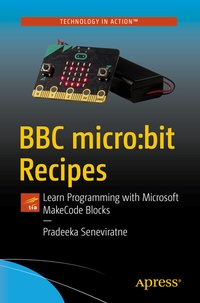
BBC micro:bit Recipes
Learn Programming with Microsoft MakeCode Blocks
Published on 28. June 2019
XXIII, 352 pages
978-1-4842-4913-0 (ISBN)
Description

Build engaging programs for the BBC micro:bit using Microsoft's MakeCode web editor. Using this open source platform, you'll learn to program in an accessible way that easily translates into real-world programming.
BBC micro:bit Recipes is a practical guide with a problem-solving approach. It provides exact solutions for common application development problems for the micro:bit using MakeCode. You'll discover and apply techniques that can be used to build simple games with sprites, keep score, and control game play.
The micro:bit is a small programmable device that is a cross between a very small computer and a programmable embedded board. It is easy to program, extremely versatile, and designed with young learners in mind. In particular, it is designed to be easy for people who have never programmed before.
By the end of this book, you'll have the foundation to build programs with the Microsoft MakeCode editor and use and process data with built-in sensors, such as accelerometer, compass, temperature, touch, and light. You'll also see how to work with communication protocols, such as Serial, I2C, and SPI and how to use variables, loops, logic, arrays, math and functions to easily solve problems.
What You'll Learn
Who This Book Is For
Those who are interested in learning to program the BBC micro:bit with Microsoft MakeCode. The difficulty level falls from beginner to intermediate level.
BBC micro:bit Recipes is a practical guide with a problem-solving approach. It provides exact solutions for common application development problems for the micro:bit using MakeCode. You'll discover and apply techniques that can be used to build simple games with sprites, keep score, and control game play.
The micro:bit is a small programmable device that is a cross between a very small computer and a programmable embedded board. It is easy to program, extremely versatile, and designed with young learners in mind. In particular, it is designed to be easy for people who have never programmed before.
By the end of this book, you'll have the foundation to build programs with the Microsoft MakeCode editor and use and process data with built-in sensors, such as accelerometer, compass, temperature, touch, and light. You'll also see how to work with communication protocols, such as Serial, I2C, and SPI and how to use variables, loops, logic, arrays, math and functions to easily solve problems.
What You'll Learn
-
Display text, images, and animations on the micro:bit display
-
Connect external sensors and process data
-
Make and play music through speakers and headphones
- Use Bluetooth service to communicate with Smartphones and tablets
Who This Book Is For
Those who are interested in learning to program the BBC micro:bit with Microsoft MakeCode. The difficulty level falls from beginner to intermediate level.
More details
Series
Edition
First Edition
Language
English
Place of publication
Berkeley
United States
Publishing group
APRESS
Target group
Professional and scholarly
Product notice
Reflowable
Illustrations
XXIII, 352 p. 289 illus., 282 illus. in color.
File size
15,24 MB
ISBN-13
978-1-4842-4913-0 (9781484249130)
DOI
10.1007/978-1-4842-4913-0
Schweitzer Classification
Other editions
Additional editions
Book
07/2019
APress
€58.84
Shipment within 15-20 days
Person
Pradeeka Seneviratne is a software engineer with over 10 years of experience in computer programming and systems design. He is an expert in the development of Arduino and Raspberry Pi-based embedded systems and is currently a full-time embedded software engineer working with embedded systems and highly scalable technologies. Previously, Pradeeka worked as a software engineer for several IT infrastructure and technology servicing companies.
Pradeeka is an author of many books: Building Arduino PLCs [Apress], Internet of Things with Arduino Blueprints [Packt], Raspberry Pi 3 Projects for Java Programmers [Packt], Beginning BBC micro:bit [Apress], and Hands-on Internet of Things with Blynk [Packt].
Pradeeka is an author of many books: Building Arduino PLCs [Apress], Internet of Things with Arduino Blueprints [Packt], Raspberry Pi 3 Projects for Java Programmers [Packt], Beginning BBC micro:bit [Apress], and Hands-on Internet of Things with Blynk [Packt].
Content
Chapter 1: MakeCode Setup Fundamentals.- Chapter 2: MakeCode Extended Features.- Chapter 3: MakeCode Programming Basics.- Chapter 4: Working with Text.- Chapter 5: Displaying Images.- Chapter 6: Inputs and Outputs.- Chapter 7: Loops and Logic.- Chapter 8: Using Mathematical Functions.- Chapter 9: Using Variables.- Chapter 10: Functions and Arrays.- Chapter 11: Playing Music.- Chapter 12: Using Sensors.- Chapter 13: Using Bluetooth Services.- Chapter 14: Using Radio.- Chapter 15: Building Simple Games.
