

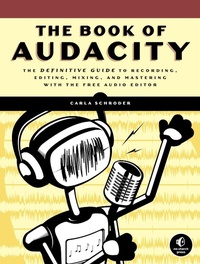
The Book of Audacity
Record, Edit, Mix, and Master with the Free Audio Editor
Published on 15. March 2011
384 pages
978-1-59327-292-0 (ISBN)
Description

The Book of Audacity is the definitive guide to Audacity, the powerful, free, cross-platform audio editor. Audacity allows anyone to transform their Windows, Mac, or Linux computer into a powerful recording studio.
The Book of Audacity is the perfect book for bands on a budget, solo artists, audiophiles, and anyone who wants to learn more about digital audio. Musician and podcaster Carla Schroder will guide you through a range of fun and useful Audacity projects that will demystify that geeky audio jargon and show you how to get the most from Audacity.
You'll learn how to:
-Record podcasts, interviews, and live performances
-Be your own backing band or chorus
-Edit, splice, mix, and master multitrack recordings
-Create super high-fidelity and surround-sound recordings
-Digitize your vinyl or tape collection and clean up noise, hisses, and clicks
-Create custom ringtones and sweet special effects
In addition, you'll learn how to choose and use digital audio hardware like mics and preamps, and tune your computer for flawless audio performance. You'll also find out how to package your work for digital distribution, whether you want to share a podcast through iTunes or sell your own CDs. Become your own producer with The Book of Audacity. The fun starts now.
The Book of Audacity is the perfect book for bands on a budget, solo artists, audiophiles, and anyone who wants to learn more about digital audio. Musician and podcaster Carla Schroder will guide you through a range of fun and useful Audacity projects that will demystify that geeky audio jargon and show you how to get the most from Audacity.
You'll learn how to:
-Record podcasts, interviews, and live performances
-Be your own backing band or chorus
-Edit, splice, mix, and master multitrack recordings
-Create super high-fidelity and surround-sound recordings
-Digitize your vinyl or tape collection and clean up noise, hisses, and clicks
-Create custom ringtones and sweet special effects
In addition, you'll learn how to choose and use digital audio hardware like mics and preamps, and tune your computer for flawless audio performance. You'll also find out how to package your work for digital distribution, whether you want to share a podcast through iTunes or sell your own CDs. Become your own producer with The Book of Audacity. The fun starts now.
More details
Other editions
Additional editions
Book
03/2011
1st Edition
No Starch Press
€35.50
Article exhausted; check different version
Person
Carla Schroder is the author of Linux Cookbook, Linux Networking Cookbook (O'Reilly), and hundreds of how-tos for various technology publications, and is the managing editor of Linux Today and Linux Planet. Carla enjoys playing instruments and recording local bands using Audacity. She is a systems and network administrator.
Content
- Intro
- The Book of Audacity
- Acknowledgments
- Introduction
- What Can Audacity Do?
- What This Book Covers
- Audacity vs. Ardour
- 1. Audacity from Start to Finish
- Audacity Quick-Start
- Audacity in Detail
- Managing Audacity Projects
- Adding Audio Files: Import vs. Open
- Saving Your Work
- Selecting Tracks and Segments of Tracks
- Track Panel
- Cutting Out Unwanted Chunks
- Fade In and Out
- Making Quiet Recordings Louder
- Timer Record and Sound Activated Recording
- Mixer Board
- Track Metadata
- Final Mixdown
- Audio File Formats and Quality Settings
- Understanding File Formats
- Understanding Bit Depth and Sampling Rate
- 16/44.1, 24/96, 32-Bit Float
- Bitrate, Bit Depth, and File Size
- Now What?
- 2. Building a Good Digital Sound Studio on the Cheap
- Getting Sound In and Out of the Computer
- An Example Studio
- Sorting Out Connectors
- Multichannel Recording, PCI, USB, FireWire
- USB or FireWire?
- Microphones
- Polar Patterns
- Which Microphones for Which Occasions?
- Microphone Cables
- Smart Miking
- Microphone Preamp
- Speakers and Headphones
- Your Computer Must Have Muscle and Vast Drawers
- Operating Systems
- Portable Recording
- The Secret of Recording Your Own Great Audio
- Visit Appendix A
- 3. Transferring Vinyl LPs (and Other Legacy Media) to CD
- Preparing Vinyl LPs for Copying
- Eight Steps to Converting Records to CDs
- Audacity Settings
- Recording
- Fixing Defects
- Fade In, Fade Out
- Fixing Warps
- Fixing Skips and Pops
- Finding and Repairing Clipping
- Noise Removal
- Customizing Dynamic Range Compression
- Normalization
- Dividing a Long Track into Individual Songs
- Exporting to CD-Ready Files, One Long Audacity Track
- Exporting to CD-Ready Files, Multiple Audacity Tracks
- Writing Songs to a CD
- Copying Vintage 78s
- Connecting Legacy Devices to Your Computer
- Connecting a Turntable to Your Computer
- Connecting a Tape Deck
- Which Is Better: Vinyl, Tape, or CDs?
- The Digital Advantage
- Longevity
- 4. Creating and Editing Live Tracks for CD
- Making Good Live Recordings
- Portable Digital Recorder
- Laptop with Audacity
- Multitrack Recording of a Live Performance
- Be Nice to the Sound Crews
- Audacity Settings for Recording
- Setting Recording Volume Levels
- Starting, Stopping, and Pausing Recording
- Monitoring Your Live Recording
- Editing Live Recordings
- Editing and Downmixing Multitrack Recordings
- Special CD Settings in Audacity
- Trimming
- Splitting Stereo Tracks for Surgical Repairs
- Fixing Clipping and Too-Loud Passages
- Noise Removal
- Compressing Dynamic Range
- Cutting a Single Long Track into Individual Song Tracks
- Creating Graceful Breaks Between Songs
- Normalization
- Optional Track Metadata
- Final Export
- Writing Your Songs to CD
- Labeling Your CD
- Mass CD Duplication
- Combining Songs from Different Recording Sessions, Fix-its, and Special Effects
- 5. Authoring a Compilation CD
- Audio CDs
- There Is Not a Special Audio CD
- Convert MP3s to Red Book CD
- CD Writers and Software
- Three Ways to Author a CD Compilation in Audacity
- One Track per Song Project
- Single Audacity Track Compilation Project
- Single Audacity Track + CD-Mastering Program
- CD Cue Sheets and BIN Files
- Fixes and Cleanups
- Splitting Stereo Tracks for Surgical Repairs
- Normalization
- Making Graceful Fades and Song Breaks
- Configuring Audacity for Orange Book CDs
- Putting an Orange Book CD Collection Together
- File Formats and Quality Settings
- Computer Media Players
- Ripping CDs
- Ripping DVDs
- 6. Authoring Super High-Fidelity Audio DVDs
- What Are WAV, AIFF, and FLAC?
- DVD-Audio Overview
- Creating High-Quality Recordings in Audacity
- More Power
- What Bit Depth Is Best?
- What Sampling Rate Is Best?
- Saving Your Masters
- Creating 5.1 Surround
- Exporting to 16-Bit
- DVD-Audio Authoring Software
- Transferring Legacy Media
- Learn More
- 7. Creating Podcasts
- The Short Story
- Making a Simple Voicecast
- Audacity Settings
- Cleaning Up Your Recording
- Reducing Too-Tall Peaks
- Fades
- Normalization
- Export to MP3 or Ogg?
- Ogg Vorbis Quality Settings
- MP3 Quality Settings
- Other Lossy Formats
- Exporting Your Podcast
- Two-Person Podcasts
- Editing a Two-Track Recording as a Single Stereo Track
- Editing a Two-Track Recording as Two Mono Tracks
- Adding a Background Music Track
- 8. Becoming an Online Star
- File Formats and Audio Quality
- The Business of a Recording Artist
- Establishing an Online Presence
- Online Music Distributors
- Self-Hosting
- Selling Stuff Online
- To DRM or Not to DRM?
- Copyrights and Legal Issues
- Learn More
- 9. Multitrack Recording
- Tracks, Channels, and Clips
- How to Make Multitrack Recordings
- Playback Tips and Tricks
- Label Tracks
- Creating and Managing Labels
- Using Labels to Edit Multiple Tracks
- Aligning and Moving Tracks
- Link Tracks and Track Groups
- Time-Shifting Multiple Tracks at the Same Time
- Splitting Tracks
- Working with Clips
- Time-Shifting Inside Tracks
- Metronome Track
- Overdubbing
- Measuring and Fixing Latency
- Changing Tempo
- NTSC, PAL, and CDDA Frames
- Creating Loops
- Mixdown to Stereo
- Customizing the Mixer Board
- Too Loud! Clipping!
- Control Your Channel Mapping
- Multichannel Surround
- 10. Making Your Own Ringtones
- Customizing Audio for a Mobile Phone
- Applying Dynamic Range Compression
- Phone Audio File Formats
- RTTTL
- Proprietary Audio File Formats
- How to Transfer Files to Your Phone
- 11. Audacity Plug-ins for Special Effects
- Cross-Fades
- Generate Menu
- Sine Wave Example
- Frequency Range of Generated Tones
- DTMF Tones
- Chirps
- Generating Noise
- Test Tones
- Click Track
- Pluck
- Risset Drum
- Effect Menu
- Reverberation
- Amplify
- Auto Duck
- Change Pitch
- Phaser
- Reverse
- Sliding Time Scale/Pitch Shift
- WahWah
- Linux Plug-ins
- Linux LADSPA Plug-ins
- Linux Nyquist Plug-ins
- Windows Plug-ins
- Audio Effects Glossary
- 12. Fix-its and Cleanups
- Split Stereo Tracks
- Repeat Last Effect
- Noise Removal
- Normalization
- Remove Clicks and Scratches
- Click Removal
- Repair
- Draw Tool
- Truncate Silence
- Change Tempo
- Change Pitch
- Change Speed
- Compress Dynamic Range
- How Much Dynamic Range?
- Compressor Settings
- Chris's Dynamic Compressor
- Leveller
- Equalization
- Fix Timing and Latency Errors
- Analyze Menu
- 13. Configuring Linux for Best Audio Quality
- Using Distributions with Real-Time Kernels
- Specialized Multimedia Linux Distributions
- 64 Studio
- Ubuntu Studio
- dyne:bolic
- pure:dyne
- Musix
- Building a Real-Time Kernel
- Latency Is Not That Scary
- Sorting Out Linux Audio
- Using ALSA
- Setting Recording and Playback Levels in alsamixer
- Master vs. PCM
- Multiple Sound Cards
- Adjusting Volume Levels
- Hardware Testing with alsa-utils
- Testing Speakers
- Testing Recording
- ALSA Applications
- Querying Your Sound Card
- Using JACK with Audacity
- Connecting a FireWire Recording Interface
- Creating Persistent Configurations
- JACK Settings
- Turning PulseAudio and Phonon Off
- Linux System Tweaks
- The Tangled History of Linux Audio
- Sound Cards
- 14. Configuring Windows for Best Audio Quality
- Enabling MP3 Support
- Enabling WMA, M4A/M4P Support
- Low-Latency Recording and Audio Driver Fun
- Tuning Windows for Best Performance
- Tuning Windows XP
- Tuning Windows Vista and 7
- Configuring Windows Audio Devices
- 15. Customizing Audacity
- Customizing Audacity's Default Options
- Devices
- Playback
- Recording
- Quality
- Interface
- Tracks
- Import/Export
- Projects
- Libraries
- Spectrograms
- Directories
- Warnings
- Effects
- Keyboard and Mouse
- A. Audio Hardware
- PCI, PCI-e, PCMCIA Sound Cards
- PCI
- PCI-e
- PCMCIA
- USB Recording Interfaces
- FireWire Recording Interfaces
- Stand Alone ADC/DACs
- B. Glossary
- A-E
- F-J
- K-O
- P-T
- U-Z
- C. Seven Myths of Digital Audio
- The Myth of the Golden Ear
- The Myth of Burn-In
- The Myth of Tube Superiority
- The Myth of Uber Cables
- The Myth of Analog Superiority
- The Myth That You Don't Need Tone Controls
- The Myth That Someone Else Knows Better Than You
- D. References and Resources
- Books
- Online Resources
- Image Credits
- GNU Free Documentation License
- 0. PREAMBLE
- 1. APPLICABILITY AND DEFINITIONS
- 2. VERBATIM COPYING
- 3. COPYING IN QUANTITY
- 4. MODIFICATIONS
- 5. COMBINING DOCUMENTS
- 6. COLLECTIONS OF DOCUMENTS
- 7. AGGREGATION WITH INDEPENDENT WORKS
- 8. TRANSLATION
- 9. TERMINATION
- 10. FUTURE REVISIONS OF THIS LICENSE
- 11. RELICENSING
- E. Updates
- Index
- About the Author
- Colophon
