

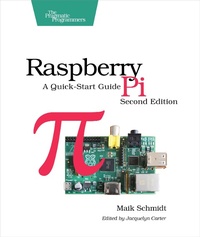
Raspberry Pi
A Quick-Start Guide
Published on 21. March 2014
176 pages
978-1-68050-446-0 (ISBN)
Description

Printed in full color.
Most of the book is targeted at beginners in computing and programming. A few parts, such as the small electronics project and setting up a web server, assume some intermediate skills.
The Raspberry Pi is one of the most successful open source hardware projects ever. For less than $40, you get a full-blown PC, a multimedia center, and a web server--and this book gives you everything you need to get started. You'll learn the basics, progress to controlling the Pi, and then build your own electronics projects. This new edition is revised and updated with two new chapters on adding digital and analog sensors, and creating videos and a burglar alarm with the Pi camera.
Get your Raspberry Pi up and running and doing cool stuff. You'll start with the basics: adding hardware, installing and configuring Debian Linux, and customizing the Pi's firmware to get the most out of your hardware.
Then the fun begins. You'll connect the Pi to your home network, surf the web, and tweet messages. You'll learn how to get the most out of Midori, the Pi's standard browser, and control the desktops of other PCs with the Pi. Then you'll explore the Pi's versatility with a series of home projects. Turn it into a web server in your home network; convert the Pi into a powerful multimedia center so you can watch high-definition video and listen to your favorite music; and play classic video games.
Then you'll use the GPIO pins on the Raspberry Pi to build your own electronics projects, such as an "out of memory" alarm. You'll learn how to use digital and analog sensors with the Pi, even though the Pi doesn't have analog input ports! Finally, you'll set up the Pi camera, create your own time-lapse videos, and build an automatic e-mailing burglar alarm. Power to the Pi!
What You Need
You need a Raspberry Pi and several things that you probably already have at home, such as a keyboard, a mouse, a monitor/TV set, and an SD card. To build the electronic projects you need a few cheap parts and the Pi camera.
Most of the book is targeted at beginners in computing and programming. A few parts, such as the small electronics project and setting up a web server, assume some intermediate skills.
The Raspberry Pi is one of the most successful open source hardware projects ever. For less than $40, you get a full-blown PC, a multimedia center, and a web server--and this book gives you everything you need to get started. You'll learn the basics, progress to controlling the Pi, and then build your own electronics projects. This new edition is revised and updated with two new chapters on adding digital and analog sensors, and creating videos and a burglar alarm with the Pi camera.
Get your Raspberry Pi up and running and doing cool stuff. You'll start with the basics: adding hardware, installing and configuring Debian Linux, and customizing the Pi's firmware to get the most out of your hardware.
Then the fun begins. You'll connect the Pi to your home network, surf the web, and tweet messages. You'll learn how to get the most out of Midori, the Pi's standard browser, and control the desktops of other PCs with the Pi. Then you'll explore the Pi's versatility with a series of home projects. Turn it into a web server in your home network; convert the Pi into a powerful multimedia center so you can watch high-definition video and listen to your favorite music; and play classic video games.
Then you'll use the GPIO pins on the Raspberry Pi to build your own electronics projects, such as an "out of memory" alarm. You'll learn how to use digital and analog sensors with the Pi, even though the Pi doesn't have analog input ports! Finally, you'll set up the Pi camera, create your own time-lapse videos, and build an automatic e-mailing burglar alarm. Power to the Pi!
What You Need
You need a Raspberry Pi and several things that you probably already have at home, such as a keyboard, a mouse, a monitor/TV set, and an SD card. To build the electronic projects you need a few cheap parts and the Pi camera.
More details
Other editions
Additional editions
Book
06/2014
2nd Edition
The Pragmatic Programmers
€21.00
Shipment within 3-4 weeks
Person
Maik Schmidt has worked as a software developer for nearly 20 years and makes a living creating complex solutions for large enterprises. Outside his day job, he writes book reviews and articles for computer science magazines. He is the author of Arduino: A Quick-Start Guide, Enterprise Recipes with Ruby and Rails, and Enterprise Integration with Ruby for Pragmatic Bookshelf.
Content
- Cover
- Table of Contents
- Acknowledgments
- Preface
- Who Should Read This Book?
- What's in This Book?
- Where Can I Get a Raspberry Pi and Additional Hardware?
- Debian Linux
- Code Examples and Conventions
- Online Resources
- 1. Meet the Raspberry Pi
- Get to Know the Hardware
- What Else You Need
- Next Steps
- 2. Install an Operating System
- See What's Available
- Have a Look Around with NOOBS
- Prepare a Bootable SD Card
- Next Steps
- 3. Configure Raspbian
- Boot the Pi for the First Time
- Customize Your Installation with Raspi-config
- Start the Desktop
- Manage Your Software with apt-get
- Install Software and Media Using the Pi Store
- Next Steps
- 4. Configure the Firmware
- Update the Firmware and Kernel
- Configure the Video Output
- Test and Configure the Audio System
- Next Steps
- 5. Intermezzo: Build a Kiosk with the Pi
- Display Twitter Live Search Information
- Refresh Websites Automatically
- Try Different Browsers
- Next Steps
- 6. Networking with the Pi
- Perform Everyday Tasks on the Web
- Use Secure Shell with the Pi
- Share Desktops with the Pi
- Turn the Pi into a Web Server
- Add Wi-Fi to the Pi
- Next Steps
- 7. Turn the Pi into a Multimedia Center
- Install Raspbmc
- Start Raspbmc for the First Time
- Add Files to XBMC
- Control XBMC Remotely
- Next Steps
- 8. Play Games on Your Pi
- Play Interactive Fiction
- Play Point-and-Click Adventures
- Emulate Other Platforms
- Play Native Games
- Next Steps
- 9. Tinker with the GPIO Pins
- What You Need
- Meet the Pi's GPIO Pins
- Build a Basic Circuit
- Control an LED Using the GPIO Pins
- Build an Out-of-Memory Alarm
- Display the GPIO Status in a Browser
- What If It Doesn't Work?
- Next Steps
- 10. Working with Digital and Analog Sensors
- What You Need
- Detect Motion with the Pi
- Measure Temperature with the Pi
- What If It Doesn't Work?
- Next Steps
- 11. Control the Pi Camera
- Meet the Camera's Hardware
- Connect the Camera to the Pi
- Install the Camera Drivers
- Take Some Photos
- Record High-Definition Videos
- Build a Burglar Alarm
- What If It Doesn't Work?
- Where to Go from Here
- A1. A Linux Primer
- A First Encounter
- Navigate Through the File System
- Edit Text Files
- Manage Users
- Manage Processes
- Shut Down and Reboot the Pi
- Get Help
- Index
- - SYMBOLS -
- - DIGITS -
- - A -
- - B -
- - C -
- - D -
- - E -
- - F -
- - G -
- - H -
- - I -
- - J -
- - K -
- - L -
- - M -
- - N -
- - O -
- - P -
- - Q -
- - R -
- - S -
- - T -
- - U -
- - V -
- - W -
- - X -
- - Y -
- - Z -
