

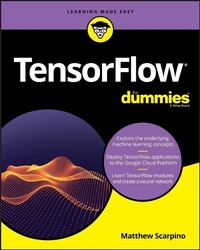
TensorFlow For Dummies
1st Edition
Published on 7. March 2018
368 pages
978-1-119-46619-2 (ISBN)
Description

Become a machine learning pro!
Google TensorFlow has become the darling of financial firms and research organizations, but the technology can be intimidating and the learning curve is steep. Luckily, TensorFlow For Dummies is here to offer you a friendly, easy-to-follow book on the subject. Inside, you'll find out how to write applications with TensorFlow, while also grasping the concepts underlying machine learning--all without ever losing your cool!
Machine learning has become ubiquitous in modern society, and its applications include language translation, robotics, handwriting analysis, financial prediction, and image recognition. TensorFlow is Google's preeminent toolset for machine learning, and this hands-on guide makes it easy to understand, even for those without a background in artificial intelligence.
* Install TensorFlow on your computer
* Learn the fundamentals of statistical regression and neural networks
* Visualize the machine learning process with TensorBoard
* Perform image recognition with convolutional neural networks (CNNs)
* Analyze sequential data with recurrent neural networks (RNNs)
* Execute TensorFlow on mobile devices and the Google Cloud Platform (GCP)
If you're a manager or software developer looking to use TensorFlow for machine learning, this is the book you'll want to have close by.
Google TensorFlow has become the darling of financial firms and research organizations, but the technology can be intimidating and the learning curve is steep. Luckily, TensorFlow For Dummies is here to offer you a friendly, easy-to-follow book on the subject. Inside, you'll find out how to write applications with TensorFlow, while also grasping the concepts underlying machine learning--all without ever losing your cool!
Machine learning has become ubiquitous in modern society, and its applications include language translation, robotics, handwriting analysis, financial prediction, and image recognition. TensorFlow is Google's preeminent toolset for machine learning, and this hands-on guide makes it easy to understand, even for those without a background in artificial intelligence.
* Install TensorFlow on your computer
* Learn the fundamentals of statistical regression and neural networks
* Visualize the machine learning process with TensorBoard
* Perform image recognition with convolutional neural networks (CNNs)
* Analyze sequential data with recurrent neural networks (RNNs)
* Execute TensorFlow on mobile devices and the Google Cloud Platform (GCP)
If you're a manager or software developer looking to use TensorFlow for machine learning, this is the book you'll want to have close by.
More details
Other editions
Additional editions
Matthew Scarpino
TensorFlow For Dummies
Book
05/2018
1st Edition
Wiley
Unfortunately, price unknown
Article exhausted; check different version
Content
- Intro
- Title Page
- Copyright Page
- Table of Contents
- Introduction
- About This Book
- Foolish Assumptions
- Icons Used in this Book
- Beyond the Book
- Where to Go from Here
- Part 1 Getting to Know TensorFlow
- Chapter 1 Introducing Machine Learning with TensorFlow
- Understanding Machine Learning
- The Development of Machine Learning
- Statistical regression
- Reverse engineering the brain
- Steady progress
- The computing revolution
- The rise of big data and deep learning
- Machine Learning Frameworks
- Torch
- Theano
- Caffe
- Keras
- TensorFlow
- Chapter 2 Getting Your Feet Wet
- Installing TensorFlow
- Python and pip/pip3
- Installing on Mac OS
- Installing on Linux
- Installing on Windows
- Exploring the TensorFlow Installation
- Running Your First Application
- Exploring the example code
- Launching Hello TensorFlow!
- Setting the Style
- Chapter 3 Creating Tensors and Operations
- Creating Tensors
- Creating Tensors with Known Values
- The constant function
- zeros, ones, and fill
- Creating sequences
- Creating Tensors with Random Values
- Transforming Tensors
- Creating Operations
- Basic math operations
- Rounding and comparison
- Exponents and logarithms
- Vector and matrix operations
- Putting Theory into Practice
- Chapter 4 Executing Graphs in Sessions
- Forming Graphs
- Accessing graph data
- Creating GraphDefs
- Creating and Running Sessions
- Creating sessions
- Executing a session
- Interactive sessions
- Writing Messages to the Log
- Visualizing Data with TensorBoard
- Running TensorBoard
- Generating summary data
- Creating custom summaries
- Writing summary data
- Putting Theory into Practice
- Chapter 5 Training
- Training in TensorFlow
- Formulating the Model
- Looking at Variables
- Creating variables
- Initializing variables
- Determining Loss
- Minimizing Loss with Optimization
- The Optimizer class
- The GradientDescentOptimizer
- The MomentumOptimizer
- The AdagradOptimizer
- The AdamOptimizer
- Feeding Data into a Session
- Creating placeholders
- Defining the feed dictionary
- Stochasticity
- Monitoring Steps, Global Steps, and Epochs
- Saving and Restoring Variables
- Saving variables
- Restoring variables
- Working with SavedModels
- Saving a SavedModel
- Loading a SavedModel
- Putting Theory into Practice
- Visualizing the Training Process
- Session Hooks
- Creating a session hook
- Creating a MonitoredSession
- Putting theory into practice
- Part 2 Implementing Machine Learning
- Chapter 6 Analyzing Data with Statistical Regression
- Analyzing Systems Using Regression
- Linear Regression: Fitting Lines to Data
- Polynomial Regression: Fitting Polynomials to Data
- Binary Logistic Regression: Classifying Data into Two Categories
- Setting up the problem
- Defining models with the logistic function
- Computing loss with maximum likelihood estimation
- Putting theory into practice
- Multinomial Logistic Regression: Classifying Data into Multiple Categories
- The Modified National Institute of Science and Technology (MNIST) Dataset
- Defining the model with the softmax function
- Computing loss with cross entropy
- Putting theory into practice
- Chapter 7 Introducing Neural Networks and Deep Learning
- From Neurons to Perceptrons
- Neurons
- Perceptrons
- Improving the Model
- Weights
- Bias
- Activation functions
- Layers and Deep Learning
- Layers
- Deep learning
- Training with Backpropagation
- Implementing Deep Learning
- Tuning the Neural Network
- Input standardization
- Weight initialization
- Batch normalization
- Regularization
- Managing Variables with Scope
- Variable scope
- Retrieving variables from collections
- Scopes for names and arguments
- Improving the Deep Learning Process
- Creating tuned layers
- Putting theory into practice
- Chapter 8 Classifying Images with Convolutional Neural Networks (CNNs)
- Filtering Images
- Convolution
- Averaging Filter
- Filters and features
- Feature detection analogy
- Setting convolution parameters
- Convolutional Neural Networks (CNNs)
- Creating convolution layers
- Creating pooling layers
- Putting Theory into Practice
- Processing CIFAR images
- Classifying CIFAR images in code
- Performing Image Operations
- Converting images
- Color processing
- Rotating and mirroring
- Resizing and cropping
- Convolution
- Putting Theory into Practice
- Chapter 9 Analyzing Sequential Data with Recurrent Neural Networks (RNNs)
- Recurrent Neural Networks (RNNs)
- RNNs and recursive functions
- Training RNNs
- Creating RNN Cells
- Creating a basic RNN
- Predicting text with RNNs
- Creating multilayered cells
- Creating dynamic RNNs
- Long Short-Term Memory (LSTM) Cells
- Creating LSTMs in code
- Predicting text with LSTMs
- Gated Recurrent Units (GRUs)
- Creating GRUs in code
- Predicting text with GRUs
- Part 3 Simplifying and Accelerating TensorFlow
- Chapter 10 Accessing Data with Datasets and Iterators
- Datasets
- Creating datasets
- Processing datasets
- Iterators
- One-shot iterators
- Initializable iterators
- Reinitializable iterators
- Feedable iterators
- Putting Theory into Practice
- Bizarro Datasets
- Loading data from CSV files
- Loading the Iris and Boston datasets
- Chapter 11 Using Threads, Devices, and Clusters
- Executing with Multiple Threads
- Configuring a new session
- Configuring a running session
- Configuring Devices
- Building TensorFlow from source
- Assigning operations to devices
- Configuring GPU usage
- Executing TensorFlow in a Cluster
- Creating a ClusterSpec
- Creating a server
- Specifying jobs and tasks
- Running a simple cluster
- Chapter 12 Developing Applications with Estimators
- Introducing Estimators
- Training an Estimator
- Testing an Estimator
- Running an Estimator
- Creating Input Functions
- Configuring an Estimator
- Using Feature Columns
- Creating and Using Estimators
- Linear regressors
- DNN classifiers
- Combined linear-DNN classifiers
- Wide and deep learning
- Analyzing census data
- Running Estimators in a Cluster
- Accessing Experiments
- Creating an experiment
- Methods of the experiment class
- Running an experiment
- Putting theory into practice
- Chapter 13 Running Applications on the Google Cloud Platform (GCP)
- Overview
- Working with GCP projects
- Creating a new project
- Billing
- Accessing the machine learning engine
- The Cloud Software Development Kit (SDK)
- The gcloud Utility
- Google Cloud Storage
- Buckets
- Objects and virtual hierarchy
- The gsutil utility
- Preparing for Deployment
- Receiving arguments
- Packaging TensorFlow code
- Executing Applications with the Cloud SDK
- Local execution
- Deploying to the cloud
- Configuring a Cluster in the Cloud
- Setting the training input
- Obtaining the training output
- Setting the prediction input
- Obtaining the prediction output
- Part 4 The Part of Tens
- Chapter 14 The Ten Most Important Classes
- Tensor
- Operation
- Graph
- Session
- Variable
- Optimizer
- Estimator
- Dataset
- Iterator
- Saver
- Chapter 15 Ten Recommendations for Training Neural Networks
- Select a Representative Dataset
- Standardize Your Data
- Use Proper Weight Initialization
- Start with a Small Number of Layers
- Add Dropout Layers
- Train with Small, Random Batches
- Normalize Batch Data
- Try Different Optimization Algorithms
- Set the Right Learning Rate
- Check Weights and Gradients
- Index
- EULA
