

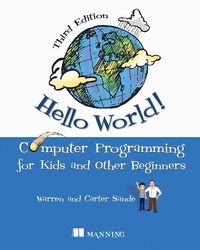
Hello World! Third Edition
Computer Programming for Kids and Other Beginners
1st Edition
Published on 29. November 2019
496 pages
978-1-63835-051-4 (ISBN)
Description

"Simple yet empowering. Kids will be amazed at how quickly they can get productive." - James McGinn, Bull Valley
Key Features
Learn to program with Python, a language designed to be easy for beginners
Written by father-and-son team Warren and Carter Sande
Colorful pictures, clever cartoons, and fun examples
Practice questions and exercises
Kid-tested and reviewed by professional educators
Purchase of the print book includes a free eBook in PDF, Kindle, and ePub formats from Manning Publications.
About The Book
With this book, ANYONE can learn to write useful programs and games in Python. Designed especially for readers 9-16 years old, this book is easy to read and use. Printed in full color, it's never boring, with hands-on practice and interesting graphics throughout.
Hello World! Computer Programming for Kids and Other Beginners, Third Edition introduces the world of computer programming in a clear and fun style. Using Python, a programming language designed to be easy to learn, each engaging lesson teaches skills that apply to any kind of programming. It brings to life the basic concepts of computing-looping, decisions, input and output, graphics, and more. Now in its third edition, this international bestseller has been fully updated to Python 3 and includes a new chapter about how the internet works.
What You Will Learn
Install Python and get set up for programming
Math and data for programming
Building GUIs for your programs
Creating simple games
Adding comments to your code
Graphics, sprites, and collision detection
Simulate pets and a lunar landing
Where to go next on your programming journey
This Book Is Written For
Like the previous two editions, Hello World! Third Edition is not just for kids. While the tone is light and engaging, it doesn't "talk down" to the reader, and beginners of any age will love its readability and sense of humor. Written by Warren Sande and his son, Carter, it is full of examples that will get you thinking and learning. Reviewed by professional educators, this book is kid-tested and parent-approved. You don't need to know anything about programming to use the book, just the basics of using a computer. If you can start a program and save a file, you can learn to program using this book!
Key Features
Learn to program with Python, a language designed to be easy for beginners
Written by father-and-son team Warren and Carter Sande
Colorful pictures, clever cartoons, and fun examples
Practice questions and exercises
Kid-tested and reviewed by professional educators
Purchase of the print book includes a free eBook in PDF, Kindle, and ePub formats from Manning Publications.
About The Book
With this book, ANYONE can learn to write useful programs and games in Python. Designed especially for readers 9-16 years old, this book is easy to read and use. Printed in full color, it's never boring, with hands-on practice and interesting graphics throughout.
Hello World! Computer Programming for Kids and Other Beginners, Third Edition introduces the world of computer programming in a clear and fun style. Using Python, a programming language designed to be easy to learn, each engaging lesson teaches skills that apply to any kind of programming. It brings to life the basic concepts of computing-looping, decisions, input and output, graphics, and more. Now in its third edition, this international bestseller has been fully updated to Python 3 and includes a new chapter about how the internet works.
What You Will Learn
Install Python and get set up for programming
Math and data for programming
Building GUIs for your programs
Creating simple games
Adding comments to your code
Graphics, sprites, and collision detection
Simulate pets and a lunar landing
Where to go next on your programming journey
This Book Is Written For
Like the previous two editions, Hello World! Third Edition is not just for kids. While the tone is light and engaging, it doesn't "talk down" to the reader, and beginners of any age will love its readability and sense of humor. Written by Warren Sande and his son, Carter, it is full of examples that will get you thinking and learning. Reviewed by professional educators, this book is kid-tested and parent-approved. You don't need to know anything about programming to use the book, just the basics of using a computer. If you can start a program and save a file, you can learn to program using this book!
More details
Other editions
Additional editions
Warren Sande | Carter Sande
Hello World!
A Complete Python-Based Computer Programming Tutorial with Fun Illustrations, Examples, and Hand-On Exercises.
Book
04/2020
3rd Edition
Manning Publications
€37.50
Shipment within 10-20 days
Persons
Warren Sande is an Electronic Systems Engineer who uses Python (and other languages) in his work, and also uses it to help teach his son about computers and programming. He holds a degree in Electronic Systems Engineering from the University of Regina, Saskatchewan as well as a Diploma in Communication Arts, specializing in Broadcasting, from the Southern Alberta Institute of Technology. He has taught introductory software courses to computer novices.
Carter Sande is a bright, curious, energetic, and thoughtful boy who loves computers, playing the piano, bouncing on the trampoline, and Mario. He has been playing and experimenting with computers from a young age.
Carter Sande is a bright, curious, energetic, and thoughtful boy who loves computers, playing the piano, bouncing on the trampoline, and Mario. He has been playing and experimenting with computers from a young age.
Content
- Intro
- Copyright
- Brief Table of Contents
- Table of Contents
- Praise for the First Edition of Hello World!
- Praise for the Second Edition of Hello World!
- Preface
- What is programming?
- Python-a language for us and the computer
- Why learn programming?
- Why Python?
- Acknowledgments
- Acknowledgments for the First Edition
- Acknowledgments for the Second Edition
- Acknowledgments for the Third Edition
- About this book
- What you need
- What you don't need
- Carter says
- What's new in the Third Edition
- Note to parents and teachers
- Chapter 1. Getting Started
- Installing Python
- Starting Python with IDLE
- Instructions, please
- Interacting with Python
- Time to program
- Running your first program
- If something goes wrong
- Our second program
- Chapter 2. Remember This: Memory and Variables
- Input, processing, output
- Names
- What's in a name?
- Numbers and strings
- How "variable" are they?
- The new me
- Chapter 3. Basic Math
- The four basic operations
- Operators
- Order of operations
- Integer division: Quotient and remainder
- Exponentiation: Raising to a power
- Increment and decrement
- Really big and really small
- Chapter 4. Types of Data
- Changing types
- Getting more information: type()
- Type-conversion errors
- Chapter 5. Input
- input()
- Putting the input on the same line
- Inputting numbers
- Input from the web
- Chapter 6. GUIs: Graphical User Interfaces
- What's a GUI?
- Our first GUI
- GUI input
- Pick your flavor
- The number guessing game ... again
- Other GUI pieces
- Chapter 7. Decisions, Decisions
- Testing, testing
- Indenting
- Am I seeing double?
- Other kinds of tests
- What happens if the test is false?
- Testing for more than one condition
- Using and
- Using or
- Using not
- Chapter 8. Loop the Loop
- Counting loops
- Using a counting loop
- A shortcut: range()
- A matter of style: Loop variable names
- Counting by steps
- Counting without numbers
- While we're on the subject ...
- Bailing out of a loop: break and continue
- Chapter 9. Just for You: Comments
- Adding comments
- Single-line comments
- End-of-line comments
- Multiline comments
- Triple-quoted strings
- Commenting style
- Comments in this book
- Commenting out
- Chapter 10. Game Time
- Skier
- Chapter 11. Nested and Variable Loops
- Nested loops
- Variable loops
- Variable nested loops
- Even more variable nested loops
- Using nested loops
- Counting calories
- Chapter 12. Collecting Things Together: Lists and Dictionaries
- What's a list?
- Creating a list
- Adding things to a list
- Getting items from a list
- "Slicing" a list
- Modifying items
- Other ways of adding to a list
- Deleting from a list
- Searching a list
- Looping through a list
- Sorting lists
- Mutable and immutable
- Lists of lists: Tables of data
- Dictionaries
- Chapter 13. Functions
- Functions: The building blocks
- Passing arguments to a function
- Functions that return a value
- Variable scope
- A bit of advice on naming variables
- Chapter 14. Objects
- Objects in the real world
- Objects in Python
- Object = attributes + methods
- Creating objects
- An example class: HotDog
- Hiding the data
- Polymorphism and inheritance
- Thinking ahead
- Chapter 15. Modules
- What's a module?
- Why use modules?
- How do we create modules?
- How do we use modules?
- Namespaces
- Standard modules
- Chapter 16. Graphics
- Getting some help: Pygame
- A Pygame window
- Drawing in the window
- Individual pixels
- Images
- Let's get moving!
- Animation
- Smoother animation
- Bouncing the ball
- Wrapping the ball
- Chapter 17. Sprites and Collision Detection
- Sprites
- Bump! Collision detection
- Counting time
- Chapter 18. A New Kind of Input: Events
- Events
- Keyboard events
- Mouse events
- Timer events
- Time for another game-PyPong
- Chapter 19. Sound
- More help from Pygame: mixer
- Making sounds vs. playing sounds
- Playing sounds
- Controlling volume
- Playing background music
- Repeating music
- Adding sounds to PyPong
- Adding music to PyPong
- Chapter 20. More GUIs
- Working with PyQt
- Qt Designer
- Saving the GUI
- The return of event handlers
- More useful GUIs
- TempGUI
- Creating the new GUI
- Squashing a bug
- What's on the menu?
- Chapter 21. Print Formatting and Strings
- New lines
- Horizontal spacing: Tabs
- Inserting variables in strings
- Number formatting
- Formatting, the new way
- Strings 'n' things
- Chapter 22. File Input and Output
- What's a file?
- Filenames
- File locations
- Opening a file
- Reading a file
- Text files and binary files
- Writing to a file
- Saving your stuff in files: pickle
- Game time again-Hangman
- Chapter 23. Take a Chance: Randomness
- What's randomness?
- Rolling the dice
- Creating a deck of cards
- Crazy Eights
- Chapter 24. Computer Simulations
- Modeling the real world
- Lunar Lander
- Keeping time
- Time objects
- Virtual Pet
- Chapter 25. Skier Explained
- The skier
- The obstacles
- Chapter 26. Making Network Connections with Sockets
- What's the difference between text and bytes?
- Servers
- Getting data from the client
- Making a chat server
- Chapter 27. What's Next?
- For younger programmers
- Python
- Game programming and Pygame
- Other game programming (non-Python)
- Keep it BASIC
- Websites
- Mobile apps
- Look around
- Appendix A. Variable Naming Rules
- Appendix B. Differences Between Python 3 and 2
- input()
- Integer division
- range()
- Bytes and character encodings
- Python 2 to 3 conversion
- Appendix C. Answers to Self-Test Questions
- Chapter 1: Getting Started
- Chapter 2: Remember This: Memory and Variables
- Chapter 3: Basic Math
- Chapter 4: Types of Data
- Chapter 5: Input
- Chapter 6: GUIs: Graphical User Interfaces
- Chapter 7: Decisions, Decisions
- Chapter 8: Loop the Loop
- Chapter 9: Just for You-Comments
- Chapter 10: Game Time
- Chapter 11: Nested and Variable Loops
- Chapter 12: Collecting Things Together-Lists and Dictionaries
- Chapter 13: Functions
- Chapter 14: Objects
- Chapter 15: Modules
- Chapter 16: Graphics
- Chapter 17: Sprites and Collision Detection
- Chapter 18: A New Kind of Input: Events
- Chapter 19: Sound
- Chapter 20: More GUIs
- Chapter 21: Print Formatting and Strings
- Chapter 22: File Input and Output
- Chapter 23: Take a Chance-Randomness
- Chapter 24: Computer Simulations
- Chapter 26: Making Network Connections with Sockets
- List of Code Listings
- ANOTHER TITLE FROM MANNING
- Index
- List of Tables
- List of Listings
