

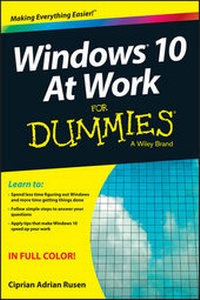
Windows 10 At Work For Dummies
Published on 14. September 2015
416 pages
978-1-119-08475-4 (ISBN)
Description

The fast and easy way to get up and running with Windows 10 at work
If you want to spend less time figuring out Windows and more time getting things accomplished, you've come to the right place. Covering Windows 10 and packed with time-saving tips to help you get the most out of the software, Windows 10 At Work For Dummies offers everything you need to get back precious hours of your work day and make Windows work for you, rather than against you.
This full-color, all-encompassing guide breaks down the most common Windows tasks into easily digestible parts, providing you with illustrated, step-by-step instructions on everything you'll encounter in Windows 10. From setting up your desktop with your favorite apps to finding the files and applications you need--and everything in between--this hands-on, friendly guide takes the headache out of working with Windows.
* Provides over 300 tasks broken into core steps
* Provides easy-to-follow answers to all of your Windows questions
* Illustrates the new features of Windows 10
* If you're a time-pressed professional looking to find answers to all of your Windows-related questions, this is the one-stop resource you'll turn to again and again.
If you want to spend less time figuring out Windows and more time getting things accomplished, you've come to the right place. Covering Windows 10 and packed with time-saving tips to help you get the most out of the software, Windows 10 At Work For Dummies offers everything you need to get back precious hours of your work day and make Windows work for you, rather than against you.
This full-color, all-encompassing guide breaks down the most common Windows tasks into easily digestible parts, providing you with illustrated, step-by-step instructions on everything you'll encounter in Windows 10. From setting up your desktop with your favorite apps to finding the files and applications you need--and everything in between--this hands-on, friendly guide takes the headache out of working with Windows.
* Provides over 300 tasks broken into core steps
* Provides easy-to-follow answers to all of your Windows questions
* Illustrates the new features of Windows 10
* If you're a time-pressed professional looking to find answers to all of your Windows-related questions, this is the one-stop resource you'll turn to again and again.
All prices
More details
Other editions
Additional editions
Ciprian Adrian Rusen
Windows 10 At Work For Dummies
Book
10/2015
Wiley
€24.90
Article exhausted; check different version
Person
Ciprian Adrian Rusen is a Microsoft MVP and Windows expert. His 7tutorials.com blog has more than 1.3 million monthly readers who lookto him for insight into technology in general and Windows in particular.
Content
Introduction 1
Chapter 1: Getting Started with Windows 10 5
Chapter 2: Using the New Start Menu 25
Chapter 3: Using Touch and Touchpads 35
Chapter 4: Connecting to Wi-Fi Networks and the Internet 51
Chapter 5: Using Internet Explorer 65
Chapter 6: Managing Files and Folders 81
Chapter 7: Customizing File Explorer 115
Chapter 8: Customizing Windows 10 133
Chapter 9: Using Mail and Calendar 155
Chapter 10: Using Skype 165
Chapter 11: Using OneDrive 179
Chapter 12: Using OneNote 193
Chapter 13: Using Office Online and Office Apps 205
Chapter 14: Using Cortana 211
Chapter 15: Capturing Pictures, Screenshots, and Video 225
Chapter 16: Working with Apps 233
Chapter 17: Working with Devices 245
Chapter 18: Working on the Road 261
Chapter 19: Doing Your Job in Windows 10 279
Chapter 20: Protecting Your Data 291
Chapter 21: Personalizing User Accounts 303
Chapter 22: Sharing with Others on a Network 313
Chapter 23: Improving Your Privacy and Security 333
Chapter 24: Preventing Problems with Windows 10 357
Chapter 25: Fixing Common Problems with Windows 10 365
Chapter 1: Getting Started with Windows 10 5
Chapter 2: Using the New Start Menu 25
Chapter 3: Using Touch and Touchpads 35
Chapter 4: Connecting to Wi-Fi Networks and the Internet 51
Chapter 5: Using Internet Explorer 65
Chapter 6: Managing Files and Folders 81
Chapter 7: Customizing File Explorer 115
Chapter 8: Customizing Windows 10 133
Chapter 9: Using Mail and Calendar 155
Chapter 10: Using Skype 165
Chapter 11: Using OneDrive 179
Chapter 12: Using OneNote 193
Chapter 13: Using Office Online and Office Apps 205
Chapter 14: Using Cortana 211
Chapter 15: Capturing Pictures, Screenshots, and Video 225
Chapter 16: Working with Apps 233
Chapter 17: Working with Devices 245
Chapter 18: Working on the Road 261
Chapter 19: Doing Your Job in Windows 10 279
Chapter 20: Protecting Your Data 291
Chapter 21: Personalizing User Accounts 303
Chapter 22: Sharing with Others on a Network 313
Chapter 23: Improving Your Privacy and Security 333
Chapter 24: Preventing Problems with Windows 10 357
Chapter 25: Fixing Common Problems with Windows 10 365
