

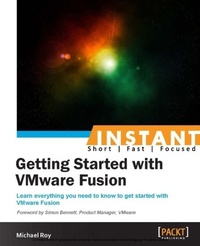
Instant Getting Started with VMware Fusion
Learn everything you need to know to get started with VMware Fusion.
Published on 7. October 2025
64 pages
978-1-78217-789-0 (ISBN)
Description

Learn everything you need to know to get started with VMware Fusion.
Key Features
Learn something new in an Instant! A short, fast, focused guide delivering immediate results
Understand how to keep your Virtual Machine secure
See what's new in VMware Fusion 6 from previous versions
Get a quick, concise, and easy introduction to VMWare Fusion
Book DescriptionRunning Windows on your Mac can seem complicated, but this book will make things easy by showing you how to get the most out of VMware Fusion. Having a virtual copy of Windows on your Mac can let you make a secure backup of your files and run Windows applications, which makes your computer more versatile. This book will show you how to start running Windows on your Mac, with practical examples of how to keep your Virtual Machine secure, backed up, and running smoothly. You will learn about the new features of VMware Fusion 6 and where to get help and support for the software when you need it. This book will walk you through what you need to know to safely and securely run Windows on your Mac. It then proceeds to show you how to upgrade to Windows 8, and shows you how you can seamlessly switch between Windows 7 and Windows 8 using snapshots. Next, it covers all that you need to know to safely and securely run Windows on a Mac computer with Intel processors. You will also learn how to manage your Virtual Machine backups and keep your VM safe. The recipes in this book will give you a helpful head start in getting the most out of VMware Fusion 6.What you will learn
Install Windows 7 directly from Microsoft using the trial version
Upgrade your Windows 7 Virtual Machine to Windows 8
Effectively back up your Virtual Machine
Back up your Windows files easily using Time Machine
Discover and learn about the many features of snapshots
Keep your old PC alive by cloning it into a Virtual Machine
Discover the best places to find help and resources for VMware Fusion
Who this book is for
Key Features
Learn something new in an Instant! A short, fast, focused guide delivering immediate results
Understand how to keep your Virtual Machine secure
See what's new in VMware Fusion 6 from previous versions
Get a quick, concise, and easy introduction to VMWare Fusion
Book DescriptionRunning Windows on your Mac can seem complicated, but this book will make things easy by showing you how to get the most out of VMware Fusion. Having a virtual copy of Windows on your Mac can let you make a secure backup of your files and run Windows applications, which makes your computer more versatile. This book will show you how to start running Windows on your Mac, with practical examples of how to keep your Virtual Machine secure, backed up, and running smoothly. You will learn about the new features of VMware Fusion 6 and where to get help and support for the software when you need it. This book will walk you through what you need to know to safely and securely run Windows on your Mac. It then proceeds to show you how to upgrade to Windows 8, and shows you how you can seamlessly switch between Windows 7 and Windows 8 using snapshots. Next, it covers all that you need to know to safely and securely run Windows on a Mac computer with Intel processors. You will also learn how to manage your Virtual Machine backups and keep your VM safe. The recipes in this book will give you a helpful head start in getting the most out of VMware Fusion 6.What you will learn
Install Windows 7 directly from Microsoft using the trial version
Upgrade your Windows 7 Virtual Machine to Windows 8
Effectively back up your Virtual Machine
Back up your Windows files easily using Time Machine
Discover and learn about the many features of snapshots
Keep your old PC alive by cloning it into a Virtual Machine
Discover the best places to find help and resources for VMware Fusion
Who this book is for
All prices
More details
Edition
Digital original
Language
English
Place of publication
Birmingham
United Kingdom
Target group
Professional and scholarly
US School Grade: College Graduate Student
Edition type
Digital original
File size
3,12 MB
ISBN-13
978-1-78217-789-0 (9781782177890)
Copyright in bibliographic data and cover images is held by Nielsen Book Services Limited or by the publishers or by their respective licensors: all rights reserved.
Schweitzer Classification
Other editions
Additional editions
Michael Roy
Instant Getting Started with VMware Fusion
Book
03/2014
Packt Publishing
€33.60
Shipment within 3-4 weeks
Person
Roy Michael :
Michael Roy is a virtualization expert working for VMware, the world's leading virtualization and cloud computing company used by 95 percent of Fortune 500 companies to manage and virtualize their data center infrastructure. He currently specializes in technical marketing for hybrid cloud services, but started at VMware working on VMware Fusion 2 in 2009 where he co-led a world-class global support team, giving customers the help they needed to get the most out of VMware Fusion. Prior to VMware, he managed a small data center in downtown Toronto as the senior systems administrator, and also spent two years working for Apple where he became a Mac expert. When not working with computers, clouds, or virtual machines, he likes to snowboard, surf, and cook, and listen to, play, and create music. Michael's success story at VMware can be found at http://www.vmware.com/go/mikeroy-journey.
Michael Roy is a virtualization expert working for VMware, the world's leading virtualization and cloud computing company used by 95 percent of Fortune 500 companies to manage and virtualize their data center infrastructure. He currently specializes in technical marketing for hybrid cloud services, but started at VMware working on VMware Fusion 2 in 2009 where he co-led a world-class global support team, giving customers the help they needed to get the most out of VMware Fusion. Prior to VMware, he managed a small data center in downtown Toronto as the senior systems administrator, and also spent two years working for Apple where he became a Mac expert. When not working with computers, clouds, or virtual machines, he likes to snowboard, surf, and cook, and listen to, play, and create music. Michael's success story at VMware can be found at http://www.vmware.com/go/mikeroy-journey.
Content
Table of Contents

