

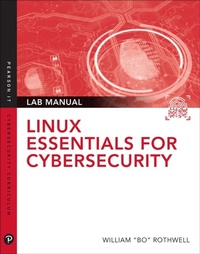
Linux Essentials for Cybersecurity Lab Manual
1st Edition
Published on 9. October 2018
300 pages
978-0-13-530518-8 (ISBN)
Description

This lab manual accompanies the textbook Linux Essentials for Cybersecurity, which teaches people how to use Linux systems and ensures that the Linux systems they work on are as secure as possible.
To really become a Linux cybersecurity expert, you need practice.
In this book, there are three different types of labs to practice your skills:
Labs in which you are presented with a short problem that requires only a single operation to complete.
Labs that are more complex but in which we provide you with a guide to perform each step, one at a time.
Scenario labs in which you are asked to solve a problem entirely on your own. These labs are designed to pose a greater challenge.
No matter the type, these labs are designed to be performed on live Linux systems to give you hands-on practice and develop critical thinking and complex problem-solving skills.
To really become a Linux cybersecurity expert, you need practice.
In this book, there are three different types of labs to practice your skills:
Labs in which you are presented with a short problem that requires only a single operation to complete.
Labs that are more complex but in which we provide you with a guide to perform each step, one at a time.
Scenario labs in which you are asked to solve a problem entirely on your own. These labs are designed to pose a greater challenge.
No matter the type, these labs are designed to be performed on live Linux systems to give you hands-on practice and develop critical thinking and complex problem-solving skills.
All prices
More details
Edition
1. Auflage
Language
English
Place of publication
Upper Saddle River
United States
Publishing group
Pearson Education (US)
Target group
Professional and scholarly
File size
1,75 MB
ISBN-13
978-0-13-530518-8 (9780135305188)
Copyright in bibliographic data and cover images is held by Nielsen Book Services Limited or by the publishers or by their respective licensors: all rights reserved.
Schweitzer Classification
Other editions
Additional editions
William Rothwell
Linux Essentials for Cybersecurity Lab Manual
Book
12/2018
Pearson It Certification
€56.03
Shipment within 3-4 weeks
Person
At the impressionable age of 14, William "Bo" Rothwell crossed paths with a TRS-80 Micro Computer System (affectionately known as a "Trash 80"). Soon after the adults responsible for Bo made the mistake of leavin him alone with the TRS-80, he immediately dismantled it and held his first computer class, showing his friends what made this "computer thing" work.
Since that experience, Bo's passion for understanding how computers work and sharing this knowledge with others has resulted in a rewarding career in IT training. His experience includes Linux, Unix, and programming languages such as Perl, Python, Tcl, and BASH. He is the founder and president of One Course Source, an IT training organization.
Since that experience, Bo's passion for understanding how computers work and sharing this knowledge with others has resulted in a rewarding career in IT training. His experience includes Linux, Unix, and programming languages such as Perl, Python, Tcl, and BASH. He is the founder and president of One Course Source, an IT training organization.
Content
Part I: Introducing Linux
Chapter 1: Distributions and key components
Chapter 2: Working on the command line
Chapter 3: Getting help
Chapter 4: Editing files
Chapter 5: When things go wrong
Part II: User and group accounts
Chapter 6: Managing group accounts
Chapter 7: Managing user account
Chapter 8: Develop an account security policy
Part III: File and data storage
Chapter 9: File permissions
Chapter 10: Manage local storage: Concepts
Chapter 11: Manage local storage: Practical application
Chapter 12: Manage network storage
Chapter 13: Develop a storage security policy
Part IV: Automation
Chapter 14: Crontab and at
14.1 Manage crontab
14.2 Configure at commands
Chapter 15: Scripting
15.1 Script project #1
15.2 Script project #2
Chapter 16: Common automation tasks
15.3 Script project #3
15.4 Script project #4
Chapter 17: Develop an automation security policy
17.1 Secure crontab
17.2 Create a automation security policy
Part V: Networking
Chapter 18: Networking basics
18.1 Explore networking componets
Chapter 19: Network configuration
19.1 Configure networking on CentOS
19.2 Configure networking on Ubuntu"
Chapter 20: Network service configuration: Essential services
20.1 Configure a BIND server
20.2 Configure a Postfix server
20.3 Administer procmail and Dovecot
Chapter 21: Network service configuration: Web services
21.1 Configure and administer an Apache server
21.2. Configure a proxy server
Chapter 22: Connecting to remote systems
22.1 Create an LDAP server
22.2 Configure a FTP server
22.3 Administer a SSH server
Chapter 23: Develop an network security policy
23.1 Administer kernel security parameters
23.2 Secure the system with TCP Wrappers
23.3 Configure Network Time Protocol
23.4 Create a networking security policy
Part VI: Process and log administration
Chapter 24: Process control
24.1 Manage system processes
24.2 Display system information"
Chapter 25: System logging
25.1 Manage log files
25.1 Configure log rotation
Part VII: Software management
Chapter 26: Red Hat-based software management
26.1 Manage software packages with rpm
26.2 Manage software packages with yum
Chapter 27: Debian-based software management
27.1 Manage software packages with dpkg
27.2 Manage software packages with apt
Chapter 28: System booting
28.1 Configure GRUB
28.2 Manage the startup process
Chapter 29: Develop a software management security policy
29.1 Explore Common Vulerabilities and Exposure reports
29.2 Manage and secure legacy services
Part VII: Security tasks
Chapter 30: Footprinting
30.1 Use probing tools
30.2 Scan the network
Chapter 31: Firewalls
31.1 Create a firewall to protect a system
31.2 Impliment NAT
Chapter 32: Intrusion Detection
Chapter 1: Distributions and key components
Chapter 2: Working on the command line
Chapter 3: Getting help
Chapter 4: Editing files
Chapter 5: When things go wrong
Part II: User and group accounts
Chapter 6: Managing group accounts
Chapter 7: Managing user account
Chapter 8: Develop an account security policy
Part III: File and data storage
Chapter 9: File permissions
Chapter 10: Manage local storage: Concepts
Chapter 11: Manage local storage: Practical application
Chapter 12: Manage network storage
Chapter 13: Develop a storage security policy
Part IV: Automation
Chapter 14: Crontab and at
14.1 Manage crontab
14.2 Configure at commands
Chapter 15: Scripting
15.1 Script project #1
15.2 Script project #2
Chapter 16: Common automation tasks
15.3 Script project #3
15.4 Script project #4
Chapter 17: Develop an automation security policy
17.1 Secure crontab
17.2 Create a automation security policy
Part V: Networking
Chapter 18: Networking basics
18.1 Explore networking componets
Chapter 19: Network configuration
19.1 Configure networking on CentOS
19.2 Configure networking on Ubuntu"
Chapter 20: Network service configuration: Essential services
20.1 Configure a BIND server
20.2 Configure a Postfix server
20.3 Administer procmail and Dovecot
Chapter 21: Network service configuration: Web services
21.1 Configure and administer an Apache server
21.2. Configure a proxy server
Chapter 22: Connecting to remote systems
22.1 Create an LDAP server
22.2 Configure a FTP server
22.3 Administer a SSH server
Chapter 23: Develop an network security policy
23.1 Administer kernel security parameters
23.2 Secure the system with TCP Wrappers
23.3 Configure Network Time Protocol
23.4 Create a networking security policy
Part VI: Process and log administration
Chapter 24: Process control
24.1 Manage system processes
24.2 Display system information"
Chapter 25: System logging
25.1 Manage log files
25.1 Configure log rotation
Part VII: Software management
Chapter 26: Red Hat-based software management
26.1 Manage software packages with rpm
26.2 Manage software packages with yum
Chapter 27: Debian-based software management
27.1 Manage software packages with dpkg
27.2 Manage software packages with apt
Chapter 28: System booting
28.1 Configure GRUB
28.2 Manage the startup process
Chapter 29: Develop a software management security policy
29.1 Explore Common Vulerabilities and Exposure reports
29.2 Manage and secure legacy services
Part VII: Security tasks
Chapter 30: Footprinting
30.1 Use probing tools
30.2 Scan the network
Chapter 31: Firewalls
31.1 Create a firewall to protect a system
31.2 Impliment NAT
Chapter 32: Intrusion Detection
