

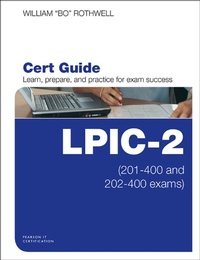
LPIC-2 Cert Guide
(201-400 and 202-400 exams)
1st Edition
Published on 23. May 2016
864 pages
978-0-13-442597-9 (ISBN)
Description

LPIC-2 Cert Guide (201-400 and 202-400 Exams) is a best-of-breed exam study guide. Expert Linux/Unix instructor William "Bo" Rothwell shares preparation hints and test-taking tips, helping you identify areas of weakness and improve both your conceptual knowledge and hands-on skills. Material is presented in a concise manner, focusing on increasing your understanding and retention of exam topics.
The book presents you with an organized test preparation routine through the use of proven series elements and techniques. Exam topic lists make referencing easy. Chapter-ending Exam Preparation Tasks help you drill on key concepts you must know thoroughly. Review questions help you assess your knowledge, and a final preparation chapter guides you through tools and resources to help you craft your final study plan.
You get access to the powerful Pearson IT Certification Practice Test engine, complete with hundreds of exam-realistic questions. The assessment engine offers you a wealth of customization options and reporting features, laying out a complete assessment of your knowledge to help you focus your study where it is needed most.
Well-regarded for its level of detail, assessment features, and challenging review questions and exercises, this study guide helps you master the concepts and techniques that will allow you to succeed on the exam the first time. The study guide helps you master all the topics on both LPIC-2 exams, including:
Capacity planning
Managing the kernel
Managing system startup
Managing filesystems and devices
Administering advanced storage devices
Configuring the network
Performing system maintenance
Administering Domain Name Server (DNS)
Configuring web services
Administering file sharing
Managing network clients
Administering e-mail services
Administering system security
Learn, prepare, and practice for LPIC-2 201-400 and 202-400 exam success with this Cert Guide from Pearson IT Certification, a leader in IT Certification.
Master LPIC-2 Exam 201-400 and 202-400 exam topics
Assess your knowledge with chapter-ending quizzes
Review key concepts with exam preparation tasks
Practice with realistic exam questions
The book presents you with an organized test preparation routine through the use of proven series elements and techniques. Exam topic lists make referencing easy. Chapter-ending Exam Preparation Tasks help you drill on key concepts you must know thoroughly. Review questions help you assess your knowledge, and a final preparation chapter guides you through tools and resources to help you craft your final study plan.
You get access to the powerful Pearson IT Certification Practice Test engine, complete with hundreds of exam-realistic questions. The assessment engine offers you a wealth of customization options and reporting features, laying out a complete assessment of your knowledge to help you focus your study where it is needed most.
Well-regarded for its level of detail, assessment features, and challenging review questions and exercises, this study guide helps you master the concepts and techniques that will allow you to succeed on the exam the first time. The study guide helps you master all the topics on both LPIC-2 exams, including:
Capacity planning
Managing the kernel
Managing system startup
Managing filesystems and devices
Administering advanced storage devices
Configuring the network
Performing system maintenance
Administering Domain Name Server (DNS)
Configuring web services
Administering file sharing
Managing network clients
Administering e-mail services
Administering system security
Learn, prepare, and practice for LPIC-2 201-400 and 202-400 exam success with this Cert Guide from Pearson IT Certification, a leader in IT Certification.
Master LPIC-2 Exam 201-400 and 202-400 exam topics
Assess your knowledge with chapter-ending quizzes
Review key concepts with exam preparation tasks
Practice with realistic exam questions
All prices
More details
Series
Edition
1. Auflage
Language
English
Place of publication
Upper Saddle River
United States
Publishing group
Pearson Education (US)
Target group
Professional and scholarly
File size
47,01 MB
ISBN-13
978-0-13-442597-9 (9780134425979)
Copyright in bibliographic data and cover images is held by Nielsen Book Services Limited or by the publishers or by their respective licensors: all rights reserved.
Schweitzer Classification
Other editions
Additional editions
Book
06/2016
Pearson It Certification
€84.34
Article exhausted; check different version
Person
William "Bo" Rothwell At the impressionable age of 14, Bo crossed paths with a TRS-80 Micro Computer System (affectionately known as a "Trash 80"). Soon after, the adults responsible for Bo made the mistake of leaving him alone with the TRS-80. He immediately dismantled it and held his first computer class, showing his friends what made this "computer thing" work.
Since that experience, Bo's passion for understanding how computers work and sharing this knowledge with others has resulted in a rewarding career in IT training. His experience includes Linux, Unix, and programming languages such as Perl, Python, Tcl, and BASH. He is the founder and president of One Course Source, an IT training organization.
Since that experience, Bo's passion for understanding how computers work and sharing this knowledge with others has resulted in a rewarding career in IT training. His experience includes Linux, Unix, and programming languages such as Perl, Python, Tcl, and BASH. He is the founder and president of One Course Source, an IT training organization.
Content
Part I : Capacity Planning
Chapter 1 Measuring and Troubleshooting Resource Usage
Chapter 2 Predict Future Resource Needs
Chapter 3 Kernel Components and Compiling
Chapter 4 Kernel Runtime Management and Troubleshooting
Part III: Managing System Startup
Chapter 5 Customizing SysV-init System Startup
Chapter 6 Administrating System Recovery
Chapter 7 Alternate Boot Loaders
Part IV: Managing Filesystem and Devices
Chapter 8 Operating the Linux Filesystem
Chapter 9 Maintaining a Linux Filesystem
Chapter 10 Creating and Configuring Filesystem Options
Part V: Administrating Advanced Storage Device
Chapter 11 Configuring RAID
Chapter 12 Adjusting Storage Device Access
Chapter 13 Logical Volume Manager
Part VI: Confi guring the Network
Chapter 14 Basic Network Configuration
Chapter 15 Advanced Network Configuration and Troubleshooting
Chapter 16 Troubleshooting Network Issues
Part VII: Performing System Maintenance
Chapter 17 Make and Install Programs from Source
Chapter 18 Backup Operations
Chapter 19 Notify Users on System-Related Issues
Part VIII: Administrating Domain Name Server
Chapter 20 Basic DNS Server Configuration
Chapter 21 Create and Maintain DNS Zones
Chapter 22 Securing a DNS Server
Part IX: Confi guring Web Services
Chapter 23 Implementing a Web Server
Chapter 24 Apache Configuration for HTTPS
Chapter 25 Implementing a Proxy Server
Part X: Administrating File Sharing
Chapter 26 SAMBA Server Configuration
Chapter 27 NFS Server Configuration
Part XI: Managing Network Clients
Chapter 28 DHCP Configuration
Chapter 29 PAM Authentication
Chapter 30 Configuring an OpenLDAP Server
Chapter 31 LDAP Client Usage
Part XII: Administrating E-Mail Services
Chapter 32 Using E-mail Servers
Chapter 33 Managing Local E-mail Delivery
Chapter 34 Managing Remote E-mail Delivery
Part XIII: Administrating System Security
Chapter 35 Configuring a Router
Chapter 36 Securing FTP Servers
Chapter 37 Secure Shell (SSH)
Chapter 38 Security Tasks and OpenVPN
Chapter 39 Final Preparation
Chapter 1 Measuring and Troubleshooting Resource Usage
Chapter 2 Predict Future Resource Needs
Chapter 3 Kernel Components and Compiling
Chapter 4 Kernel Runtime Management and Troubleshooting
Part III: Managing System Startup
Chapter 5 Customizing SysV-init System Startup
Chapter 6 Administrating System Recovery
Chapter 7 Alternate Boot Loaders
Part IV: Managing Filesystem and Devices
Chapter 8 Operating the Linux Filesystem
Chapter 9 Maintaining a Linux Filesystem
Chapter 10 Creating and Configuring Filesystem Options
Part V: Administrating Advanced Storage Device
Chapter 11 Configuring RAID
Chapter 12 Adjusting Storage Device Access
Chapter 13 Logical Volume Manager
Part VI: Confi guring the Network
Chapter 14 Basic Network Configuration
Chapter 15 Advanced Network Configuration and Troubleshooting
Chapter 16 Troubleshooting Network Issues
Part VII: Performing System Maintenance
Chapter 17 Make and Install Programs from Source
Chapter 18 Backup Operations
Chapter 19 Notify Users on System-Related Issues
Part VIII: Administrating Domain Name Server
Chapter 20 Basic DNS Server Configuration
Chapter 21 Create and Maintain DNS Zones
Chapter 22 Securing a DNS Server
Part IX: Confi guring Web Services
Chapter 23 Implementing a Web Server
Chapter 24 Apache Configuration for HTTPS
Chapter 25 Implementing a Proxy Server
Part X: Administrating File Sharing
Chapter 26 SAMBA Server Configuration
Chapter 27 NFS Server Configuration
Part XI: Managing Network Clients
Chapter 28 DHCP Configuration
Chapter 29 PAM Authentication
Chapter 30 Configuring an OpenLDAP Server
Chapter 31 LDAP Client Usage
Part XII: Administrating E-Mail Services
Chapter 32 Using E-mail Servers
Chapter 33 Managing Local E-mail Delivery
Chapter 34 Managing Remote E-mail Delivery
Part XIII: Administrating System Security
Chapter 35 Configuring a Router
Chapter 36 Securing FTP Servers
Chapter 37 Secure Shell (SSH)
Chapter 38 Security Tasks and OpenVPN
Chapter 39 Final Preparation
