

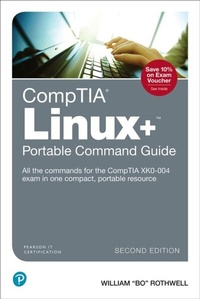
CompTIA Linux+ Portable Command Guide
All the commands for the CompTIA XK0-004 exam in one compact, portable resource
2nd Edition
Published on 10. March 2021
416 pages
978-0-13-559183-3 (ISBN)
Description

Here are all the Linux commands, files, and concepts you need to pass your CompTIA Linux+ exam, in one concise, condensed resource. CompTIA Linux+ Portable Command Guide, Second Edition, is filled with valuable, easy-to-access information-and it's portable enough to use wherever your work takes you.
This guide summarizes all Linux+ certification-level Linux commands, keywords, command arguments, and associated prompts, and provides tips and examples of how to apply them to real-world scenarios. Configuration examples throughout the book give you a better understanding of how these commands are used in real-world environments.
Fully updated for today's CompTIA XK0-004 exam, this quick reference resource will help you memorize commands and concepts as you work to earn your Linux+ certification and use it in the workplace. Linux+ commands for research and solutions
Logical how-to topic groupings for a one-stop resource
Great for review before your Linux+ certification exam
Compact size makes it easy to carry with you, wherever you go
"Create Your Own Journal" appendix with blank, lined pages lets you personalize the book for your needs
"What Do You Want to Do?" chart inside front cover helps you to quickly reference specific tasks
The book is organized into these parts:
Part I: Hardware and System Configuration: boot process, kernel modules, network connections, storage, cloud, virtualization, localization
Part II: Systems Operation and Maintenance: software installation/configuration, users/groups, services, server roles, jobs, Linux devices, GUIs
Part III: Security: user/group permissions and ownership, access/authentication, security best practices, logging, firewalls, backup/restore/compress
Part IV: Linux Troubleshooting and Diagnostics: analyze/remediate system properties; optimize performance; troubleshoot user, application, and hardware issues
Part V: Automation and Scripting: BASH scripting, Git version control, orchestration
This guide summarizes all Linux+ certification-level Linux commands, keywords, command arguments, and associated prompts, and provides tips and examples of how to apply them to real-world scenarios. Configuration examples throughout the book give you a better understanding of how these commands are used in real-world environments.
Fully updated for today's CompTIA XK0-004 exam, this quick reference resource will help you memorize commands and concepts as you work to earn your Linux+ certification and use it in the workplace. Linux+ commands for research and solutions
Logical how-to topic groupings for a one-stop resource
Great for review before your Linux+ certification exam
Compact size makes it easy to carry with you, wherever you go
"Create Your Own Journal" appendix with blank, lined pages lets you personalize the book for your needs
"What Do You Want to Do?" chart inside front cover helps you to quickly reference specific tasks
The book is organized into these parts:
Part I: Hardware and System Configuration: boot process, kernel modules, network connections, storage, cloud, virtualization, localization
Part II: Systems Operation and Maintenance: software installation/configuration, users/groups, services, server roles, jobs, Linux devices, GUIs
Part III: Security: user/group permissions and ownership, access/authentication, security best practices, logging, firewalls, backup/restore/compress
Part IV: Linux Troubleshooting and Diagnostics: analyze/remediate system properties; optimize performance; troubleshoot user, application, and hardware issues
Part V: Automation and Scripting: BASH scripting, Git version control, orchestration
All prices
More details
Edition
2nd edition
Language
English
Place of publication
Upper Saddle River
United States
Publishing group
Pearson Education (US)
Target group
Professional and scholarly
File size
34,39 MB
ISBN-13
978-0-13-559183-3 (9780135591833)
Copyright in bibliographic data and cover images is held by Nielsen Book Services Limited or by the publishers or by their respective licensors: all rights reserved.
Schweitzer Classification
Other editions
Additional editions
William Rothwell
CompTIA Linux+ Portable Command Guide
All the commands for the CompTIA XK0-004 exam in one compact, portable resource
Book
11/2019
2nd Edition
Pearson It Certification
€33.00
Shipment within 15-20 days
Person
At the impressionable age of 14, William "Bo" Rothwell crossed paths with a TRS-80 Micro Computer System (affectionately known as a "Trash 80"). Soon after the adults responsible for Bo made the mistake of leaving him alone with the TSR-80, he immediately dismantled it and held his first computer class, showing his friends what made this "computer thing" work.
Since this experience, Bo's passion for understanding how computers work and sharing this knowledge with others has resulted in a rewarding career in IT training. His experience includes Linux, Unix, IT Security, DevOps, and programming languages such as Perl, Python, Tcl, and BASH. He is the founder and lead instructor of One Course Source, an IT training organization.
Since this experience, Bo's passion for understanding how computers work and sharing this knowledge with others has resulted in a rewarding career in IT training. His experience includes Linux, Unix, IT Security, DevOps, and programming languages such as Perl, Python, Tcl, and BASH. He is the founder and lead instructor of One Course Source, an IT training organization.
Content
CHAPTER 1 Explain Linux boot process concepts
CHAPTER 2 Given a scenario, install, configure, and monitor kernel modules
CHAPTER 3 Given a scenario, configure and verify network connection parameters
CHAPTER 4 Given a scenario, manage storage in a Linux environment
CHAPTER 5 Compare and contrast cloud and virtualization concepts and technologies
CHAPTER 6 Given a scenario, confi gure localization options
CHAPTER 7 Given a scenario, conduct software installations, configurations, updates, and removals
CHAPTER 8 Given a scenario, manage users and groups
CHAPTER 9 Given a scenario, create, modify, and redirect files
CHAPTER 10 Given a scenario, manage services
CHAPTER 11 Summarize and explain server roles
CHAPTER 12 Given a scenario, automate and schedule jobs
CHAPTER 13 Explain the use and operation of Linux devices
CHAPTER 14 Compare and Contrast Linux Graphical User Interfaces
CHAPTER 15 Given a scenario, apply or acquire the appropriate user and/or group permissions and ownership
CHAPTER 16 Given a scenario, confi gure and implement appropriate access and authentication methods
CHAPTER 17 Summarize security best practices in a Linux environment
CHAPTER 18 Given a scenario, implement logging services
CHAPTER 19 Given a scenario, implement and confi gure Linux fi rewalls
CHAPTER 20 Given a scenario, backup, restore, and compress fi les
CHAPTER 21 Given a scenario, analyze system properties and remediate accordingly
CHAPTER 22 Given a scenario, analyze system processes in order to optimize performance
CHAPTER 23 Given a scenario, analyze and troubleshoot user issues
CHAPTER 24 Given a scenario, analyze and troubleshoot application and hardware issues
CHAPTER 25 Given a scenario, deploy and execute basic BASH scripts
CHAPTER 26 Given a scenario, carry out version control using Git
CHAPTER 27 Summarize orchestration processes and concepts
CHAPTER 2 Given a scenario, install, configure, and monitor kernel modules
CHAPTER 3 Given a scenario, configure and verify network connection parameters
CHAPTER 4 Given a scenario, manage storage in a Linux environment
CHAPTER 5 Compare and contrast cloud and virtualization concepts and technologies
CHAPTER 6 Given a scenario, confi gure localization options
CHAPTER 7 Given a scenario, conduct software installations, configurations, updates, and removals
CHAPTER 8 Given a scenario, manage users and groups
CHAPTER 9 Given a scenario, create, modify, and redirect files
CHAPTER 10 Given a scenario, manage services
CHAPTER 11 Summarize and explain server roles
CHAPTER 12 Given a scenario, automate and schedule jobs
CHAPTER 13 Explain the use and operation of Linux devices
CHAPTER 14 Compare and Contrast Linux Graphical User Interfaces
CHAPTER 15 Given a scenario, apply or acquire the appropriate user and/or group permissions and ownership
CHAPTER 16 Given a scenario, confi gure and implement appropriate access and authentication methods
CHAPTER 17 Summarize security best practices in a Linux environment
CHAPTER 18 Given a scenario, implement logging services
CHAPTER 19 Given a scenario, implement and confi gure Linux fi rewalls
CHAPTER 20 Given a scenario, backup, restore, and compress fi les
CHAPTER 21 Given a scenario, analyze system properties and remediate accordingly
CHAPTER 22 Given a scenario, analyze system processes in order to optimize performance
CHAPTER 23 Given a scenario, analyze and troubleshoot user issues
CHAPTER 24 Given a scenario, analyze and troubleshoot application and hardware issues
CHAPTER 25 Given a scenario, deploy and execute basic BASH scripts
CHAPTER 26 Given a scenario, carry out version control using Git
CHAPTER 27 Summarize orchestration processes and concepts
