

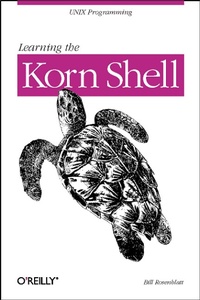
Learning the Korn Shell
1st Edition
Published on 1. January 1993
360 pages
978-1-4493-6094-8 (ISBN)
Description

This Nutshell Handbook is a thorough introduction to the Korn shell, both as a user interface and as a programming language.The Korn shell, like the C and Bourne shells, is a program that interprets UNIX commands. It has many features that aren't found in other shells, including command history (the ability to recall and edit previous commands). The Korn shell is also faster; several of its features allow you to write programs that execute more quickly than their Bourne or C shell equivalents.This book provides a clear and concise explanation of the Korn shell's features. It explains ksh string operations, co-processes, signals and signal handling, and one of the worst "e;dark corners"e; of shell programming: command-line interpretation. It does this by introducing simple real-life examples and then adding options and complexity in later chapters, illustrating the way real-world script development generally proceeds. An additional (and unique) programming aid, a Korn shell debugger (kshdb), is also included.Learning the Korn Shell is an ideal resource for many UNIX users and programmers, including software developers who want to "e;prototype"e; their designs, system administrators who want to write tools for their own use, and even novices who just want to use some of ksh's more advanced interactive features.
More details
Other editions
New editions
Arnold Robbins
Learning the Korn Shell
E-Book
04/2002
2nd Edition
O'Reilly
€35.99
Available for download
Additional editions
Bill Rosenblatt
Learning the Korn Shell
Book
02/1993
O'Reilly
€29.00
Article exhausted; check for reprint
Content
- Cover
- Copyright
- Table of Contents
- Preface
- Korn Shell Versions
- Summary of Korn Shell Features
- Intended Audience
- Code Examples
- Chapter Summary
- Conventions Used in This Handbook
- Acknowledgments
- We'd Like to Hear From You
- Chapter 1. Korn Shell Basics
- What Is a Shell?
- Scope of This Book
- History of UNIX Shells
- The Korn Shell
- Features of the Korn Shell
- Getting the Korn Shell
- Interactive Shell Use
- Commands, Arguments, and Options
- Files
- Directories
- Filenames and Wildcards
- Input and Output
- Standard I/O
- I/O Redirection
- Pipelines
- Background Jobs
- Background I/O
- Background Jobs and Priorities
- Special Characters and Quoting
- Quoting
- Backslash-escaping
- Quoting Quotation Marks
- Continuing Lines
- Control Keys
- Chapter 2. Command-line Editing
- Enabling Command-line Editing
- The History File
- Emacs Editing Mode
- Basic Commands
- Word Commands
- Line Commands
- Moving Around in the History File
- Filename Completion and Expansion
- Miscellaneous Commands
- Keyboard Shortcuts with Aliases
- Vi Editing Mode
- Simple Control Mode Commands
- Entering and Changing Text
- Deletion Commands
- Moving Around in the History File
- Character-finding Commands
- Filename Completion
- Miscellaneous Commands
- The fc Command
- Finger Habits
- Chapter 3. Customizing Your Environment
- The .profile File
- Aliases
- Tracked Aliases
- Options
- Shell Variables
- Variables and Quoting
- Built-in Variables
- Directory Search Path
- Customization and Subprocesses
- Environment Variables
- The Environment File
- Customization Hints
- Chapter 4. Basic Shell Programming
- Shell Scripts and Functions
- Functions
- Shell Variables
- Positional Parameters
- More on Variable Syntax
- String Operators
- Syntax of String Operators
- Patterns and Regular Expressions
- Pattern-matching Operators
- Length Operator
- Command Substitution
- Advanced Examples: pushd and popd
- Chapter 5. Flow Control
- if/else
- Exit Status and Return
- Combinations of Exit Statuses
- Condition Tests
- Integer Conditionals
- for
- case
- select
- while and until
- Chapter 6. Command-line Options and Typed Variables
- Command-line Options
- shift
- Options with Arguments
- getopts
- Integer Variables and Arithmetic
- Arithmetic Conditionals
- Arithmetic Variables and Assignment
- Arrays
- typeset
- Local Variables in Functions
- String Formatting Options
- Type and Attribute Options
- Function Options
- Chapter 7. Input/Output and Command-line Processing
- I/O Redirectors
- Here-documents
- File Descriptors
- String I/O
- read
- Command-line Processing
- Quoting
- eval
- Chapter 8. Process Handling
- Process IDs and Job Numbers
- Job Control
- Foreground and Background
- Suspending a Job
- Signals
- Control-key Signals
- kill
- ps
- trap
- Traps and Functions
- Process ID Variables and Temporary Files
- Ignoring Signals
- Resetting Traps
- Coroutines
- wait
- Advantages and Disadvantages of Coroutines
- Parallelization
- Coroutines with Two-way Pipes
- Two-way Pipes Versus Standard Pipes
- Subshells
- Subshell Inheritance
- Nested Subshells
- Chapter 9. Debugging Shell Programs
- Basic Debugging Aids
- Set Options
- Fake Signals
- A Korn Shell Debugger
- Structure of the Debugger
- The Preamble
- Debugger Functions
- Sample kshdb Session
- Exercises
- Chapter 10. Korn Shell Administration
- Installing the Korn Shell as the Standard Shell
- Environment Customization
- umask
- ulimit
- Types of Global Customization
- System Security Features
- Restricted Shell
- A System Break-in Scenario
- Tracked Aliases
- Privileged Mode
- Appendix A. Related Shells
- The Bourne Shell
- The IEEE 1003.2 POSIX Shell Standard
- wksh
- pdksh
- bash
- Workalikes on PC Platforms
- The Future of the Korn Shell
- Appendix B. Reference Lists
- Invocation Options
- Built-in Commands and Keywords
- Built-in Shell Variables
- Test Operators
- Options
- Typeset Options
- Emacs Mode Commands
- Vi Control Mode Commands
- Appendix C. Obtaining Sample Programs
- FTP
- FTPMAIL
- BITFTP
- UUCP
- Index
- About the Author
