

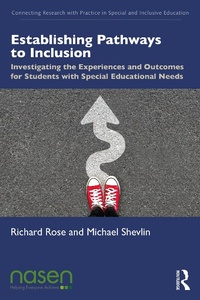
Establishing Pathways to Inclusion
Investigating the Experiences and Outcomes for Students with Special Educational Needs
1st Edition
Published on 15. February 2021
208 pages
978-1-000-34240-6 (ISBN)
Description

Providing a robust understanding of what really works for educators and pupils alike, this book shows how inclusive practices function effectively in schools. Rose and Shevlin identify key factors which can influence successful inclusive practice and examine how schools can establish and implement an agenda for change.
Using a framework for analysing and understanding how students become effective social learners, this book guides readers through sections on context, observed experiences, and the factors for success they highlight, covering topics such as:
The respective attitudes of students, caregivers and teachers
Insights from support staff and school leaders
The social and academic outcomes for pupils with special educational needs
Lessons learned from inclusive practices
Ideal for researchers, lecturers, and advanced students in the field of inclusive education, Establishing Pathways to Inclusion is an important contribution from leading researchers in this vital field of study.
Using a framework for analysing and understanding how students become effective social learners, this book guides readers through sections on context, observed experiences, and the factors for success they highlight, covering topics such as:
The respective attitudes of students, caregivers and teachers
Insights from support staff and school leaders
The social and academic outcomes for pupils with special educational needs
Lessons learned from inclusive practices
Ideal for researchers, lecturers, and advanced students in the field of inclusive education, Establishing Pathways to Inclusion is an important contribution from leading researchers in this vital field of study.
More details
Series
Edition
1. Auflage
Language
English
Place of publication
London
United Kingdom
Publishing group
Taylor & Francis Ltd
Target group
College/higher education
Professional and scholarly
Illustrations
13 Tables, black and white; 1 Line drawings, black and white; 1 Illustrations, black and white
ISBN-13
978-1-000-34240-6 (9781000342406)
Copyright in bibliographic data and cover images is held by Nielsen Book Services Limited or by the publishers or by their respective licensors: all rights reserved.
Schweitzer Classification
Other editions
Additional editions
Richard Rose | Michael Shevlin
Establishing Pathways to Inclusion
Investigating the Experiences and Outcomes for Students with Special Educational Needs
Book
02/2021
1st Edition
Routledge
€206.20
Shipment within 10-20 days
Richard Rose | Michael Shevlin
Establishing Pathways to Inclusion
Investigating the Experiences and Outcomes for Students with Special Educational Needs
Book
02/2021
1st Edition
Routledge
€59.80
Shipment within 10-20 days
Persons
Richard Rose is Professor Emeritus of Inclusive Education at the University of Northampton, UK.
Michael Shevlin is Professor of Inclusive Education at Trinity College Dublin, Republic of Ireland.
Michael Shevlin is Professor of Inclusive Education at Trinity College Dublin, Republic of Ireland.
Content
Section 1: Context and Introducing the Study 1. Inclusive Education in Ireland: Developments and Challenges 2. Policy and Research Context within the Republic of Ireland 3. Collating Evidence: Research Methods Deployed During the Study Section 2: Experiences and Outcomes: Multiple Perspectives 4. Student Experiences and Outcomes 5. Parental Reflections on their Experiences 6. The Attitudes and Experiences of Teachers 7. Insights from School Leaders 8. Perspectives of Support Teachers and Therapeutic Professionals 9. The Experiences of Paraprofessionals 10. Academic Outcomes for Students with Special Educational Needs 11. Social Outcomes for Students with Special Educational Needs 12. Student Transition from Primary to Post-Primary School Section 3: Critical Factors in Establishing Inclusive Learning Environments 13. Setting an Agenda for Research 14. Inclusive Education in Ireland - What Have We Learned?
