

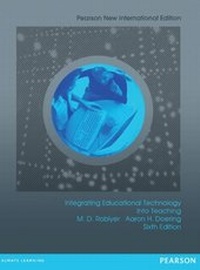
Integrating Educational Technology into Teaching
Description

Integrating Educational Technology into Teaching shows pre-service teachers how to plan for Technology Integration, and offers them the opportunity to practice Technology Integration when designing curriculum to support and shape learning.
Integrating Educational Technology into Teaching presents a comprehensive technology integration framework built on both research and proven classroom practices. The Technology Integration Planning Model (TIP Model) shows teachers how to create an environment in which technology can effectively enhance learning. This sixth edition shows how to incorporate the Technological Pedagogical Content Knowledge (Tech-PACK) framework into the TIP Model. Carefully-selected examples and exercises in each chapter encourage teachers to reflect on their practice as they develop the insights, knowledge, and skills they need to integrate technology into content area curricula. Using hundreds of lesson examples and recommended resources, the text balances the theory-based "why" and the practical "how" of using technology to support and shape the future of technology in education.
The goal of this edition is for teachers to see more clearly their role in shaping the future of technology in education. This book illustrates that great education means employing technologies to fulfill the vision they make possible: a worldwide social network and a global community that learns and grows together.
The full text downloaded to your computer
With eBooks you can:
- search for key concepts, words and phrases
- make highlights and notes as you study
- share your notes with friends
eBooks are downloaded to your computer and accessible either offline through the Bookshelf (available as a free download), available online and also via the iPad and Android apps.
Upon purchase, you'll gain instant access to this eBook.
Time limit
The eBooks products do not have an expiry date. You will continue to access your digital ebook products whilst you have your Bookshelf installed.
All prices
More details
Other editions
Additional editions
Persons
M.D. Roblyer
M.D. Roblyer has been a technology-using teacher, professor, and contributor to the field of educational technology for nearly 40 years and has authored or co-authored hundreds of books, monographs, articles, columns, and papers on educational technology research and practice. Her other books for Pearson Education include Starting Out on the Internet: A Learning Journey for Teachers; Technology Tools for Teachers: A Microsoft Office Tutorial (with Steven C. Mills); and Educational Technology in Action: Problem-based Exercises for Technology Integration.
She began her exploration of technology's benefits for teaching in 1971 as a graduate student at one of the country's first successful instructional computer training sites, Pennsylvania State University, where she helped write tutorial literacy lessons in the Coursewriter II authoring language on an IBM 1500 dedicated instructional mainframe computer. While obtaining a Ph.D. in instructional systems at Florida State University, she worked on several major courseware development and training projects with Control Data Corporation's PLATO system. In 1981-1982, she designed one of the early microcomputer software series Grammar Problems for Practice, in conjunction with the Milliken Publishing Company.
Currently, Dr. Roblyer is Adjunct Professor of Instructional Technology and Distance Education (ITDE) at Nova Southeastern University, chairing dissertations for ITDE doctoral students. She serves on editorial boards of various technology and research journals and is past-president of two AERA Special Interest Groups. Her current research focus is promoting student success in virtual school environments and exploring ways to increase interactive qualities in virtual courses. She is married to fellow FSU Ph.D., William R. Wiencke and is the mother of a daughter, Paige.
Aaron H. Doering
Aaron Doering is an associate professor in the Learning Technologies program at the University of Minnesota. He holds the Bonnie Westby Huebner Endowed Chair in Education and Technology, is a co-director of the Learning Technologies Media Lab, is a Laureate of the prestigious humanitarian Tech Awards, and is a fellow for the University of Minnesota Institute on the Environment. Doering received his Ph.D. in instructional systems and technology and a masters in geography.
Doering serves on numerous editorial boards and gives hundreds of talks a year on adventure learning, engagement, and motivation and his academic writing is focused on how to design and develop adventure learning (AL) environments, the impact of AL inside and outside the classroom, designing and developing online distance learning environments, and K-12 technology integration. He is also the PI of numerous projects such as Earthducation, an investigation of education and sustainability on every continent; Explore15, a user-driven adventure learning environment where students and teachers create their own AL environments; North of Sixty, where students throughout the world are collecting, analyzing, and sharing climate change data; and GeoThentic, a learning environment where teachers teach and students learn geography using geospatial technologies.
Doering has always had a passion for the environment and education from his childhood days of growing up on a farm in southern Minnesota. He always realized that our personal actions have a huge impact on our environment and that we need to be cognizant of how we are all interconnected. From his experiences teaching middle and high school social studies, to working at the National Geographic Society, to the thousands of miles he has spent crossing the circumpolar Arc
Content
- Chapter 1 EDUCATIONAL TECHNOLOGY IN CONTEXT: The Big Picture
- Chapter 2 THEORY INTO PRACTICE: Foundations for Effective Technology Integration
- Chapter 3 INSTRUCTIONAL SOFTWARE FOR 21ST CENTURY TEACHING
- Chapter 4 TECHNOLOGY TOOLS FOR 21ST CENTURY TEACHING: The Basic Suite
- Chapter 5 TECHNOLOGY TOOLS FOR 21ST CENTURY TEACHING: Beyond the Basics
- Chapter 6 HYPERMEDIA TOOLS FOR 21st CENTURY TEACHING
- Chapter 7 DISTANCE TEACHING AND LEARNING AND THE ROLE OF THE OF THE INTERNET
- Chapter 8 DEVELOPING AND USING WEB-BASED LEARNING ACTIVITIES
- Chapter 9 TEACHING AND LEARNING WITH TECHNOLOGY AND LANGUAGE ARTS INSTRUCTION
- Chapter 10 TEACHING AND LEARNING WITH TECHNOLOGY IN FOREIGN AND SECOND LANGUAGE INSTRUCTION
- Chapter 11 TEACHING AND LEARNING WITH TECHNOLOGY IN MATHEMATICS AND SCIENCE INSTRUCTION
- Chapter 12 TEACHING AND LEARNING WITH TECHNOLOGY IN SOCIAL STUDIES INSTRUCTION
- Chapter 13 TEACHING AND LEARNING WITH TECHNOLOGY IN MUSIC AND ART INSTRUCTION
- Chapter 14 TEACHING AND LEARNING WITH TECHNOLOGY IN PHYSICAL EDUCATION AND HEALTH EDUCATION
- Chapter 15 TEACHING AND LEARNING WITH TECHNOLOGY IN SPECIAL EDUCATION
