

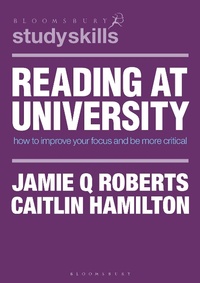
Reading at University
How to Improve Your Focus and be More Critical
1st Edition
Published on 22. February 2020
168 pages
978-1-350-31490-0 (ISBN)
Description

This concise and practical text will equip students with the effective reading strategies they need when preparing for their university assessments. It dispels assumptions often made about the nature of reading at university, and provides an overview of the culture of academic reading, note-making, and what markers expect. This text provides support for reading structured around the process of crafting an assignment, including reading critically and developing an academic voice.
More details
Series
Edition
1. Auflage
Language
English
Place of publication
London
United Kingdom
Publishing group
Bloomsbury Publishing PLC
Target group
College/higher education
Illustrations
10 bw illus
ISBN-13
978-1-350-31490-0 (9781350314900)
Copyright in bibliographic data and cover images is held by Nielsen Book Services Limited or by the publishers or by their respective licensors: all rights reserved.
Schweitzer Classification
Other editions
Additional editions
Jamie Q. Roberts | Caitlin Hamilton
Reading at University
How to Improve Your Focus and Be More Critical
Book
02/2020
Bloomsbury Academic
€28.40
Shipment within 15-20 days
Persons
Jamie Roberts is a Learning Advisor at the University of New South Wales, Australia. He is Director of Uniwrite, a company which runs preparatory writing courses for high school students.
Caitlin Hamilton is a Research Associate at the University of New South Wales, Australia. She is Editorial Manager of the Australian Journal of International Affairs.
Caitlin Hamilton is a Research Associate at the University of New South Wales, Australia. She is Editorial Manager of the Australian Journal of International Affairs.
Content
Introduction
Twelve dubious assumptions about reading at university
The purpose of universities and the nature of academic publishing and what this means for your reading
Marking criteria related to reading
The different types of sources encountered at university
Optimising the environment in which you read
Making notes when you read
Reading to work out what a source is generally about
Reading in depth
The assignment-production process: reading, planning and writing
Reading critically (part 1): different ways of using information in your writing, including critiquing
An extended activity about how to find, evaluate and use information from a single source
Reading critically (part 2): Comparative reading and synthesis
Reading to understand your field
Reading to write: developing your academic voice by imitating good writers
Reading widely to enrich your studies and life
Conclusion.
Twelve dubious assumptions about reading at university
The purpose of universities and the nature of academic publishing and what this means for your reading
Marking criteria related to reading
The different types of sources encountered at university
Optimising the environment in which you read
Making notes when you read
Reading to work out what a source is generally about
Reading in depth
The assignment-production process: reading, planning and writing
Reading critically (part 1): different ways of using information in your writing, including critiquing
An extended activity about how to find, evaluate and use information from a single source
Reading critically (part 2): Comparative reading and synthesis
Reading to understand your field
Reading to write: developing your academic voice by imitating good writers
Reading widely to enrich your studies and life
Conclusion.
