

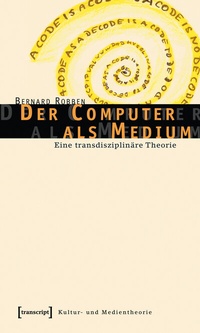
Der Computer als Medium
Eine transdisziplinäre Theorie
1st Edition
Published on 15. July 2015
316 pages
978-3-8394-0429-4 (ISBN)
Description

Der Computer ist zum allgemeinen Medium des Wissens geworden. Durch sein Erscheinen wandeln sich Text und Bild grundlegend. In einem originellen Konzept wird der Computer in dieser Studie als verallgemeinertes Schriftmedium konzipiert. Schrift als Kulturtechnik transformiert sich zur computierten und computierenden Notation.Mit diesem Buch wird keine weitere Einzelstudie auf dem Feld der digitalen Medien vorgelegt, sondern eine Theorie des Computers als Medium, die auf ungewöhnliche Weise informationstechnische und kulturwissenschaftliche Medientheorien miteinander verbindet.
Reviews / Votes
»Absicht der von Bernhard Robben vorgelegten [...] Studie ist, eine Medientheorie des Computers zu schreiben. Dabei verbindet der Autor im Rahmen einer 'transdisziplinären Theorie` informationstechnische und kulturwissenschaftliche Medientheorien miteinander. Leitgedanke Robbens ist, dass der Computer schon vorhandene Medien integriert.«More details
Other editions
Additional editions
Book
01/2006
1st Edition
transcript
€28.80
Article exhausted; check different version
Person
Author
Bernard Robben, Universität Bremen und Hochschule für Künste Bremen, Deutschland
Bernard Robben (Dr.-Ing.) ist tätig in der Lehre des Studiengangs Digitale Medien der Universität Bremen und der Hochschule für Künste Bremen. Seine Forschungsschwerpunkte sind Medientheorie und Mensch-Computer-Interaktion.
ISNI:
Content
1 - INHALT [Seite 5]
2 - EINLEITUNG: ÜBER-SETZUNGEN [Seite 11]
3 - DIFFERÄNZ: NOTATION PROZESSIERENDER ÜBERSETZUNGEN [Seite 25]
3.1 - Computer: Medium der Übersetzung [Seite 29]
3.2 - Notation: Zeichen und Wahrnehmung [Seite 46]
3.3 - Übersetzung: Schrift wird Notation [Seite 58]
3.4 - Medium: Mittler und Mittleres [Seite 92]
3.5 - Interaktion mit dem Technisch-Unbewussten [Seite 102]
4 - GESCHICHTE DES MEDIALEN RAUMES [Seite 119]
4.1 - Schrift [Seite 119]
4.2 - Bild [Seite 140]
4.3 - Technische Medien als Griffel der Natur [Seite 160]
4.4 - Film [Seite 171]
4.5 - Telegrafie [Seite 184]
5 - BILDWENDEN [Seite 191]
5.1 - Was ist ein Bild? [Seite 193]
5.2 - Vom perspektivischen Sehen zum Aspekt-Sehen [Seite 204]
5.3 - Die neue Bildlichkeit des Computers als Medium [Seite 217]
5.4 - Denken mit dem Auge [Seite 230]
6 - FORMUNGEN DES COMPUTERS ALS MEDIUM [Seite 241]
6.1 - Internet [Seite 243]
6.2 - Hypertext und Hypermedia [Seite 251]
6.3 - Programmiersprachen [Seite 257]
6.4 - Simulation [Seite 266]
6.5 - Komposition von Realitäten [Seite 274]
7 - FAZIT: DAS RAUM-ZEIT DISPOSITIV VON ÜBERSETZUNGEN [Seite 289]
8 - LITERATUR [Seite 297]
2 - EINLEITUNG: ÜBER-SETZUNGEN [Seite 11]
3 - DIFFERÄNZ: NOTATION PROZESSIERENDER ÜBERSETZUNGEN [Seite 25]
3.1 - Computer: Medium der Übersetzung [Seite 29]
3.2 - Notation: Zeichen und Wahrnehmung [Seite 46]
3.3 - Übersetzung: Schrift wird Notation [Seite 58]
3.4 - Medium: Mittler und Mittleres [Seite 92]
3.5 - Interaktion mit dem Technisch-Unbewussten [Seite 102]
4 - GESCHICHTE DES MEDIALEN RAUMES [Seite 119]
4.1 - Schrift [Seite 119]
4.2 - Bild [Seite 140]
4.3 - Technische Medien als Griffel der Natur [Seite 160]
4.4 - Film [Seite 171]
4.5 - Telegrafie [Seite 184]
5 - BILDWENDEN [Seite 191]
5.1 - Was ist ein Bild? [Seite 193]
5.2 - Vom perspektivischen Sehen zum Aspekt-Sehen [Seite 204]
5.3 - Die neue Bildlichkeit des Computers als Medium [Seite 217]
5.4 - Denken mit dem Auge [Seite 230]
6 - FORMUNGEN DES COMPUTERS ALS MEDIUM [Seite 241]
6.1 - Internet [Seite 243]
6.2 - Hypertext und Hypermedia [Seite 251]
6.3 - Programmiersprachen [Seite 257]
6.4 - Simulation [Seite 266]
6.5 - Komposition von Realitäten [Seite 274]
7 - FAZIT: DAS RAUM-ZEIT DISPOSITIV VON ÜBERSETZUNGEN [Seite 289]
8 - LITERATUR [Seite 297]
