

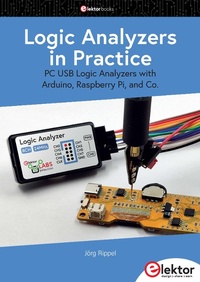
Logic Analyzers in Practice
PC USB Logic Analyzers with Arduino, Raspberry Pi, and Co.
1st Edition
Published on 25. January 2024
149 pages
978-3-89576-593-3 (ISBN)
Description

Step-by-step instructions guide you through the analysis of modern protocols such as I2C, SPI, UART, RS-232, NeoPixel, WS28xx, HD44780 and 1-Wire protocols. With the help of numerous experimental circuits based on the Raspberry Pi Pico, Arduino Uno and the Bus Pirate, you will learn the practical application of popular USB logic analyzers.
All the experimental circuits presented in this book have been fully tested and are fully functional. The necessary program listings are included - no special programming or electronics knowledge is required for these circuits. The programming languages used are MicroPython and C along with the development environments Thonny and Arduino IDE.
This book uses several models of flexible and widely available USB logic analyzers and shows the strengths and weaknesses of each price range. You will learn about the criteria that matter for your work and be able to find the right device for you.
Whether Arduino, Raspberry Pi or Raspberry Pi Pico, the example circuits shown allow you to get started quickly with protocol analysis and can also serve as a basis for your own experiments.
After reading this book, you will be familiar with all the important terms and contexts, conduct your own experiments, analyze protocols independently, culminating in a comprehensive knowledge set of digital signals and protocols.
All the experimental circuits presented in this book have been fully tested and are fully functional. The necessary program listings are included - no special programming or electronics knowledge is required for these circuits. The programming languages used are MicroPython and C along with the development environments Thonny and Arduino IDE.
This book uses several models of flexible and widely available USB logic analyzers and shows the strengths and weaknesses of each price range. You will learn about the criteria that matter for your work and be able to find the right device for you.
Whether Arduino, Raspberry Pi or Raspberry Pi Pico, the example circuits shown allow you to get started quickly with protocol analysis and can also serve as a basis for your own experiments.
After reading this book, you will be familiar with all the important terms and contexts, conduct your own experiments, analyze protocols independently, culminating in a comprehensive knowledge set of digital signals and protocols.
All prices
More details
Other editions
Additional editions
Book
02/2024
1st Edition
Elektor
€34.95
Available immediately
Person
"I am an electronics technician and work intensively with electronics in my professional environment as well as privately, dealing with analog and digital robots, computers, amateur radio, circuit design and circuit board layouts, microcontrollers... Did a lot of soldering and troubleshooting and faultfinding, repaired many things conducting electricity, and often failed. But I have always enjoyed recording my experiences and passing on my knowledge."
Jörg Rippel
Jörg Rippel
Content
- Logic Analyzers in Practice
- All rights reserved
- Contents
- Preface
- 1 What You Need to Know About Logic Analyzers
- 1.1 What is a Logic Analyzer?
- 1.1.1 What software can you use with a logic analyzer?
- 1.1.2 Will a basic logic analyzer do the job?
- 1.2 Why do I need a logic analyzer?
- 1.3 What's so special about a logic analyzer?
- 1.4 What a logic analyzer is not
- 1.5 How do I connect a logic analyzer?
- 1.6 What should I pay for a logic analyzer?
- 1.6.1 The entry-level model
- 1.6.2 The mid-range model
- 1.6.3 High-end models
- 2 Choosing the Right Logic Analyzer
- 2.1 Important criteria and specification
- 2.2 Bandwidth and sampling rate
- 2.3 Logic levels and Threshold Voltage
- 2.3.1 What is a logic level?
- 2.3.2 What is a threshold voltage?
- 2.3.3 How does the logic analyzer interpret signals?
- 2.3.4 Check the threshold voltage
- 2.4 Positive and negative logic
- 2.5 Analogue and digital inputs
- 2.6 Synchronous and asynchronous sampling
- 2.6.1 Synchronous sampling
- 2.6.2 Asynchronous sampling
- 2.6.3 When to choose synchronous or asynchronous sampling?
- 2.7 Buffer and Stream modes
- 2.7.1 Buff er mode
- 2.7.2 Stream mode
- 2.7.3 The pros and cons
- 2.8 The USB port
- 2.9 Simple and complex triggering
- 2.10 Checklist for choosing a logic analyzer
- 2.10.1 A checklist of your own needs
- 2.10.2 What's really important?
- 2.10.3 Logic analyzers
- 2.10.4 Mixed signal devices
- 2.10.5 Horses for courses
- 3 Protocols and Hardware
- 3.1 Experimental circuits
- 3.1.1 What you will need
- 3.1.2 Additional tools
- 3.2 The software user interface concept
- 3.3 The I²C bus
- 3.3.1 The I²C weather station
- 3.3.2 Analyzing the I²C protocol
- 3.3.3 The weather station source code
- 3.4 The SPI bus
- 3.4.1 Raspberry Pi Pico with SPI graphics display
- 3.4.2 SPI Analysis
- 3.4.3 SPI display source code
- 3.5 UART / RS-232
- 3.5.1 The Raspberry Pi Pico and serial data transfer
- 3.5.2 UART analysis
- 3.5.3 Source code for the Pico UART
- 3.6 NeoPixel and the WS281x
- 3.6.1 The RGB-LED adapter board
- 3.6.2 WS28xx analysis
- 3.6.3 RGB-LED source code
- 3.7 The HD44780 LCD display controller
- 3.7.1 Bus Pirate and LCD adapter
- 3.7.2 HD44780 analysis
- 3.8 The 1-Wire protocol
- 3.8.1 Source code for the DS1820
- 3.9 Final thoughts on the protocol
- 4 Pitfalls
- 4.1 Errors and issues when measuring
- 4.2 The test probes
- 4.3 The ideal test setup
- 4.4 Ground loops
- 4.5 Earthing considerations at high frequency
- 4.6 Probe loading
- 4.7 Where to tap into the signal
- 4.8 Input voltage range
- 4.9 Using a logic analyzer as a scope
- Post script
- Appendix: Setting Up Your Work Environment
- A1.1 Raspberry Pi Pico and Thonny with MicroPython
- A1.2 Raspberry Pi Pico and Thonny with CircuitPython
- A1.3 Arduino UNO and the Arduino IDE
- A1.4 The Raspberry Pi and Python
- Literature References
- Index
