

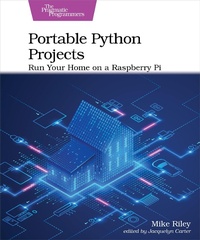
Portable Python Projects
Description

Discover easy ways to control your home with the powerful new Raspberry Pi hardware. Program short Python scripts that will detect changes in your home and react with the instructions you code. Use new add-on accessories to monitor a variety of measurements, from light intensity and temperature to motion detection and water leakage. Expand the base projects with your own custom additions to perfectly match your own home setup. Most projects in the book can be completed in under an hour, giving you more time to enjoy and tweak your autonomous creations. No breadboard or electronics knowledge required!
Get to know the latest Raspberry Pi hardware, and create awesome automation solutions for home or work that don''t require an electronics degree, cumbersome add-ons, or expensive third-party subscription services. Create easy to run Python scripts on your own that make your Pi do things that would have required a team of automation experts to build only a few years ago.
Connect to and control popular home automation lighting systems from a Raspberry Pi. Trigger autonomous actions based on movement, temperature, and timer events. Power on your own computer and appliances using your voice. Remotely control infrared-enabled consumer electronics, create chatbots to retrieve personalized items of interest, and implement a temperature-monitoring room fan. These are just some of the projects that the book will show you how to make. Most projects can be completed and operational in under an hour, and do not require any messy schematics or a spaghetti bowl of wires and breadboard-attached circuits to operate.
Control your home or office exactly the way you want instead of relying on an expensive mysterious box of third-party technology to do it for you.
What You Need:
Raspberry Pi (Pi 4 Model B or higher recommended) running Raspberry Pi OS
More details
Other editions
Additional editions
Content
- Cover
- Table of Contents
- Acknowledgments
- Introduction
- About the Book
- Online Resources
- Part I-Setup
- 1. Assembling the Hardware
- Raspberry Pi
- microSD Card
- USB-C Power Supply
- Micro-HDMI Adapter
- Keyboard, Mouse, and Monitor
- Water Sensor
- DockerPi SensorHub
- Hue Starter Kit
- Smart Voice Assistant
- USB Infrared Transceiver
- Pi Camera Module V2
- Next Steps
- 2. Setting Up the Software
- Raspberry Pi OS
- Configuring the Settings
- SSH Keys
- Python
- Pip Pip Hooray
- Git
- Rclone
- Supervisor
- Code Editor
- Next Steps
- Part II-Projects
- 3. Twitch Timer
- Setup
- Creating a Sleep-Timer Script
- TwitchTimer Script Improvements
- Next Steps
- 4. Water Leak Notifier
- Setup
- Test Script
- Water Sensor Email Alerts
- Sensor Supervision
- Next Steps
- 5. Hue Fan
- Setup
- Seating the Sensor
- Bridge Registration
- Registered Devices
- Turn It On Again
- Sensing the Heat
- Excessively Warm
- All Together Now
- Next Steps
- 6. Hue Auto Light
- Setup
- Light Bright
- We've Got Movement
- Next Steps
- 7. PiSpeak
- Setup
- Feeding RSS
- Database CRUD
- Converting Audio
- Processing the Audio
- Tagging the Audio
- Move It
- List It
- Play It On the Go
- Schedule It
- Next Steps
- 8. Voice Wake on LAN
- Setup
- Listen to Wake Up
- Scripted WOL
- Catching a Bullet
- Wake Up
- Next Steps
- 9. Voice IR Control
- Setup
- Test It
- Add It
- Blast It
- Next Steps
- 10. RedditBot
- Setup
- Reddit Access
- Reddit Commands
- Bot Creation
- Bot Interaction
- Next Steps
- 11. PhotoHook
- Setup
- Camera Attachment
- Camera Activation
- Take a Picture
- Motion Detector
- Hook a Photo
- Post a Picture
- Movement Notification
- Next Steps
- 12. Continuous Improvement
- Maintain
- Explore
- Enjoy
- Bibliography
- Index
- - SYMBOLS -
- - A -
- - B -
- - C -
- - D -
- - E -
- - F -
- - G -
- - H -
- - I -
- - J -
- - K -
- - L -
- - M -
- - N -
- - O -
- - P -
- - R -
- - S -
- - T -
- - U -
- - V -
- - W -
- - Y -
