
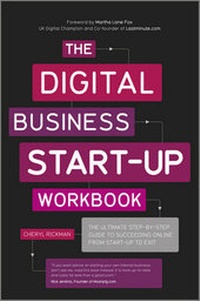
The Digital Business Start-Up Workbook
Description
Alles über E-Books | Antworten auf Fragen rund um E-Books, Kopierschutz und Dateiformate finden Sie in unserem Info- & Hilfebereich.
More details
Other editions
Additional editions
Person
Cheryl Rickman is author of the bestselling start-up book The Small Business Start-Up Workbook and is ghostwriter to one of the BBC Dragon's.
Cheryl started her career working for an online information publisher before going on to run he own internet business aged 25. WebCritique was a web usability and content consultancy which she sold in 2005. Clients included Microsoft, Business Link and Motorola. Additionally, together with her partner, Cheryl co-founded ilikemusic.com (I Like Music) in 2000. During her time as Editor of ilikemusic.com, Cheryl spent seven years interviewing popstars and developing the business. The business now generates revenues in excess of £1m.
Cheryl has interviewed more than 100 entrepreneurs running businesses of all sizes, from one-man bands to large corporations; equally dedicated, passionate and insightful.

Content
System requirements
File format: PDF
Copy-Protection: Adobe-DRM (Digital Rights Management)
System requirements:
- Computer (Windows; MacOS X; Linux): Install the free reader Adobe Digital Editions prior to download (see eBook Help).
- Tablet/smartphone (Android; iOS): Install the free app Adobe Digital Editions or the app PocketBook before downloading (see eBook Help).
- E-reader: Bookeen, Kobo, Pocketbook, Sony, Tolino and many more (only limited: Kindle).
The file format PDF always displays a book page identically on any hardware. This makes PDF suitable for complex layouts such as those used in textbooks and reference books (images, tables, columns, footnotes). Unfortunately, on the small screens of e-readers or smartphones, PDFs are rather annoying, requiring too much scrolling.
This eBook uses Adobe-DRM, a „hard” copy protection. If the necessary requirements are not met, unfortunately you will not be able to open the eBook. You will therefore need to prepare your reading hardware before downloading.
Please note: We strongly recommend that you authorise using your personal Adobe ID after installation of any reading software.
For more information, see our eBook Help page.