

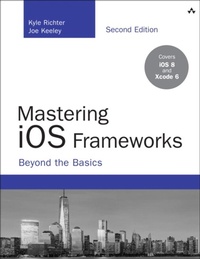
Mastering iOS Frameworks
Beyond the Basics
2nd Edition
Published on 11. April 2015
576 pages
978-0-13-405252-6 (ISBN)
Description

Apple's iOS SDK provides an amazingly powerful collection of frameworks. But it has been difficult to find detailed and useful knowledge about them-until now. With this book's practical insights and tested code, you can use Apple's frameworks to create apps that are more innovative and usable...faster and more reliable...more successful and profitable.
Kyle Richter and Joe Keeley focus on intermediate-to-advanced techniques that professional iOS developers can use every day. Their far-reaching coverage ranges from social support to security, Core Data to iCloud-even Apple Watch.
Organized as a convenient modular reference, nearly every chapter contains a complete Objective-C sample project. A multi-chapter Game Center case study shows how multiple iOS features can be combined to do even more.
All source code may be downloaded at https://github.com/dfsw/icf.
Coverage includes:
Adding physics-like animation and behaviors to UIViews
Using Core Location to determine device location, display customized maps, and implement geofencing
Making games and apps social with Leaderboards
Accessing music and image collections
Building health/fitness apps with HealthKit
Integrating with home automation via HomeKit
Passing data between platforms using JSON
Setting up local and remote notifications
Remotely storing and syncing data with CloudKit
Accessing app functionality with extensions
Effortlessly adding AirPrint support
Providing Handoff continuity between iOS 8 and Yosemite devices
Getting productive with Core Data
Integrating Twitter and Facebook via Social Framework
Performing resource-intensive tasks with Grand Central Dispatch
Securing user data with Keychain and Touch ID
Customizing collection views
Making the most of gesture recognizers
Creating and distributing "passes"
Debugging, instrumenting, and profiling apps
Kyle Richter and Joe Keeley focus on intermediate-to-advanced techniques that professional iOS developers can use every day. Their far-reaching coverage ranges from social support to security, Core Data to iCloud-even Apple Watch.
Organized as a convenient modular reference, nearly every chapter contains a complete Objective-C sample project. A multi-chapter Game Center case study shows how multiple iOS features can be combined to do even more.
All source code may be downloaded at https://github.com/dfsw/icf.
Coverage includes:
Adding physics-like animation and behaviors to UIViews
Using Core Location to determine device location, display customized maps, and implement geofencing
Making games and apps social with Leaderboards
Accessing music and image collections
Building health/fitness apps with HealthKit
Integrating with home automation via HomeKit
Passing data between platforms using JSON
Setting up local and remote notifications
Remotely storing and syncing data with CloudKit
Accessing app functionality with extensions
Effortlessly adding AirPrint support
Providing Handoff continuity between iOS 8 and Yosemite devices
Getting productive with Core Data
Integrating Twitter and Facebook via Social Framework
Performing resource-intensive tasks with Grand Central Dispatch
Securing user data with Keychain and Touch ID
Customizing collection views
Making the most of gesture recognizers
Creating and distributing "passes"
Debugging, instrumenting, and profiling apps
More details
Series
Edition
2nd edition
Language
English
Place of publication
Boston
United States
Publishing group
Pearson Education (US)
Target group
Professional and scholarly
ISBN-13
978-0-13-405252-6 (9780134052526)
Copyright in bibliographic data and cover images is held by Nielsen Book Services Limited or by the publishers or by their respective licensors: all rights reserved.
Schweitzer Classification
Other editions
Additional editions
Book
05/2015
2nd Edition
Addison Wesley
€45.79
Article exhausted; check different version
Persons
Kyle Richter is the Chief Executive Officer at MartianCraft, an award-winning Mobile Development Studio. Kyle began developing software in the early 1990s and has always been dedicated to the Apple ecosystem. He has authored and coauthored several books on iOS development, includingBeginning iOS Game Center Development, Beginning Social Game Development, andiOS Components and Frameworks. Between running day-to-day operations at MartianCraft, Kyle travels the world speaking on development and entrepreneurship. He currently calls the Florida Keys home, where he spends his time with his border collie. He can be found on Twitter at @kylerichter.
Joe Keeley is a Partner and Lead Engineer at MartianCraft. Joe provides technical leadership on iOS projects for clients, and has led a number of successful client projects to completion. He has liked writing code since first keying on an Apple II, and has worked on a wide variety of technology and systems projects in his career. Joe has presented several technical topics at iOS and Mac conferences around the U.S. Joe lives in Denver, Colorado, with his wife and two daughters, and hopes to get back into competitive fencing again in his spare time. He can be reached on Twitter at @jwkeeley.
Joe Keeley is a Partner and Lead Engineer at MartianCraft. Joe provides technical leadership on iOS projects for clients, and has led a number of successful client projects to completion. He has liked writing code since first keying on an Apple II, and has worked on a wide variety of technology and systems projects in his career. Joe has presented several technical topics at iOS and Mac conferences around the U.S. Joe lives in Denver, Colorado, with his wife and two daughters, and hopes to get back into competitive fencing again in his spare time. He can be reached on Twitter at @jwkeeley.
Content
1 UIKit Dynamics 1
The Sample App 1
Introduction to UIKit Dynamics 2
Implementing UIKit Dynamics 3
Gravity 3
Collisions 4
Attachments 7
Springs 8
Snap 9
Push Forces 10
Item Properties 11
In-Depth UIDynamicAnimator and UIDynamicAnimatorDelegate 13
Summary 14
2 Core Location, MapKit, and Geofencing 15
The Sample App 15
Obtaining User Location 16
Requirements and Permissions 16
Checking for Services 19
Starting Location Request 19
Parsing and Understanding Location Data 22
Significant Change Notifications 23
Using GPX Files to Test Specific Locations 23
Displaying Maps 25
Understanding the Coordinate Systems 25
MKMapKit Configuration and Customization 25
Responding to User Interactions 27
Map Annotations and Overlays 28
Adding Annotations 28
Displaying Standard and Custom Annotation Views 31
Draggable Annotation Views 34
Working with Map Overlays 35
Geocoding and Reverse-Geocoding 36
Geocoding an Address 36
Reverse-Geocoding a Location 40
Geofencing 43
Checking for Regional Monitoring Capability 43
Defining Boundaries 44
Monitoring Changes 45
Getting Directions 47
Summary 52
3 Leaderboards 53
The Sample App 53
Spawning a Cactus 55
Cactus Interaction 58
Displaying Life and Score 60
Pausing and Resuming 62
Final Thoughts on Whack-a-Cac 63
iTunes Connect 63
Game Center Manager 66
Authenticating 68
Common Authentication Errors 69
iOS 6 and Newer Authentication 71
Submitting Scores 73
Adding Scores to Whack-a-Cac 76
Presenting Leaderboards 77
Score Challenges 79
Going Further with Leaderboards 81
Summary 83
4 Achievements 85
iTunes Connect 85
Dis
The Sample App 1
Introduction to UIKit Dynamics 2
Implementing UIKit Dynamics 3
Gravity 3
Collisions 4
Attachments 7
Springs 8
Snap 9
Push Forces 10
Item Properties 11
In-Depth UIDynamicAnimator and UIDynamicAnimatorDelegate 13
Summary 14
2 Core Location, MapKit, and Geofencing 15
The Sample App 15
Obtaining User Location 16
Requirements and Permissions 16
Checking for Services 19
Starting Location Request 19
Parsing and Understanding Location Data 22
Significant Change Notifications 23
Using GPX Files to Test Specific Locations 23
Displaying Maps 25
Understanding the Coordinate Systems 25
MKMapKit Configuration and Customization 25
Responding to User Interactions 27
Map Annotations and Overlays 28
Adding Annotations 28
Displaying Standard and Custom Annotation Views 31
Draggable Annotation Views 34
Working with Map Overlays 35
Geocoding and Reverse-Geocoding 36
Geocoding an Address 36
Reverse-Geocoding a Location 40
Geofencing 43
Checking for Regional Monitoring Capability 43
Defining Boundaries 44
Monitoring Changes 45
Getting Directions 47
Summary 52
3 Leaderboards 53
The Sample App 53
Spawning a Cactus 55
Cactus Interaction 58
Displaying Life and Score 60
Pausing and Resuming 62
Final Thoughts on Whack-a-Cac 63
iTunes Connect 63
Game Center Manager 66
Authenticating 68
Common Authentication Errors 69
iOS 6 and Newer Authentication 71
Submitting Scores 73
Adding Scores to Whack-a-Cac 76
Presenting Leaderboards 77
Score Challenges 79
Going Further with Leaderboards 81
Summary 83
4 Achievements 85
iTunes Connect 85
Dis
