

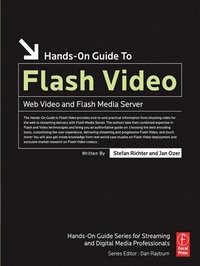
Hands-On Guide to Flash Video
Web Video and Flash Media Server
1st Edition
Published on 2. May 2007
376 pages
978-1-136-03233-2 (ISBN)
Description

The Hands-On Guide to Flash Video is a professional reference book written by industry experts that are currently helping professionals produce Web video and implement Flash Media Server. This book covers Flash Video production from soup to nuts, beginning with how to configure your camcorder and ending to advanced server techniques like bandwidth detection and FMS logging and reporting. Real word lessons from case studies of successful Flash Video deployments are also included.
Supplemental files located at: www.flashvideobook.com
By reading this book, you'll learn to:
* Shoot high quality video for streaming
* Choose the best encoder and encoding techniques for producing Flash Video
* Deploy Flash Video via progressive download or via the Flash Media Server.
* Create and light a compression friendly set
* Deinterlace and preprocess your video prior to encoding
* Choose encoding parameters like data rate, resolution and frame rate
* Optimize encoding with Sorenson Squeeze, Flix Pro and the Adobe Flash Video Encoder
* Shoot and produce chromakey video for alpha channel delivery
* Customize a Flash player via skinning, and use Cue Points for navigation
* Setup, install, and maintain Flash Media Server
Supplemental files located at: www.flashvideobook.com
By reading this book, you'll learn to:
* Shoot high quality video for streaming
* Choose the best encoder and encoding techniques for producing Flash Video
* Deploy Flash Video via progressive download or via the Flash Media Server.
* Create and light a compression friendly set
* Deinterlace and preprocess your video prior to encoding
* Choose encoding parameters like data rate, resolution and frame rate
* Optimize encoding with Sorenson Squeeze, Flix Pro and the Adobe Flash Video Encoder
* Shoot and produce chromakey video for alpha channel delivery
* Customize a Flash player via skinning, and use Cue Points for navigation
* Setup, install, and maintain Flash Media Server
More details
Language
English
Place of publication
London
United Kingdom
Publishing group
Taylor & Francis Ltd
Target group
Professional and scholarly
Product notice
Reflowable
File size
45,83 MB
ISBN-13
978-1-136-03233-2 (9781136032332)
Copyright in bibliographic data and cover images is held by Nielsen Book Services Limited or by the publishers or by their respective licensors: all rights reserved.
Schweitzer Classification
Other editions
Additional editions
Book
08/2017
1st Edition
Routledge
€244.50
Shipment within 10-20 days
Book
05/2007
1st Edition
Focal Press
€64.60
Shipment within 15-20 days
Persons
Stefan is a certified Flash Developer who has been involved with Flash Media Server since its very early days. He was the driving force behind Europe's first Flash-centric video hosting provider and now runs one of the largest resources on the subject at Flashcomguru.com. As well as holding the position of VP of Application Development at Dallas-based POPview he handles a variety of projects from his home office in the UK, specializing in Flash Video and Rich Internet Applications for clients that include CNET, USA Network and Unilever. Stefan is the author of a series of Adobe Developer Center articles, has spoken at several industry events and contributes a regular column on Flash Video to Streaming Media Magazine.
Jan has worked in digital video since 1990, joining PC Magazine as a contributing editor in 1996, and EventDV in 1994, and is a frequent contributor to Streaming Media Magazine. Jan has written 12 books on digital video, translated into 7 languages. In 1994, Jan's company, Doceo Publishing, released the Video Compression Sampler, the first comparison of CD-ROM compression technologies. In January, 2006, Jan released two white papers through StreamingMedia.com that rigorously compared the quality and usability of the Windows Media, Real, Apple's H.264 and Flash codecs (Proprietary Codecs, 2006: Choosing and Using the Optimal Video Codec) and solely Flash codecs (Flash Codecs, 2006: Choosing and Using the Optimal Flash Codec). Jan has lectured internationally on streaming media production since 1998.
Jan has worked in digital video since 1990, joining PC Magazine as a contributing editor in 1996, and EventDV in 1994, and is a frequent contributor to Streaming Media Magazine. Jan has written 12 books on digital video, translated into 7 languages. In 1994, Jan's company, Doceo Publishing, released the Video Compression Sampler, the first comparison of CD-ROM compression technologies. In January, 2006, Jan released two white papers through StreamingMedia.com that rigorously compared the quality and usability of the Windows Media, Real, Apple's H.264 and Flash codecs (Proprietary Codecs, 2006: Choosing and Using the Optimal Video Codec) and solely Flash codecs (Flash Codecs, 2006: Choosing and Using the Optimal Flash Codec). Jan has lectured internationally on streaming media production since 1998.
Content
1. Quick Start
2. Introductory Concepts - Streaming Video Production
3. Designing the Set
4. Lighting the Set
5. Camera Skills
6. Correcting Audio and Video Problems
7. Preparing for Compression
8. Producing Alpha Channel video
9. Encoding Your Video
10. Introduction to Flash Video Programming
11. Deploying Progressive Flash Video
12. Customizing FLV Playback
13. Using Cue Points
14. Controlling Your Content
15. Advanced Effects and Playback Options
16. Introduction to Flash Media Server (FMS)
17. Streaming Video with Flash Media Server
18. Advanced Flash Media Server Techniques
19. Case Studies
2. Introductory Concepts - Streaming Video Production
3. Designing the Set
4. Lighting the Set
5. Camera Skills
6. Correcting Audio and Video Problems
7. Preparing for Compression
8. Producing Alpha Channel video
9. Encoding Your Video
10. Introduction to Flash Video Programming
11. Deploying Progressive Flash Video
12. Customizing FLV Playback
13. Using Cue Points
14. Controlling Your Content
15. Advanced Effects and Playback Options
16. Introduction to Flash Media Server (FMS)
17. Streaming Video with Flash Media Server
18. Advanced Flash Media Server Techniques
19. Case Studies
