

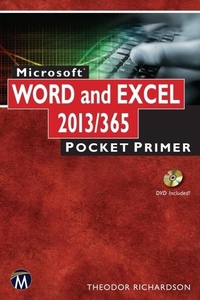
Microsoft Word and Excel 2013/365
Pocket Primer
1st Edition
Published on 3. November 2014
200 pages
978-1-942270-10-2 (ISBN)
Description

As part of the new Pocket Primer series, this book provides an overview of the major concepts and tutorial videos to use Word and Excel. The book serves as a starting point for deeper exploration of Word and Excel. The focus of this book is on using these two software packages and includes instruction for Word 365, which includes both Word 2013 for Windows and Word 2011 for Macintosh.Features: Includes tutorial videos on the companion DVD Provides an overview of the most important Word and Excel techniques Contains Word and Excel graphics and animation effects
More details
Series
Language
English
Place of publication
Berlin
United States
Target group
Professional and scholarly
US School Grade: College Graduate Student
File size
8,78 MB
ISBN-13
978-1-942270-10-2 (9781942270102)
Copyright in bibliographic data and cover images is held by Nielsen Book Services Limited or by the publishers or by their respective licensors: all rights reserved.
Schweitzer Classification
Other editions
Additional editions
Book
11/2014
1st Edition
Mercury Learning & Information
€34.95
Article not available at the moment
Content
- Intro
- Title Page
- Dedication
- Contents
- Introduction
- Acknowledgments
- Chapter 1: Review of Basic Computing
- 1.1 Navigating the Desktop
- 1.2 Introduction to the Windows Operating System
- 1.2.1 Windows 7
- 1.2.2 Windows 8
- 1.2.3 The Windows Desktop
- 1.2.3.1 The Control Panel
- 1.2.3.2 Jump Lists
- 1.2.3.3 Task Manager
- 1.2.3.4 Libraries Feature
- 1.3 Introduction to Mac OS X
- 1.3.1 The Macintosh OS X Desktop
- 1.3.1.1 The Finder
- 1.3.1.2 The Dock
- 1.3.1.3 The Dashboard, Exposé, and Spaces
- 1.3.1.4 Force Quit
- 1.4 Organizing Files and Folders
- 1.4.1 Files and Folders in Windows
- 1.4.2 Files and Folders on a Mac
- 1.5 Working with Files on Your Computer
- 1.5.1 WordPad on Windows
- 1.5.2 TextEdit for Macintosh
- Chapter Summary
- Chapter Knowledge Check
- Practice Exercises
- Chapter 2: Microsoft OneDrive and Cloud Computing
- 2.1 Cloud Computing
- 2.2 Microsoft OneDrive
- 2.2.1 Creating a Microsoft Account
- 2.2.2 Uploading and Downloading Files
- 2.3 Integrating OneDrive with the Desktop
- 2.3.1 OneDrive on Windows 7
- 2.3.2 OneDrive on Windows 8
- 2.3.3 OneDrive on Mac OS X
- 2.4 Integrating OneDrive with Microsoft Office
- 2.5 Accessing OneDrive on a Remote Device
- 2.6 Alternate Cloud Computing Platforms
- 2.6.1 Google Drive
- 2.6.2 iCloud
- Chapter Summary
- Chapter Knowledge Check
- Practice Exercises
- Chapter 3: Introduction to Word and Word Processing
- 3.1 Introduction to Productivity Software
- 3.1.1 The File Menu
- 3.1.2 Document Management
- 3.1.3 Help Files
- 3.1.4 Productivity Shortcuts
- 3.1.5 The System Clipboard
- 3.2 Introduction to Word Processing Software
- 3.3 Anatomy of Microsoft Word
- 3.3.1 Microsoft Word 2013
- 3.3.2 Microsoft Word 2011
- 3.3.3 Microsoft Word Web App
- 3.4 Diving into Word Processing
- 3.4.1 Writing a Cover Letter
- 3.4.2 Formatting Text
- 3.4.2.1 The Font Panel
- 3.4.2.2 The Paragraph Panel
- 3.4.2.3 Format Painter
- 3.4.3 Bullets and Numbering
- 3.4.4 Document Review
- 3.4.4.1 Spelling and Grammar
- 3.4.4.2 Thesaurus
- 3.4.4.3 Find and Replace
- 3.4.5 Using Document Templates
- 3.4.6 Writing a Resume
- 3.4.7 Using Headers and Footers
- 3.4.8 Document Types
- Chapter Summary
- Chapter Knowledge Check
- Practice Exercises
- Chapter 4: Developing and Editing Documents
- 4.1 Typography
- 4.2 Writing a Research Article
- 4.2.1 Outlining the Document
- 4.2.2 Using and Managing Styles
- 4.2.3 Using the Navigation Pane and Document Map Pane
- 4.3 Managing Citations
- 4.3.1 Footnotes and Endnotes
- 4.3.2 Creating a Bibliography
- 4.4 Setting a Page Layout
- 4.4.1 Formatting Columns
- 4.4.2 Adding Graphic Elements and Captions
- 4.5 Additional Document Elements
- 4.5.1 Adding a Cover Page
- 4.5.2 Adding a Table of Contents
- Chapter Summary
- Chapter Knowledge Check
- Practice Exercises
- Chapter 5: Incorporating Media Elements
- 5.1 Visually Enhancing Documents
- 5.2 Media Elements in Word
- 5.2.1 Images
- 5.2.2 Adding Shapes
- 5.2.3 Clip Art
- 5.2.3.1 Clip Art in Office 2013
- 5.2.3.2 Clip Art in Office 2011
- 5.2.3.3 Getting Clip Art from Office.com
- 5.2.3.4 Handling Clip Art
- 5.2.4 SmartArt
- 5.2.5 Tables
- 5.2.6 Charts
- 5.2.7 Symbols
- 5.2.8 Equations
- 5.2.9 Additional Document Enhancements
- 5.3 Arranging and Grouping Elements
- Chapter Summary
- Chapter Knowledge Check
- Practice Exercises
- Chapter 6: Advanced Features of Word Processing
- 6.1 Mail Merge
- 6.1.1 Mail Merge in Microsoft Word 2013
- 6.1.2 Mail Merge in Microsoft Word 2011
- 6.2 Additional Document Elements
- 6.2.1 Adding Symbols
- 6.2.2 Editing Equations
- 6.2.3 Adding Tables
- 6.3 Editing Existing Documents
- 6.3.1 Document Comparison
- 6.3.2 Track Changes
- 6.3.3 Comments
- Chapter Summary
- Chapter Knowledge Check
- Practice Exercises
- Chapter 7: Introduction to Excel and Spreadsheet Software
- 7.1 Introduction to Spreadsheet Software
- 7.2 Anatomy of Excel
- 7.2.1 Microsoft Excel 2013
- 7.2.2 Microsoft Excel 2011
- 7.2.3 Microsoft Excel Web App
- 7.3 Diving into Spreadsheets
- 7.3.1 Adding and Formatting Text
- 7.3.2 Formatting Values
- 7.3.3 Using Sequences
- 7.3.4 Formatting Cells
- 7.3.5 Freezing Panes
- 7.3.6 Adding Basic Formulas
- 7.3.6.1 Mathematical Calculations
- 7.3.6.2 Freezing Cells in Formulas
- 7.3.6.3 The SUM Function
- 7.3.7 Using Directional Fill
- 7.3.8 Navigating the Spreadsheet
- 7.4 Adding Charts
- 7.4.1 Chart Data
- 7.4.2 Formatting Charts
- Chapter Summary
- Chapter Knowledge Check
- Practice Exercises
- Chapter 8: Developing Worksheets and Graphic Representations
- 8.1 Constructing a Worksheet
- 8.1.1 Merging and Splitting Cells
- 8.1.2 Adding and Deleting Rows and Columns
- 8.1.3 Hiding Rows and Columns
- 8.1.4 Advanced Cell Referencing
- 8.2 List Management
- 8.2.1 Using Sorting and Filters
- 8.2.2 Removing Duplicates
- 8.2.3 Text to Columns
- 8.2.4 Table Formatting
- 8.3 Additional Formatting Elements
- 8.3.1 Conditional Formatting
- 8.3.2 Tab Color
- 8.3.3 Comments
- 8.3.4 Text Boxes
- 8.4 Chart Types
- 8.4.1 Column
- 8.4.2 Line
- 8.4.3 Pie
- 8.4.4 Bar
- 8.4.5 Area
- 8.4.6 Scatter
- Chapter Summary
- Chapter Knowledge Check
- Practice Exercises
- Chapter 9: Advanced Features of Spreadsheet Software
- 9.1 Business Applications
- 9.2 Using Functions
- 9.2.1 Common Functions
- 9.2.2 Text Functions
- 9.2.3 Value Lookup
- 9.2.4 IF Statements and Logic
- 9.2.5 Function Wizard
- 9.2.6 Calculation Options
- 9.2.7 Tracing Variables
- 9.2.8 Data Validation
- 9.3 Subtotals
- 9.3.1 Grouping Cells
- 9.3.2 Constructing Subtotals
- 9.4 Pivot Tables
- 9.4.1 Constructing a Pivot Table
- 9.4.2 Using Pivot Table Values in Formulas
- 9.5 What If Analysis
- 9.6 External Data Management
- 9.6.1 External Data Sources
- 9.6.2 Exporting Data
- 9.7 Arranging the Workspace
- Chapter Summary
- Chapter Knowledge Check
- Practice Exercises
- Index
