

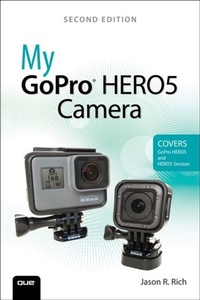
My GoPro HERO5 Camera
2nd Edition
Published on 5. May 2017
432 pages
978-0-13-466733-1 (ISBN)
Description

Step-by-step instructions with callouts to the GoPro HERO5 Black, HERO5 Session (TM), or HERO Session (TM) camera. Photos and sample images show you exactly what to do.
Help when you run into problems or limitations with your GoPro camera in specific shooting situations.
Tips and Notes to help you get the most from your GoPro camera when taking pictures or shooting HD video in a wide range of shooting situations.
Full-color, step-by-step tasks walk you through getting and keeping your GoPro camera working just the way you want in order to shoot the absolute best photos and videos possible. Learn how to:
Set up your GoPro camera and prepare for any type of shooting situation
Take awesome first- or third-person videos just about anywhere, including underwater or in low-light situations
Select and use the best camera housing, mount, and accessories to capture the perfect shots
Take detailed and vibrant high-resolution, digital images with your GoPro camera
Shoot stunning HD video using your GoPro camera
Record high-quality audio in conjunction with your videos
Choose the best resolution and camera settings for each shooting situation you encounter
Wirelessly transfer your digital content from your camera to your smartphone or tablet using the GoPro Capture (TM) mobile app
Transfer content from your camera to your computer to view, edit, enhance, archive, and share it using photo editing software or the GoPro QUIK Desktop (TM) and GoPro Studio (TM) video editing software
Learn strategies used by the pros to achieve your own professional results
Help when you run into problems or limitations with your GoPro camera in specific shooting situations.
Tips and Notes to help you get the most from your GoPro camera when taking pictures or shooting HD video in a wide range of shooting situations.
Full-color, step-by-step tasks walk you through getting and keeping your GoPro camera working just the way you want in order to shoot the absolute best photos and videos possible. Learn how to:
Set up your GoPro camera and prepare for any type of shooting situation
Take awesome first- or third-person videos just about anywhere, including underwater or in low-light situations
Select and use the best camera housing, mount, and accessories to capture the perfect shots
Take detailed and vibrant high-resolution, digital images with your GoPro camera
Shoot stunning HD video using your GoPro camera
Record high-quality audio in conjunction with your videos
Choose the best resolution and camera settings for each shooting situation you encounter
Wirelessly transfer your digital content from your camera to your smartphone or tablet using the GoPro Capture (TM) mobile app
Transfer content from your camera to your computer to view, edit, enhance, archive, and share it using photo editing software or the GoPro QUIK Desktop (TM) and GoPro Studio (TM) video editing software
Learn strategies used by the pros to achieve your own professional results
More details
Series
Edition
2nd edition
Language
English
Place of publication
Boston
United States
Publishing group
Pearson Education (US)
Target group
Professional and scholarly
ISBN-13
978-0-13-466733-1 (9780134667331)
Copyright in bibliographic data and cover images is held by Nielsen Book Services Limited or by the publishers or by their respective licensors: all rights reserved.
Schweitzer Classification
Other editions
Additional editions
Jason Rich
My GoPro HERO5 Camera
Book
06/2017
2nd Edition
Que Corporation,U.S.
€28.50
Shipment within 3-4 weeks
Person
Jason R. Rich (www.jasonrich.com) is an accomplished author, journalist, and photographer, as well as an avid traveler. Some of his recently published books for Que include: iPad and iPhone Tips and Tricks, Sixth Edition, My Digital Photography for Seniors, My Digital Travel for Seniors, and My Digital Entertainment for Seniors.
As a photographer, Jason's work appears with his articles in major daily newspapers, national magazines and online, as well as within his various books. He also works with professional actors, models, and recording artists to develop their portfolios and take their headshots. Jason also continues to pursue travel and animal photography.
Through his work as an enrichment lecturer, he often offers digital photography workshops and classes aboard cruise ships operated by Royal Caribbean, Princess Cruise Lines, Norwegian Cruise Lines, and Celebrity Cruise Lines, as well as through Adult Education programs in the New England area. Please follow Jason on Twitter (@JasonRich7) and Instagram (@JasonRich7).
As a photographer, Jason's work appears with his articles in major daily newspapers, national magazines and online, as well as within his various books. He also works with professional actors, models, and recording artists to develop their portfolios and take their headshots. Jason also continues to pursue travel and animal photography.
Through his work as an enrichment lecturer, he often offers digital photography workshops and classes aboard cruise ships operated by Royal Caribbean, Princess Cruise Lines, Norwegian Cruise Lines, and Celebrity Cruise Lines, as well as through Adult Education programs in the New England area. Please follow Jason on Twitter (@JasonRich7) and Instagram (@JasonRich7).
Content
Introduction
Chapter 1 - Overview of the GoPro HERO5, HERO5 Session, and HERO Session Cameras
Chapter 2 - Getting Started with Your GoPro HERO5 Black
Chapter 3 - Getting Started with Your GoPro HERO5 Session or HERO Session
Chapter 4 - Overview of the GoPro HERO Housings
Chapter 5 - Overview of GoPro HERO Mounts
Chapter 6 - Additional Camera Stabilization Options and Why They're Necessary
Chapter 7 - Must-Have GoPro Camera Accessories
Chapter 8 - Choosing the Best Memory Cards for Your GoPro Camera
Chapter 9 - Keeping Your Batteries Charged
Chapter 10 - Adjusting the Camera's Setup Menu Options
Chapter 11 - Remotely Controlling Your GoPro Using Apple Watch, GoPro Smart Remote, and/or Your Voice
Chapter 12 - Shooting High-Resolution Photos
Chapter 13 - Ten Strategies for Taking Professional-Quality Digital Pictures
Chapter 14 - Shooting HD Video
Chapter 15 - Shooting Photos or Video Underwater
Chapter 16 - Capturing Sound and Using Artificial Light While Shooting
Chapter 17 - Ten Strategies for Shooing Awesome HD Video
Chapter 18 - Video Editing Using the GoPro Studio Software
Chapter 19 - View, Edit and Share Photos and Video Using the GoPro Mobile App
Chapter 20 - Third-Party Software and Mobile App Options for Editing and Sharing Photos and Video
Chapter 21 - Take Flight with the GoPro Karma Drone
Chapter 22 - Sharing Your Photos and Videos
Chapter 23 - Stream Live Video from Your GoPro
Chapter 24 - Troubleshooting Camera-Related Problems and Overcoming Common Shooting Challenges
Appendix A - Additional GoPro Resources
Appendix B - Keeping Your Camera's Operating System Up To Date
Chapter 1 - Overview of the GoPro HERO5, HERO5 Session, and HERO Session Cameras
Chapter 2 - Getting Started with Your GoPro HERO5 Black
Chapter 3 - Getting Started with Your GoPro HERO5 Session or HERO Session
Chapter 4 - Overview of the GoPro HERO Housings
Chapter 5 - Overview of GoPro HERO Mounts
Chapter 6 - Additional Camera Stabilization Options and Why They're Necessary
Chapter 7 - Must-Have GoPro Camera Accessories
Chapter 8 - Choosing the Best Memory Cards for Your GoPro Camera
Chapter 9 - Keeping Your Batteries Charged
Chapter 10 - Adjusting the Camera's Setup Menu Options
Chapter 11 - Remotely Controlling Your GoPro Using Apple Watch, GoPro Smart Remote, and/or Your Voice
Chapter 12 - Shooting High-Resolution Photos
Chapter 13 - Ten Strategies for Taking Professional-Quality Digital Pictures
Chapter 14 - Shooting HD Video
Chapter 15 - Shooting Photos or Video Underwater
Chapter 16 - Capturing Sound and Using Artificial Light While Shooting
Chapter 17 - Ten Strategies for Shooing Awesome HD Video
Chapter 18 - Video Editing Using the GoPro Studio Software
Chapter 19 - View, Edit and Share Photos and Video Using the GoPro Mobile App
Chapter 20 - Third-Party Software and Mobile App Options for Editing and Sharing Photos and Video
Chapter 21 - Take Flight with the GoPro Karma Drone
Chapter 22 - Sharing Your Photos and Videos
Chapter 23 - Stream Live Video from Your GoPro
Chapter 24 - Troubleshooting Camera-Related Problems and Overcoming Common Shooting Challenges
Appendix A - Additional GoPro Resources
Appendix B - Keeping Your Camera's Operating System Up To Date
