

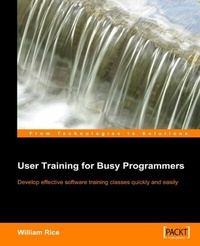
User Training for Busy Programmers
Develop effective software training classes quickly and easily
1st Edition
Published on 13. January 2025
92 pages
978-1-84719-033-8 (ISBN)
Description

Develop effective software training classes quickly and easilyKey Features - A complete guide to creating software training courses and materials
- Concise and practical step-by-step approach
- Check-lists ensure that you are fully prepared
- Based on proven educational techniques
Book DescriptionIf you need to write a successful software training course and are unsure of how to start, then this book gets right to the point with clear, concise directions for developing an end-user software course. This step-by-step job aid walks you through the process of developing a successful, instructor-led software class. There are many good books on training theory. This book takes a more practical, condensed approach for when you don't have time to learn training theory. It is based on fifteen years of technical writing and training experience. In under 100 pages, the book guides you through the process of developing an end-user software course using a method that is tested, proven, and based upon sound instructional theory.What you will learn - A systematic process for creating training courses and materials for software users
- Understanding your audience and ensuring that what you teach them is relevant and useful
- How to use effective in-class exercises as part of the learning mix
- Choosing what to teach and what to leave out
- How to tailor your approach to different user needs, and different types of software
- Preparing written guides for students and instructors
Who this book is forDo you need to write a successful software training course? Are you unsure of how to start? Would you like a step-by-step project plan to guide you in the development of your software class? This book gets right to the point with clear, concise directions for developing an end-user software course.
- Concise and practical step-by-step approach
- Check-lists ensure that you are fully prepared
- Based on proven educational techniques
Book DescriptionIf you need to write a successful software training course and are unsure of how to start, then this book gets right to the point with clear, concise directions for developing an end-user software course. This step-by-step job aid walks you through the process of developing a successful, instructor-led software class. There are many good books on training theory. This book takes a more practical, condensed approach for when you don't have time to learn training theory. It is based on fifteen years of technical writing and training experience. In under 100 pages, the book guides you through the process of developing an end-user software course using a method that is tested, proven, and based upon sound instructional theory.What you will learn - A systematic process for creating training courses and materials for software users
- Understanding your audience and ensuring that what you teach them is relevant and useful
- How to use effective in-class exercises as part of the learning mix
- Choosing what to teach and what to leave out
- How to tailor your approach to different user needs, and different types of software
- Preparing written guides for students and instructors
Who this book is forDo you need to write a successful software training course? Are you unsure of how to start? Would you like a step-by-step project plan to guide you in the development of your software class? This book gets right to the point with clear, concise directions for developing an end-user software course.
More details
Other editions
Additional editions
William Rice
User Training for Busy Programmers
Book
05/2005
Packt Publishing
€19.10
Shipment within 3-4 weeks
Person
Rice William :
William Rice is an e-learning professional from New York City. He has written books on Moodle, Blackboard, Magento, and software training. He enjoys building e-learning solutions for businesses and gains professional satisfaction when his courses help students. His hobbies include writing books, practicing archery near JFK Airport, and playing with his children. He is fascinated by the relationship between technology and society, how we create our tools, and how they shape us in turn. Married to an incredible woman who encourages his writing pursuits, he has two amazing sons.
William Rice is an e-learning professional from New York City. He has written books on Moodle, Blackboard, Magento, and software training. He enjoys building e-learning solutions for businesses and gains professional satisfaction when his courses help students. His hobbies include writing books, practicing archery near JFK Airport, and playing with his children. He is fascinated by the relationship between technology and society, how we create our tools, and how they shape us in turn. Married to an incredible woman who encourages his writing pursuits, he has two amazing sons.
Content
- Intro
- User Training for Busy Programmers
- Table of Contents
- User Training for Busy Programmers
- Credits
- About the Author
- Preface
- What This Book Covers
- Conventions
- Reader Feedback
- Customer Support
- Errata
- Questions
- 1. Introduction
- Misconceptions about Training
- Myth: Your Software Training Class should be about the Software
- Myth: Your Students Want or Need to Know It All
- Myth: In a Training Class, the Instructor Must Answer All of the Students' Questions
- Myth: When Teaching Software, You Should Begin at the Beginning
- Haven't we Solved these Problems with IDS?
- The Checklist
- Step 1: The Setup
- Set Criteria and Get Buy-In
- Step 2: Develop In-class Exercises
- Test and Revise Exercise Files
- Step 3: Develop Lectures
- Step 4: Develop the Demo
- Step 5: Package the Course
- The Student Guide
- The Instructor Guide
- Step 6: Set Up and Test Run
- Test the Room Setup
- Practice Run
- Revise the Course
- Develop Follow-up Materials
- Step 7: Deliver the Course
- Summary
- 2. The Setup
- Who Needs to be Trained?
- Action
- Audience (Select One)
- Type of Information to Cover for this Audience (Select All that are Applicable)
- Write the Learning Objectives
- Checkpoint
- Action
- Is This a Need that a Training Class Can or Should Fulfill?
- Checkpoint
- Action
- What Scenario will give your Clients the Most Realistic Experience in the Classroom?
- Define the Process
- One Process or Several?
- Checkpoint
- Action
- Develop a Training Scenario
- What is a Training Scenario?
- A Special Case: Software Toolkits
- The Scenario
- Checkpoint
- Action
- Write an Exercise Description for Each Learning Objective
- Examples of Learning Objectives and Exercise Descriptions
- Example 1
- Objective
- Exercise Description
- Example 2
- Objective
- Exercise Description
- Checkpoint
- Action
- Set the Criteria for Success
- Action: Write Criteria for Success
- Checkpoint
- Get Buy-in from Sponsors
- Summary
- 3. Develop In-class Exercises
- Prepare Software for the Exercises
- Checkpoint
- Action
- Write the Directions
- Save a Version of the Data after Each Exercise
- Extended Example of Exercise Directions
- Writing Style for Directions
- Sentence Structure: Put Conditional Phrases First
- Start Each Numbered Step with an Action
- State the Result of Each Action
- Use the Second Person
- Differentiate Button Pushes, Menu Items, and the Text Displayed on Screen
- Separate Nested Menu Items
- Action
- Test and Revise the Exercise Files
- Return the Training Files and Development Workstation to its Pre-Class Condition
- Step Through the Exercise Directions
- Checkpoint
- Action
- Summary
- 4. Develop Lectures
- Develop Lectures Around the Exercises
- A Structured Approach to Developing Lectures
- List of Suggested Slides
- Unit Title
- Purpose
- When is This Procedure Performed?
- Who Performs this Procedure?
- What Information is Entered During this Procedure?
- What Processing does the System Perform on the Data Entered During this Procedure?
- What is the Result of this Procedure?
- Special Fields
- Demonstration
- Exercise
- Review
- Questions?
- Checkpoint
- Action
- Summary
- 5. Develop the Demo
- Write the Demo Instructions
- Use Unique Data for the Demo
- Developing a Demo - Key Steps
- Write the Demo Speaking Points
- How to Write Demo Speaking Points
- Example of Demo Directions with Speaking Points
- Checkpoint
- Action
- Summary
- 6. Package the Course
- The Student Guide
- Table of Contents
- Introduction
- State the Goals of the Course
- Describe the Intended Audience
- List Prerequisites
- Duration and Class Size
- Training Group Contact Information
- Printouts of the Slides
- Directions for the In-class Exercises
- Resources and Contacts
- The Instructor Guide
- Table of Contents
- Introduction
- Printouts of the Slides
- Directions for the In-class Exercises
- Resources and Contacts
- Slide Show Files
- Checkpoint
- Action
- Summary
- 7. Setup and Test Run
- Test the Room Setup
- Practice Run
- Action
- Develop Follow-up Materials
- Example of a Follow-up Course Evaluation
- Checkpoint
- Action
- Summary
- 8. Deliver the Course
- Presenting your Course
- Summary
- 9. A Final Note
- Index
