

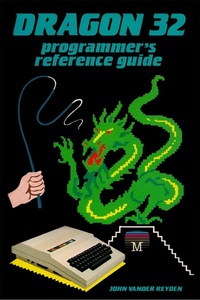
Dragon 32 Programmer's Reference Guide
Published on 31. March 2022
151 pages
978-1-78982-728-6 (ISBN)
Description

First published in 1983, this easy-to-follow guide to the Dragon 32 gives users a complete overview of the acclaimed machine that many considered well ahead of its time. Though it was more powerful and quicker than many of its competitors, the Dragon 32 never gained the success of other 8-bit computers of the day such as the Commodore 64 or the ZX Spectrum. Despite this, the classic machine still retains a dedicated following to this day. Not only is this remastered version perfect for hobbyists and collectors, it is also a highly useful resource for those interested in programming retro games and utilities.As the original publisher Melbourne House wrote:*****A comprehensive overview of programming the Dragon 32, covering BASIC, machine language, sound and graphics. The Dragon 32 Programmer's Reference Guide will show you how to exercise the full potential of your Dragon 32, by taking you from simple BASIC routines right through to advanced machine language programs.The book fully examines BASIC and tells you everything you need to know to use every function to its maximum. Each facility is illustrated by example programs.Many professional hints and tips are included, demonstrating the full features of the Dragon 32, especially the graphics and sound potential.For the serious programmer, a memory map is included as well as 'monitor entry points' giving more information about the Dragon 32 than has ever been published anywhere else.This book will take you far beyond the realms of standard Dragon 32 programming.*****Acorn Books is proud to present its Retro Reproductions series, a collection of classic computing works from the 80s and 90s given a new lease of life in the 21st century. From standards of programming reference no self-respecting microcomputer coder would be without, to obscure works unavailable for many years, these modern re-prints are perfect for any connoisseur of retro computing.
More details
Other editions
Additional editions
John Vander Reyden
Dragon 32 Programmer's Reference Guide
Book
07/2021
Acorn Books
€41.15
No shipping information available
Content
- Cover
- Contents
- Contents
- Title Page
- Publisher Info
- Dragon 32 Programmer's Reference Guide
- Introduction
- What's Included
- How to use this guide
- Chapter 1
- BASIC
- Constants
- Variables
- Arrays
- Conversion
- Lines
- BASIC Commands
- BASIC Functions
- Errors in BASIC
- Chapter 2
- Graphics
- Pixels and Resolution
- Modes
- Video Memory
- Low Resolution Graphics
- CLS
- Set/Reset
- Graphics using Strings
- High Resolution Graphics
- Initialising Commands
- Producing Graphics
- Assembler/Machine Code Graphics
- Graphics Modes
- Chapter 3
- Sound
- Example Programs
- Chapter 4
- Machine Code
- What is machine code
- The CPU
- Registers
- Addressing Modes
- Using Machine Language Programs on the Dragon
- Handy ROM Routines
- Handy Memory Locations
- How BASIC stores variables
- String stack
- How numerics are stored in the variable stack
- How to access BASIC variables from machine language programs
- Chapter 5
- PERIPHERALS
- Joysticks
- Printer
- Cassette
- Monitor/TV
- Edge Connector
- Chapter 6
- Handy routines and tips
- Speeding things up
- Disable/Enable break key
- Auto key repeat
- Reading two keys at once
- Recovering a program after a new command
- Merge
- Redefing basic keywords
- Page swapping
- Various circles
- Lines
- Scrolls
- Appendix A- Tables
- Basic Keywords
- Basic Symbols
- Appendix B- Error messages
- Appendix C- Memory map
- Appendix D- Colour Codes
- Colour set-table
- Appendix E- Character codes
- Appendix F- Print @ Grid
- Appendix G- ASCII Codes for keys
- Appendix H- Character codes
- Appendix I- Base Conversions
- Appendix J- 6809 Instruction Set
- Back Matter
- Also Available
