

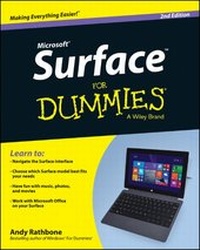
Surface For Dummies
2nd Edition
Published on 11. April 2014
336 pages
978-1-118-91661-2 (ISBN)
Description

Make Microsoft's Surface work--and play--just the wayyou want it to
Microsoft's Surface tablet has the features and personalityyou're looking for, with a robust environment for businesscomputing that doesn't skimp on fun. Surface for Dummies,2nd Edition explains how Windows 8.1 Pro and WindowsRT differ, and helps you decide which Surface model is best foryou. Step by step, this book walks you through both the hardwareand software features of the Surface, including the touch cover andtype cover, Windows RT and Windows 8.1 Pro operating systems, andthe coveted Office Home & Student 2013 software suite that'sbundled with the Surface. Written by bestselling author AndyRathbone, this easy-to-access book is filled with information onhow to use the tablet, figure out the operating system, navigatethe app environment, and take advantage of your exciting newSurface.
The book is your personal guide to one the fastest, sleekest,and most powerful tablets on the market. Surface is designed to bethin, light, and with hours of battery life so you can powerthrough your day with ease. With this handy reference, you'll beable to make quick work of your to-do list and have fun all at thesame time!
* Create: release your inner artist with Fresh Paint, atouch-based art app
* Share: Multiple accounts offer privacy and security so you canshare your Surface, but not your stuff
* Enjoy: Snap apps side by side to multi-task on the vivid HDscreen
* Discover: New apps in the Windows Store so you can workefficiently and get more done
With Surface For Dummies, 2nd Edition you cannavigate and enhance your entire Surface experience!
Microsoft's Surface tablet has the features and personalityyou're looking for, with a robust environment for businesscomputing that doesn't skimp on fun. Surface for Dummies,2nd Edition explains how Windows 8.1 Pro and WindowsRT differ, and helps you decide which Surface model is best foryou. Step by step, this book walks you through both the hardwareand software features of the Surface, including the touch cover andtype cover, Windows RT and Windows 8.1 Pro operating systems, andthe coveted Office Home & Student 2013 software suite that'sbundled with the Surface. Written by bestselling author AndyRathbone, this easy-to-access book is filled with information onhow to use the tablet, figure out the operating system, navigatethe app environment, and take advantage of your exciting newSurface.
The book is your personal guide to one the fastest, sleekest,and most powerful tablets on the market. Surface is designed to bethin, light, and with hours of battery life so you can powerthrough your day with ease. With this handy reference, you'll beable to make quick work of your to-do list and have fun all at thesame time!
* Create: release your inner artist with Fresh Paint, atouch-based art app
* Share: Multiple accounts offer privacy and security so you canshare your Surface, but not your stuff
* Enjoy: Snap apps side by side to multi-task on the vivid HDscreen
* Discover: New apps in the Windows Store so you can workefficiently and get more done
With Surface For Dummies, 2nd Edition you cannavigate and enhance your entire Surface experience!
All prices
More details
Other editions
Additional editions
Person
Andy Rathbone is the author of all previous editions ofWindows For Dummies. He's also written books on PCoperation and repair, home theater and entertainment technologies,and tablet computing. He maintains contact with his readers andanswers questions at andyrathbone.com.
Content
Introduction 1
Part I: Introductions 5
Chapter 1: Which Microsoft Surface Do You Need? 7
Chapter 2: Getting Started with Your Surface 21
Chapter 3: Setting Up Your Surface 35
Chapter 4: Introducing Your Surface's Start Screen andControls 51
Chapter 5: Typing, Touching, and Drawing on the Surface 77
Part II: Connections 101
Chapter 6: Connecting to the Internet, Printers, Monitors,Storage, and More 103
Chapter 7: All About Apps 139
Chapter 8: Browsing the Web 157
Chapter 9: Reaching Out with Mail, People, Calendar, and Skype175
Part III: Play 205
Chapter 10: Photos and Movies 207
Chapter 11: Listening to Music 219
Part IV: Work 233
Chapter 12: Visiting the Windows Desktop 235
Chapter 13: Working in Microsoft Office 2013 251
Chapter 14: Changing Settings 267
Chapter 15: Troubleshooting and Repair 279
Part V: The Part of Tens 291
Chapter 16: Ten Essential Tips 'n' Tricks 293
Chapter 17: Ten Handy Accessories 299
Index 307
Part I: Introductions 5
Chapter 1: Which Microsoft Surface Do You Need? 7
Chapter 2: Getting Started with Your Surface 21
Chapter 3: Setting Up Your Surface 35
Chapter 4: Introducing Your Surface's Start Screen andControls 51
Chapter 5: Typing, Touching, and Drawing on the Surface 77
Part II: Connections 101
Chapter 6: Connecting to the Internet, Printers, Monitors,Storage, and More 103
Chapter 7: All About Apps 139
Chapter 8: Browsing the Web 157
Chapter 9: Reaching Out with Mail, People, Calendar, and Skype175
Part III: Play 205
Chapter 10: Photos and Movies 207
Chapter 11: Listening to Music 219
Part IV: Work 233
Chapter 12: Visiting the Windows Desktop 235
Chapter 13: Working in Microsoft Office 2013 251
Chapter 14: Changing Settings 267
Chapter 15: Troubleshooting and Repair 279
Part V: The Part of Tens 291
Chapter 16: Ten Essential Tips 'n' Tricks 293
Chapter 17: Ten Handy Accessories 299
Index 307
