

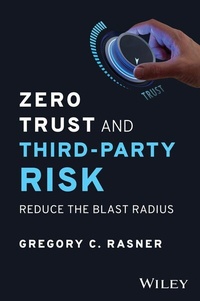
Zero Trust and Third-Party Risk
Description

In Zero Trust and Third-Party Risk, veteran cybersecurity leader Gregory Rasner delivers an accessible and authoritative walkthrough of the fundamentals and finer points of the zero trust philosophy and its application to the mitigation of third-party cyber risk. In this book, you'll explore how to build a zero trust program and nurture it to maturity. You will also learn how and why zero trust is so effective in reducing third-party cybersecurity risk.
The author uses the story of a fictional organization--KC Enterprises--to illustrate the real-world application of zero trust principles. He takes you through a full zero trust implementation cycle, from initial breach to cybersecurity program maintenance and upkeep. You'll also find:
* Explanations of the processes, controls, and programs that make up the zero trust doctrine
* Descriptions of the five pillars of implementing zero trust with third-party vendors
* Numerous examples, use-cases, and stories that highlight the real-world utility of zero trust
An essential resource for board members, executives, managers, and other business leaders, Zero Trust and Third-Party Risk will also earn a place on the bookshelves of technical and cybersecurity practitioners, as well as compliance professionals seeking effective strategies to dramatically lower cyber risk.
More details
Other editions
Additional editions
Person
Content
CHAPTER 2
Zero Trust and Third-Party Risk Model
The zero trust (ZT) and third-party risk (TPR) OSI model (Open Systems Interconnection) has been designed to break down complex concepts into simpler understandable "chunks" for organizations to consume easier. Each row and column intersection requires a bit of detail to provide enough material to take action on them. As this chapter goes through each of these intersections, you'll learn more about how they can be successfully navigated as a step along the ZT journey in the TPR space.
Zero Trust and Third-Party Users
The first area in ZT and TPR to focus on is users. In this case, a user refers to any resource that is classified as such. This should be focused on an actual person, while the other two resource categories deal with applications and infrastructure. Much of the work in ZT focuses on the identity and access management (IAM) domain, and starting with users is often the easiest (given the risk). When starting off on this exercise, be sure to differentiate between your internal native users and third parties. This sounds obvious, but there could be vendors with an internal login native to your domain. For instance, the third-party user may work for the vendor, but their login is not listed as their vendor's name, rather it is your own organization's name. The vendors with external logins that contain their vendor domain name are easiest to identify, but often access is granted using the native organization's access management system. Ensure those are identified as part of this process. If you are using a federated model for single sign-on (SSO), this will be done using your internal access management system.
Access Control Process
Before discussing the process of authentication, it would be good to provide a refresher on the access control process (authentication being part of these three steps):
- Identification: The process where a resource identifies itself
- Authentication: Verification of a resource's identity
- Authorization: Decision to allow or deny access to an object or resource
These three steps are separate and distinct, and they must happen in this order for the whole access control process to complete. For example, when you want to buy alcohol in a place that requires an access control process to purchase liquor, you will be asked to prove you're old enough. The clerk will ask for identification. You will provide your driver's license, and the clerk will inspect it to ensure you are old enough; that is authentication. Lastly, the clerk will permit the sale of the alcohol to you, and that is authorization.
The most common form of identification in the digital world is a user typing his username or email address to claim the identity of an account. That is the first step of access control. Next in the process, the user typically provides a password to perform authentication (I really am the user that I identified myself as). Multifactor deployment provides another method of authentication such as biometrics or a one-time password (OTP). Authorization enables the user to access the resource; in access to email, this step ensures the user has access to only their email, not other's email. In another case, the user might have been an administrator, and that authorization would provide that privileged user with more access. As the chapter discusses the topic of strong authentication, it is important to remember this is one step in a three-step process.
Identity: Validate Third-Party Users with Strong Authentication
Users are often the "weakest link" in most security breaches. Nearly all the breaches or security incidents in the last 10 years have been due to a user account being compromised. In fact, the Verizon Breach Report for 2022 continues to state that 80 percent of breaches are due to user accounts being inadequately secured. Often, they are compromised because the "user" did not use the best security practices when it came to password complexity and recycling. Most systems users log in with require basic authentication: username and password. But this is the weak link: username and password. Many users recycle the same passwords, and when hackers have stolen almost everyone in the world's usernames and passwords (at this point, it is not much of exaggeration to say it), those credentials eventually may end up on sale on the Dark Web. On any given day, billions of these credentials are for sale in the criminal areas of the Internet. Some are very cheap, at a few U.S. dollars per record, but some cost up to thousands if they are confirmed as a root or administrator account. Basic authentication is not going to be any part of a ZT deployment.
Strong authentication has a few definitions, but this book focuses on three big frameworks or organizations to guide our understanding: NIST 800-63 for overall framework; strong customer authentication (SCA), which is a requirement in the EU; and the Fast Identity Online (FIDO) Alliance, an open industry association that supports a wide range of authentication technologies. The National Institute of Standards and Technology (NIST) defines strong authentication as "A method used to secure computer systems and/or networks by verifying a user's identity by requiring two-factors in order to authenticate (something you know, something you are, or something you have)." The Federal Financial Institutions Examination Council (FFIEC) by adding the requirement that both factors cannot be from the same category (example, both cannot be something you are) but must be from separate categories. The Cloud Security Alliance (CSA) defines strong authentication as "an authentication based on the use of two or more elements categorized as knowledge (something only the user knows), possession (something only the user possesses), and inherence (something the user is) that are independent in that the breach of one does not compromise the reliability of the others and is designed in such a way as to protect the confidentiality of the authentication data." These definitions are fairly similar, and so to enable strong authentication there needs to be deployment of a multifactor authentication (MFA) and/or strong authentication. The following sections delve into the different types of strong authentication and provide more details on each.
Five Types of Strong Authentication Five types of strong authentication exist.
One-Time Passwords One-time passwords (OTPs) are verification codes most often sent to your phone via SMS or text. As the term implies, the code is only available for use a single time and most often with a time limit on how long it is valid. There is a subcategory or type, which is the application-generated OTP. These are often seen in online applications that generate the passcode for use on that particular application only. This type also includes a specialized authentication application such as Microsoft Authenticator or similar.
Biometrics Biometrics are generally considered as the strongest of the authentication methods. They are very hard to hack, but one drawback is the difficulty of tuning a biometric system. Biometrics also require the deployment of biometric hardware-capable devices. The most common types of biometrics include:
- Fingerprint: This is the most common type of biometric, and some laptops come equipped with them built in.
- Eye scanner: Hardware for this is not as widely available, and it can be prone to inaccuracies if a person has contacts or wears glasses.
- Facial recognition: Matches facial characteristics. Facial recognition has been seen to show some spoofing by close relatives, but generally it is considered a robust type of biometric.
- Typing recognition: This requires the user to type in a phrase, and the system matches the user's typing style, which is unique for people. Software does require training and is not widely deployed at this time.
- Speaker recognition: Voice biometrics use speech patterns to authenticate. They usually rely on standardized words to identify users, much like a password.
Certificate-Based Authentication Certificate-based authentication uses a digital certificate to identify users, machines, or devices. The certificate contains a digital identity of the resource (in this case, a user) with a public key and the digital signature of the certificate authority that issued it. A user provides a digital signature when signing in; Active Directory verifies the credibility of the digital signature and the certificate authority. Then the system cryptographically validates that the user has the correct private key associated with the certificate. A common deployment of this is via email, when a sender digitally signs the message, which allows the recipient to verify the signature and know for sure the message was sent by the actual sender.
Token-Based Authentication If you have ever used a USB device or smartcard plugged into a laptop to log in to a system, you likely used a token-based system. A token-based system allows users to enter their credentials once and get a string of random characters in exchange for access to the system.
Multifactor Authentication MFA...
