

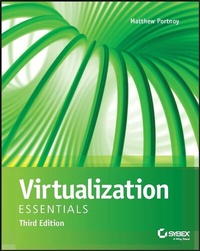
Virtualization Essentials
3rd Edition
Published on 31. March 2023
336 pages
978-1-394-18158-2 (ISBN)
Description

Learn the fundamental concepts and skills by building your own virtual machine
Virtualization is more important than ever, it's how the Cloud works! As virtualization continues to expand, millions of companies all over the world are leveraging virtualization. IT professionals need a solid understanding of virtualization concepts and software to compete in today's job market.
The updated new edition of Virtualization Essentials teaches you the core concepts and skills necessary to work with virtualization environments. Designed for new and aspiring IT professionals alike, this practical guide offers an applied, real-world approach to help you develop the necessary skill set to work in Cloud computing, the DevOps space, and the rest of the virtual world.
Virtualization Essentials simplifies complex concepts to ensure that you fully understand what virtualization is and how it works within the computing environment. Step by step, you'll learn how to build your own virtual machine, both by scratch and by migrating from physical to virtual. Each user-friendly chapter contains an overview of the topic, a discussion of key concepts, hands-on tutorials, end-of-chapter exercises, review questions, and more.
* Configure and manage a virtual machine's CPU, memory, storage, and networking
* Distinguish between Type 1 and Type 2 hypervisors
* Compare the leading hypervisor products in today's market
* Configure additional devices for a virtual machine
* Make considerations for availability
* Understand how cloud computing leverages virtualization
Virtualization Essentials is an invaluable 'learn-by-doing' resource for new and aspiring IT professionals looking to gain a solid foundation in virtualization. It is also an excellent reference for more experienced IT admins responsible for managing on-premise and remote computers and workstations.
Virtualization is more important than ever, it's how the Cloud works! As virtualization continues to expand, millions of companies all over the world are leveraging virtualization. IT professionals need a solid understanding of virtualization concepts and software to compete in today's job market.
The updated new edition of Virtualization Essentials teaches you the core concepts and skills necessary to work with virtualization environments. Designed for new and aspiring IT professionals alike, this practical guide offers an applied, real-world approach to help you develop the necessary skill set to work in Cloud computing, the DevOps space, and the rest of the virtual world.
Virtualization Essentials simplifies complex concepts to ensure that you fully understand what virtualization is and how it works within the computing environment. Step by step, you'll learn how to build your own virtual machine, both by scratch and by migrating from physical to virtual. Each user-friendly chapter contains an overview of the topic, a discussion of key concepts, hands-on tutorials, end-of-chapter exercises, review questions, and more.
* Configure and manage a virtual machine's CPU, memory, storage, and networking
* Distinguish between Type 1 and Type 2 hypervisors
* Compare the leading hypervisor products in today's market
* Configure additional devices for a virtual machine
* Make considerations for availability
* Understand how cloud computing leverages virtualization
Virtualization Essentials is an invaluable 'learn-by-doing' resource for new and aspiring IT professionals looking to gain a solid foundation in virtualization. It is also an excellent reference for more experienced IT admins responsible for managing on-premise and remote computers and workstations.
More details
Other editions
Additional editions
M Portnoy
Virtualization Essentials, 3rd Edition
Book
04/2023
3rd Edition
Sybex Inc.,U.S.
€43.50
Shipment within 15-20 days
Person
About the Author
Matthew Portnoy is an information technology professional and Sales Engineering Manager at Splunk. He specializes in data management and virtualization. He has over 30 years' experience in the IT industry and is a former Staff System Engineer at VMware.
Matthew Portnoy is an information technology professional and Sales Engineering Manager at Splunk. He specializes in data management and virtualization. He has over 30 years' experience in the IT industry and is a former Staff System Engineer at VMware.
Content
- Cover
- Title Page
- Copyright Page
- Acknowledgments
- About the Author
- Contents at a Glance
- Contents
- Introduction
- Who Should Read This Book
- What Is Covered in This Book
- How to Contact the Author
- Chapter 1 Understanding Virtualization
- Describing Virtualization
- Microsoft Windows Drives Server Growth
- Explaining Moore's Law
- Understanding the Importance of Virtualization
- Consolidation Drives Down Costs
- Virtual Servers Now Outnumber Physical Servers
- Examining Today's Trends
- Virtualization and Cloud Computing
- Hyperconverged Infrastructure
- Understanding Virtualization Software Operation
- Virtualizing Servers
- Virtualizing Desktops
- Virtualizing Applications
- Chapter 2 Understanding Hypervisors
- Describing a Hypervisor
- Exploring the History of Hypervisors
- Understanding Type 1 Hypervisors
- Understanding Type 2 Hypervisors
- Understanding the Role of a Hypervisor
- Holodecks and Traffic Cops
- Resource Allocation
- Comparing Today's Hypervisors
- VMware ESX
- Citrix Hypervisor (Xen)
- Microsoft Hyper-V
- Other Solutions
- Chapter 3 Understanding Virtual Machines
- Describing a Virtual Machine
- Examining CPUs in a Virtual Machine
- Examining Memory in a Virtual Machine
- Examining Network Resources in a Virtual Machine
- Examining Storage in a Virtual Machine
- Understanding How a Virtual Machine Works
- Working with Virtual Machines
- Understanding Virtual Machine Clones
- Understanding Templates
- Understanding Snapshots
- Understanding OVF
- Understanding Containers
- Chapter 4 Creating a Virtual Machine
- Performing P2V Conversions
- Investigating the Physical-to-Virtual Process
- Hot and Cold Cloning
- Loading Your Environment
- Loading VMware Workstation Player
- Exploring VMware Workstation Player
- Loading VirtualBox
- Building a New Virtual Machine
- Thinking About VM Configuration
- Creating a First VM
- Chapter 5 Installing Windows on a Virtual Machine
- Loading Windows into a Virtual Machine
- Installing Windows 11
- Installing VMware Tools
- Understanding Configuration Options
- Optimizing a New Virtual Machine
- The Essentials and Beyond
- Chapter 6 Installing Linux on a Virtual Machine
- Loading Linux into a Virtual Machine
- Exploring Oracle VM VirtualBox
- Installing Linux into a Virtual Machine
- Installing VirtualBox Guest Additions
- Understanding Configuration Options
- Optimizing a New Linux Virtual Machine
- The Essentials and Beyond
- Chapter 7 Managing CPUs for a Virtual Machine
- Understanding CPU Virtualization
- Configuring VM CPU Options
- Tuning Practices for VM CPUs
- Choosing Multiple vCPUs vs. a Single vCPU
- Hyperthreading
- Working with Intel and AMD Servers
- Chapter 8 Managing Memory for a Virtual Machine
- Understanding Memory Virtualization
- Memory Growth in Consumer Devices
- Configuring VM Memory Options
- Tuning Practices for VM Memory
- Calculating Memory Overhead
- Memory Optimizations
- Chapter 9 Managing Storage for a Virtual Machine
- Understanding Storage Virtualization
- How Much Digital Information Is There?
- Filesystem Options
- Configuring VM Storage Options
- Tuning VM Storage
- RAID Basics for Availability and Performance
- The Essentials and Beyond
- Chapter 10 Managing Networking for a Virtual Machine
- Understanding Network Virtualization
- Configuring VM Network Options
- Tuning Practices for Virtual Networks
- The Essentials and Beyond
- Chapter 11 Copying a Virtual Machine
- Cloning a Virtual Machine
- This Is Not the Recommended Practice for Creating a New Virtual Machine
- What Is Sysprep?
- Working with Templates
- Saving a Virtual Machine State
- Creating a Snapshot
- Merging Snapshots
- Chapter 12 Managing Additional Devices in Virtual Machines
- Using Virtual Machine Tools
- Understanding Virtual Devices
- Configuring a CD/DVD Drive
- Configuring a Floppy Disk Drive
- Configuring a Sound Card
- Configuring USB Devices
- Configuring Graphic Displays
- Configuring Other Devices
- The Essentials and Beyond
- Chapter 13 Understanding Availability
- Increasing Availability
- Protecting a Virtual Machine
- Some Advanced Topics
- Protecting Multiple Virtual Machines
- Protecting Data Centers
- The Essentials and Beyond
- Chapter 14 Understanding Applications in a Virtual Machine
- Examining Virtual Infrastructure Performance Capabilities
- Deploying Applications in a Virtual Environment
- Understanding Virtual Appliances and vApps
- Where Can You Get a Virtual Appliance?
- Open Stack and Containers
- Cloud and the Future of Virtualization
- The Essentials and Beyond
- Appendix: Answers to Additional Exercises
- Chapter 1
- Chapter 2
- Chapter 3
- Chapter 4
- Chapter 5
- Chapter 6
- Chapter 7
- Chapter 8
- Chapter 9
- Chapter 10
- Chapter 11
- Chapter 12
- Chapter 13
- Chapter 14
- Glossary
- Index
- EULA
