

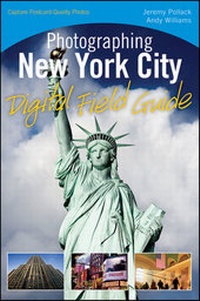
Photographing New York City Digital Field Guide
Description

Whether using a point-and-shoot or a high-end dSLR, thiscompanion guide provides you with detailed information for takingamazing shots of one of one of the world's most photographedcities. Whether you aim to capture the regal Empire State Building,vibrant Times Square, historic Grand Central Station, massiveCentral Park, or one of New York City's many other landmarks, thisportable resource goes where you go and walks you through valuabletips and techniques for taking the best shot possible.
You'll discover suggested locations for taking photos,recommended equipment, what camera settings to use, best times ofday to photograph specific attractions, how to handle weatherchallenges, and more. In addition, beautiful images of New YorkCity's most breathtaking attractions and recognizable landmarksserve to both inspire and assist you as you embark on an amazingphotographic adventure!
* Elevates your photography skills to a new level withphotography secrets from professional photographer and SmugMug COO,Andy Williams
* Presents clear, understandable tips and techniques that spanall skill levels, using all types of digital cameras, fromfull-featured compact cameras to high end DSLRs
* Features New York City's main attractions in alphabetical orderas well as thumb tabs on the pages so you can quickly and easilyaccess the information you are looking for
* Shares detailed information and insight on critical topics,such as ideal locations to photograph from, the best time of day toshoot, camera equipment to have handy, weather conditions, andoptimal camera settings to consider
Whether you're a local familiar with the territory or a visitorseeing the Big Apple for the first time, this handy guide will helpyou capture fantastic photos!
All prices
More details
Other editions
Additional editions
Persons
Jeremy Pollack (Tolland, CT) is a Connecticut-based photographer with a wide range of interests. Growing up in the woods, his first love has always been nature photography which he started shooting with his father's Canon FT QL. As his passion grew over the years, so did the breadth of his interests. Today he shoots commercial and fine art photography, selling prints at art shows and online. To connect to his blog, portfolios, fine art storefront, and other online presences, please visit www.jeremypollack.net.
Andy Williams (New York, NY) is a Photographer, COO, General Manager and House Professional Photographer at SmugMug. Andy has been a photographer all his life, and shooting professionally for 20 years. When he is not doing portrait and event work, his artistic interests tend toward landscape and street photography. He teaches and holds several workshops a year. Andy lives in the New York City area and is a member of Photographic Arts, NY, The Professional Photographers of America, The National Association of Photoshop Professionals, The IR League and Canon Professional Services. Andy can be found on Twitter, Facebook and LinkedIn. His beautiful photos can be seen via his web site at www.moonriverphotography.com.
Content
2 The Brooklyn Bridge.
3 Castle Clinton.
4 The Cathedral Church of Saint John The Divine.
5 Central Park.
6 Chinatown.
7 The Cloisters.
8 The Empire State Building.
9 The Flatiron Building.
10 Grand Central Terminal.
11 The Guggenheim Museum.
12 The USS Intrepid.
13 Manhattan From Roosevelt Island.
14 Manhattan and Williamsburg Bridges.
15 The Metropolitan Museum of Art.
16 The Museum of Natural History.
17 New York Botanical Garden.
18 The New York Public Library.
19 Rockefeller Center.
20 The Rose Center for Earth and Space.
21 Saint Patrick's Church Cathedral.
22 SoHo.
23 South Street Seaport.
24 The Staten Island Ferry.
25 The Statue of Liberty.
26 Times Square.
27 The United Nations.
28 Wall Street.
