

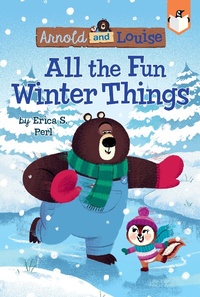
All the Fun Winter Things #4
Published on 15. October 2019
64 pages
978-1-5247-9050-9 (ISBN)
Description

There's too much fun to be had in the snow to sleep through the winter season! At least that's what Louise thinks. In this story designed to engage early readers, charming characters combine with simple text, lively illustrations, and laugh-out-loud humor to help boost kids' confidence and create lifelong readers!
Snow has fallen and the pond is frozen, so Arnold knows that--as a bear--it's time to hibernate! But Louise insists that he'll miss all the fun winter things if he does, so she convinces him to try hibernating like a chipmunk instead. They'll sleep for a short time, wake up to go sledding or have a snowball fight, and repeat! The only problem is, Arnold can't seem to keep his eyes open. What if he can't stay awake for the winter fun?
Exciting, easy-to-read books are the stepping stone a young reader needs to bridge the gap between being a beginner and being fluent.
Snow has fallen and the pond is frozen, so Arnold knows that--as a bear--it's time to hibernate! But Louise insists that he'll miss all the fun winter things if he does, so she convinces him to try hibernating like a chipmunk instead. They'll sleep for a short time, wake up to go sledding or have a snowball fight, and repeat! The only problem is, Arnold can't seem to keep his eyes open. What if he can't stay awake for the winter fun?
Exciting, easy-to-read books are the stepping stone a young reader needs to bridge the gap between being a beginner and being fluent.
More details
Other editions
Additional editions
Erica S. Perl
All the Fun Winter Things #4
Book
10/2019
Penguin Workshop
€7.50
Shipment within 10-20 days

Erica S. Perl
All the Fun Winter Things #4
Book
10/2019
Penguin Workshop
€34.71
Article exhausted; check different version
Persons
Erica S. Perl (she/her) is the author of The Capybara Conspiracy, When Life Gives You OJ, Aces Wild, Vintage Veronica, and a number of picture books. She lives in Washington, DC, with her family. Learn more about her on Twitter @ericaperl or at ericaperl.com.
Chris Chatterton (he/him) began his career in graphic design and animation, working on a variety of projects including Doctor Who and CBBC's The Dumping Ground. Chris's passion for illustration then led him to pursue a career as a freelance artist working on a number of children's books. Originally from County Durham, Chris now lives and works in the basement studio of his house in Newcastle Upon Tyne.
Chris Chatterton (he/him) began his career in graphic design and animation, working on a variety of projects including Doctor Who and CBBC's The Dumping Ground. Chris's passion for illustration then led him to pursue a career as a freelance artist working on a number of children's books. Originally from County Durham, Chris now lives and works in the basement studio of his house in Newcastle Upon Tyne.
