

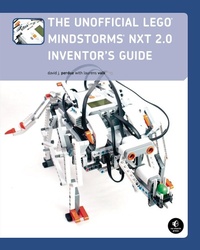
The Unofficial LEGO MINDSTORMS NXT 2.0 Inventor's Guide
Published on 1. December 2010
336 pages
978-1-59327-306-4 (ISBN)
Description

The LEGO® MINDSTORMS® NXT 2.0 set offers hundreds of building elements, programming software, and powerful electronics that you can use to create amazing robots. But where do you begin?
This eagerly awaited second edition of the bestselling Unofficial LEGO MINDSTORMS NXT Inventor's Guide is your key to designing, building, and programming robots with the NXT 2.0 set.
You'll learn practical building techniques, like how to build sturdy structures and use gears, and gain a solid understanding of the set's NXT-G programming language. A series of projects new to this edition offers step-by-step instructions for building and programming six robots, each of which can be built with just one NXT 2.0 set, including:
-Inventor-Bot, a fast, simple, modular vehicle with treads
-Sentry-Bot, a robot guard that shoots balls at intruders
-Table-Bot, a vehicle that uses its antennae to avoid falling off a tabletop
-The Jeep, a four-wheeled vehicle that avoids obstacles and follows lines
-The Lizard, a large walking robot that uses the color sensor to detect and respond to different colored balls
-The Printer, a stationary robot that uses a pen or marker to draw letters, words, and shapes on paper
Additional resources include the Piece Library, which contains basic information on the more than 80 types of LEGO pieces in the NXT 2.0 set, and the Quick Reference, which lists the 34 types of standard programming blocks.
So go ahead. Grab your NXT 2.0 set, fire up your imagination, and see what you can invent with The Unofficial LEGO MINDSTORMS NXT 2.0 Inventor's Guide.
This eagerly awaited second edition of the bestselling Unofficial LEGO MINDSTORMS NXT Inventor's Guide is your key to designing, building, and programming robots with the NXT 2.0 set.
You'll learn practical building techniques, like how to build sturdy structures and use gears, and gain a solid understanding of the set's NXT-G programming language. A series of projects new to this edition offers step-by-step instructions for building and programming six robots, each of which can be built with just one NXT 2.0 set, including:
-Inventor-Bot, a fast, simple, modular vehicle with treads
-Sentry-Bot, a robot guard that shoots balls at intruders
-Table-Bot, a vehicle that uses its antennae to avoid falling off a tabletop
-The Jeep, a four-wheeled vehicle that avoids obstacles and follows lines
-The Lizard, a large walking robot that uses the color sensor to detect and respond to different colored balls
-The Printer, a stationary robot that uses a pen or marker to draw letters, words, and shapes on paper
Additional resources include the Piece Library, which contains basic information on the more than 80 types of LEGO pieces in the NXT 2.0 set, and the Quick Reference, which lists the 34 types of standard programming blocks.
So go ahead. Grab your NXT 2.0 set, fire up your imagination, and see what you can invent with The Unofficial LEGO MINDSTORMS NXT 2.0 Inventor's Guide.
More details
Other editions
Additional editions
David J. Perdue | Laurens Valk
The Unofficial LEGO MINDSTORMS NXT 2.0 Inventor's Guide
Book
01/2010
1st Edition
No Starch Press
€52.70
Article exhausted; check different version
David J. Perdue
The Unofficial LEGO MINDSTORMS NXT Inventor´s Guide
Book
11/2007
No Starch Press
€22.00
Article exhausted; check for reprint
Persons
David J. Perdue (http://www.davidjperdue.com/) has been inventing robots with MINDSTORMS since 2001. The author of Competitive MINDSTORMS: A Complete Guide to Robotic Sumo Using LEGO MINDSTORMS (Apress, 2004), he has also written for BrickJournal and Computing Unplugged. Perdue is an implementation delivery engineer for EMC, an information infrastructure provider. He lives in St. Paul, Minnesota.
Laurens Valk is a member of the MINDSTORMS Community Partners, and one of his robots appears on the NXT 2.0 box. Valk is the author of The LEGO MINDSTORMS NXT 2.0 Discovery Book, a co-author of LEGO MINDSTORMS NXT One-Kit Wonders (both No Starch Press), and a contributor to The NXT Step Blog. He lives in the Netherlands where he studies Mechanical Engineering at Delft University of Technology.
Laurens Valk is a member of the MINDSTORMS Community Partners, and one of his robots appears on the NXT 2.0 box. Valk is the author of The LEGO MINDSTORMS NXT 2.0 Discovery Book, a co-author of LEGO MINDSTORMS NXT One-Kit Wonders (both No Starch Press), and a contributor to The NXT Step Blog. He lives in the Netherlands where he studies Mechanical Engineering at Delft University of Technology.
Content
- Intro
- The Unofficial LEGO® MINDSTORMS® NXT 2.0 Inventor's Guide
- Dedication
- Praise for the First Edition of The Unofficial LEGO® MINDSTORMS® NXT Inventor's Guide
- About the Author
- About the Robot Builder
- Technical Reviewers for the First Edition
- Acknowledgments
- Introduction
- About this Book
- Part I: Introduction to LEGO MINDSTORMS NXT 2.0
- Part II: Building
- Part III: Programming
- Part IV: Projects
- Companion Website
- I. Introduction to LEGO MINDSTORMS NXT 2.0
- 1. LEGO MINDSTORMS NXT 2.0: People, Pieces, and Potential
- Building a Robot
- Programming a Robot
- Activating a Robot
- What Can I Create with My NXT 2.0 Set?
- Conclusion
- 2. Getting Started with the NXT 2.0 Set
- Requirements
- Six AA Batteries
- A PC or Mac
- Bluetooth Technology (Optional)
- Getting a Quick Start
- Installing the NXT Software
- Using the NXT Software
- Getting Started with NXT-G
- Creating a New NXT-G Program
- Adding a Programming Block
- Establishing a Connection with the USB Cable and Downloading a Program
- Establishing a Connection with Bluetooth Technology and Downloading a Program
- The Robo Center
- My Portal
- Organizing the Pieces
- Conclusion
- II. Building
- 3. Understanding the Electronic Pieces
- The NXT
- Output (Motor) Ports and the USB Port
- The Input (Sensor) Ports
- Bluetooth Capability
- A Loudspeaker
- Buttons and the LCD
- The Servo Motors
- The Sensors
- Passive Sensors
- The Touch Sensor
- Digital Sensors
- The Color Sensor
- The Ultrasonic Sensor
- Connecting the Electronic Pieces with Electrical Cables
- Getting NXTreme
- Conclusion
- 4. Understanding the LEGO MINDSTORMS NXT 2.0 Pieces
- Introduction to the Pieces
- Classifying the Pieces
- Naming the Pieces
- Measuring the Pieces
- Examining the Pieces
- The Electronics
- The Beams
- The Straight Beam
- The Angled Beam
- The Right-Angled Beam
- The Connectors
- The Axles
- The Pegs
- The Connector Blocks
- The Gears
- Bevel Gears
- Double Bevel Gears
- Other Gears
- The Miscellaneous Elements
- Conclusion
- 5. Building Sturdy Structures
- Extending Beams
- Widening Beams
- Forming Corners
- Creating Angled Structures
- Creating Dynamic Structures
- Creating Flexible Structures
- Conclusion
- 6. Building with Gears
- The Gear Train
- Controlling a Gear Train's Performance
- The Gear Ratio
- Gearing Down: More Torque and Less Speed
- Gearing Up: More Speed and Less Torque
- Compound Gearing: Achieving Greater Torque or Speed
- Achieving Optimal Performance
- Assembling LEGO Gear Trains
- Spacing Gears on Parallel Axles
- Spacing Gears on Perpendicular Axles
- Conclusion
- III. Programming
- 7. Introduction to NXT-G
- Starting an NXT-G Program
- The NXT-G Interface
- The Menu Bar
- The Toolbar
- The Work Area
- The Programming Palette
- The Configuration Panel
- The Controller
- The Little Help Window and the Work Area Map
- Fundamental NXT-G Concepts
- The Starting Point
- Sequence Beams
- Extending the Sequence Beam
- Parallel Sequence Beams
- Automatic Resizing of Sequence Beams
- Managing Programming Blocks in the Work Area
- Navigating the Work Area
- Increasing Program Readability with Comments
- The Common Palette
- The Move Block
- The Port Parameter
- The Direction Parameter
- The Steering Parameter
- The Power Parameter
- The Duration Parameter
- The Next Action Parameter
- Feedback Boxes
- The Record/Play Block
- The Sound Block
- The Display Block
- The Wait Block
- The Loop Block
- The Switch Block
- Conclusion
- 8. Advanced NXT-G Programming
- Data Wires
- Data Plug Characteristics
- The Wire Path
- Transmitting the Data Types
- Broken Data Wires
- Data Type Mismatch
- Missing Input
- Too Many Inputs
- The Complete Palette
- The Common Blocks
- The Action Blocks
- The Motor Block
- The Sound Block
- The Display Block
- The Send Message Block
- The Color Lamp Block
- The Sensor Blocks
- The Flow Blocks
- The Data Blocks
- The Logic Block
- The Math Block
- The Compare Block
- The Range Block
- The Random Block
- The Variable Block
- The Constant Block
- The Advanced Blocks
- The Number to Text Block
- The Text Block
- The Keep Alive Block
- The File Access Block
- The Calibration Block
- The Reset Motor Block
- The Bluetooth Connection Block
- The Custom Palette
- The My Blocks
- The Web Blocks
- Conclusion
- 9. NXT-G Tools
- Calibrate Sensors
- Update NXT Firmware
- Create Pack and Go
- Block Import and Export Wizard
- Image Editor
- Remote Control
- Sound Editor
- Conclusion
- IV. Projects
- 10. The MINDSTORMS Method
- Hitting the Target with the MINDSTORMS Method
- Step 1: Getting an Idea for a Robot
- Step 2: Building the Robot
- Step 3: Programming the Robot
- Step 4: Documenting the Robot
- Conclusion
- 11. Inventor-Bot: A Vehicle with Treads
- Building Inventor-Bot
- Connecting the Cables
- Programming Inventor-Bot
- Driving Straight and Turning
- Making the Robot Interactive
- Conclusion
- 12. Sentry-Bot: An Intruder Detector
- Adding the Ultrasonic Sensor
- Avoiding Objects
- Following an Object in a Straight Line
- The Shooter Extension
- Testing the Shooter
- Creating the Complete Sentry Program
- Conclusion
- 13. Table-Bot: An Edge-Avoiding Robot
- Creating the Antennae Attachments
- Programming Table-Bot
- Keeping Track of Events
- Getting Out of Corners
- Conclusion
- 14. The Jeep: A Front-Wheel Drive Vehicle
- Understanding the Jeep Design
- Steering with the Front Wheels
- Driving with the Front Wheels
- Moving Around with the Jeep's Front-Wheel Drive
- Understanding the Wheel Speeds
- Calculating the Wheel Speeds
- Building the Jeep
- Programming the Jeep
- Jeep Program Essentials
- My Block #1: Center and Reset
- My Block #2: Wheel Control
- Testing the My Blocks
- Creating the Wall-Avoidance Program
- Following a Line
- Line-Following Basics
- Line Following with the Jeep
- Creating the Line-Following Program
- Further Explorations for the Jeep
- Idea #1: Headlights
- Idea #2: Remote Control
- Idea #3: Parking Sensor
- Conclusion
- 15. The Lizard: A Color-Sensitive Reptile
- Understanding How the Lizard Walks
- Using One Motor to Control Two Legs
- Controlling Four Legs to Produce Walking
- Making Turns
- Building the Lizard
- Building the Body
- Attaching the Cables
- Building and Attaching the Legs
- Programming the Lizard
- Synchronizing the Motors with Touch Sensors
- Creating the My Blocks
- My Block #1: Synchronize
- My Block #2: Walk
- Creating the Final Program
- Step 1: The Structure of the Program
- Step 2: Blue
- Step 3: Green
- Step 4: Red
- Step 5: Yellow
- Exploring the Lizard Further
- Idea #1: More Behavior
- Idea #2: Create Your Own Animal
- Conclusion
- 16. The Printer: A Drawing Machine
- Understanding How the Printer Works
- Components of the Printer
- Non-LEGO Requirements for the Printer
- Building the Printer
- Connecting the Cables
- Programming the Printer
- Creating the My Blocks
- My Block #1: Liftpen
- My Block #2: Lowerpen
- My Block #3: ResetHorizontal
- My Block #4: ResetVertical
- My Block #5: Eject
- My Block #6: Horizontal
- My Block #7: Vertical
- Testing and Troubleshooting the Printer
- The Test Program
- Troubleshooting the Printer
- Creased or Crumpled Paper in the Machine
- The Pen Doesn't Write
- The Pen Presses Too Hard
- The ResetVertical My Block Doesn't Work
- The Cable for Motor a Snags the Paper
- Creating the Final Program
- Exploring the Printer Further
- Idea #1: Progress Update
- Idea #2: Morse Code
- Idea #3: Data Logging
- Conclusion
- A. LEGO MINDSTORMS NXT 2.0 Piece Library
- B. NXT-G 2.0 Quick Reference
- C. Internet Resources
- General Resources
- Programming Resources
- Bluetooth Resources
- NXT Blogs
- LEGO Computeraided Design Resources
- Building Techniques
- Educational Resources
- Buying LEGO
- LEGO Storage
- Personal Websites
- LEGO Events
- Index
- About the Authors
- Copyright
