

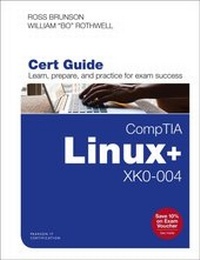
CompTIA Linux+ XK0-004 Cert Guide
1st Edition
Published on 28. January 2020
768 pages
978-0-13-530136-4 (ISBN)
Description

This is the eBook version of the print title. Note that the eBook does not provide access to the practice test software that accompanies the print book.
Learn, prepare, and practice for CompTIA Linux+ and exam success with this Cert Guide from Pearson IT Certification, a leader in IT Certification learning.
Master CompTIA Linux+ XK0-004 exam topics
Assess your knowledge with chapter-ending quizzes
Review key concepts with exam preparation tasks
CompTIA Linux+ (XK0-004) Cert Guide is a best-of-breed exam study guide. Leading Linux trainers Ross Brunson and William "Bo" Rothwell share preparation hints and test-taking tips, helping you identify areas of weakness and improve both your conceptual knowledge and hands-on skills. Material is presented in a concise manner, focusing on increasing your understanding and retention of exam topics.
The book presents you with an organized test preparation routine through the use of proven series elements and techniques. Exam topic lists make referencing easy. Chapter-ending Exam Preparation Tasks help you drill on key concepts you must know thoroughly. Review questions help you assess your knowledge, and a final preparation chapter guides you through tools and resources to help you craft your final study plan.
Well regarded for its level of detail, assessment features, and challenging review questions and exercises, this study guide helps you master the concepts and techniques that will enable you to succeed on the exam the first time, including
? Hardware and system configuration
? Systems operation and maintenance
? Security
? Linux troubleshooting and diagnostics
? Automation and scripting
It fully reflects major changes to this version of the Linux+ exam, including new coverage of virtualization, cloud concepts, Git, and orchestration.
Learn, prepare, and practice for CompTIA Linux+ and exam success with this Cert Guide from Pearson IT Certification, a leader in IT Certification learning.
Master CompTIA Linux+ XK0-004 exam topics
Assess your knowledge with chapter-ending quizzes
Review key concepts with exam preparation tasks
CompTIA Linux+ (XK0-004) Cert Guide is a best-of-breed exam study guide. Leading Linux trainers Ross Brunson and William "Bo" Rothwell share preparation hints and test-taking tips, helping you identify areas of weakness and improve both your conceptual knowledge and hands-on skills. Material is presented in a concise manner, focusing on increasing your understanding and retention of exam topics.
The book presents you with an organized test preparation routine through the use of proven series elements and techniques. Exam topic lists make referencing easy. Chapter-ending Exam Preparation Tasks help you drill on key concepts you must know thoroughly. Review questions help you assess your knowledge, and a final preparation chapter guides you through tools and resources to help you craft your final study plan.
Well regarded for its level of detail, assessment features, and challenging review questions and exercises, this study guide helps you master the concepts and techniques that will enable you to succeed on the exam the first time, including
? Hardware and system configuration
? Systems operation and maintenance
? Security
? Linux troubleshooting and diagnostics
? Automation and scripting
It fully reflects major changes to this version of the Linux+ exam, including new coverage of virtualization, cloud concepts, Git, and orchestration.
More details
Series
Language
English
Place of publication
Upper Saddle River
United States
Publishing group
Pearson Education (US)
Target group
Professional and scholarly
ISBN-13
978-0-13-530136-4 (9780135301364)
Copyright in bibliographic data and cover images is held by Nielsen Book Services Limited or by the publishers or by their respective licensors: all rights reserved.
Schweitzer Classification
Other editions
Additional editions
Ross Brunson | William Rothwell
CompTIA Linux+ XK0-004 Cert Guide
Book
11/2019
Pearson It Certification
€56.00
Shipment within 3-4 weeks
Person
At the impressionable age of 14, William "Bo" Rothwell crossed paths with a TRS-80 Micro Computer System (affectionally known as a "Trash 80"). Soon after, the adults responsible for Bo made the mistake of leaving him alone with the TSR-80. He immediately dismantled it and held his first computer class, showing his friends what made this "computer thing" work.
Since that experience, Bo's passion for understanding how computers work and sharing this knowledge with others has resulting in a rewarding career in IT training. His experience includes Linux, Unix, IT security, devops, and programming languages such as Perl, Python, Tcl, and BASH. He is the founder and lead instructor of One Course Source, an IT training organization.
Ross Brunson has more than 25 years of experience as a Linux and open source trainer, training manager, and technologist and is author of the popular LPIC-1 Exam Cram 2 (Que Publishing) and the Pearson CompTIA Linux+ / LPIC-1 Cert Guide (2014).
Ross is currently a training architect at Linux Academy (www.linuxacademy.com), where he focuses on Linux and open source training, giving helpful talks at the various FLOSS shows, and supporting the amazing Linux Academy community. Ross has very recently been the certification architect at SUSE, where he helped redesign and modernize that program. Just before that, he spent five years as the director of member services for the Linux Professional Institute, where he contributed to placing several LPI courses into the Cisco Networking Academy, conducted dozens of train-the-trainer sessions, and provided sales enablement support for the worldwide Master Affiliate network, spanning more than 100 countries.
Ross holds a number of key IT certifications and is author of several successful technical books and dozens of technical courses for major organizations (including the first U.S. LPI Certification Bootcamps). He is skilled at both contributing to and building community around IT products.
Ross lives in Paradise Valley, Montana, with his family and enjoys traveling far and wide, participating in winter sports, photography, and playing the drums (although not everyone around him appreciates it).
Since that experience, Bo's passion for understanding how computers work and sharing this knowledge with others has resulting in a rewarding career in IT training. His experience includes Linux, Unix, IT security, devops, and programming languages such as Perl, Python, Tcl, and BASH. He is the founder and lead instructor of One Course Source, an IT training organization.
Ross Brunson has more than 25 years of experience as a Linux and open source trainer, training manager, and technologist and is author of the popular LPIC-1 Exam Cram 2 (Que Publishing) and the Pearson CompTIA Linux+ / LPIC-1 Cert Guide (2014).
Ross is currently a training architect at Linux Academy (www.linuxacademy.com), where he focuses on Linux and open source training, giving helpful talks at the various FLOSS shows, and supporting the amazing Linux Academy community. Ross has very recently been the certification architect at SUSE, where he helped redesign and modernize that program. Just before that, he spent five years as the director of member services for the Linux Professional Institute, where he contributed to placing several LPI courses into the Cisco Networking Academy, conducted dozens of train-the-trainer sessions, and provided sales enablement support for the worldwide Master Affiliate network, spanning more than 100 countries.
Ross holds a number of key IT certifications and is author of several successful technical books and dozens of technical courses for major organizations (including the first U.S. LPI Certification Bootcamps). He is skilled at both contributing to and building community around IT products.
Ross lives in Paradise Valley, Montana, with his family and enjoys traveling far and wide, participating in winter sports, photography, and playing the drums (although not everyone around him appreciates it).
Content
Chapter 1 Installing Linux
Chapter 2 Package Installation and Management
Chapter 3 Virtualization
Chapter 4 The Boot Process
Chapter 5 Managing System Services
Chapter 6 System Performance
Chapter 7 File Manipulation
Chapter 8 File Processing
Chapter 9 File Permissions and Escalation
Chapter 10 SELinux and AppArmor
Chapter 11 File Compression and Storage
Chapter 12 User and Group Management
Chapter 13 Account Security
Chapter 14 Logging Services
Chapter 15 Linux Devices
Chapter 16 Hardware Troubleshooting
Chapter 17 Kernel Modules
Chapter 18 Storage Concepts
Chapter 19 Storage Configuration
Chapter 20 Network Configuration
Chapter 21 Network Troubleshooting
Chapter 22 Linux Firewalls
Chapter 23 Orchestration
Chapter 24 Automate Tasks
Chapter 25 Manage Localization
Chapter 26 BASH Scripting Essentials
Chapter 27 Git
Chapter 28 Server Roles
Chapter 29 Security Best Practices
Chapter 30 Final Preparation
Glossary
Appendix A Answers to the "Do I Know This Already?" Quizzes and Review Questions
Appendix B CompTIA Linux+ XK0-004 Cert Guide Exam Updates
Appendix C Study Planner
Chapter 2 Package Installation and Management
Chapter 3 Virtualization
Chapter 4 The Boot Process
Chapter 5 Managing System Services
Chapter 6 System Performance
Chapter 7 File Manipulation
Chapter 8 File Processing
Chapter 9 File Permissions and Escalation
Chapter 10 SELinux and AppArmor
Chapter 11 File Compression and Storage
Chapter 12 User and Group Management
Chapter 13 Account Security
Chapter 14 Logging Services
Chapter 15 Linux Devices
Chapter 16 Hardware Troubleshooting
Chapter 17 Kernel Modules
Chapter 18 Storage Concepts
Chapter 19 Storage Configuration
Chapter 20 Network Configuration
Chapter 21 Network Troubleshooting
Chapter 22 Linux Firewalls
Chapter 23 Orchestration
Chapter 24 Automate Tasks
Chapter 25 Manage Localization
Chapter 26 BASH Scripting Essentials
Chapter 27 Git
Chapter 28 Server Roles
Chapter 29 Security Best Practices
Chapter 30 Final Preparation
Glossary
Appendix A Answers to the "Do I Know This Already?" Quizzes and Review Questions
Appendix B CompTIA Linux+ XK0-004 Cert Guide Exam Updates
Appendix C Study Planner
