

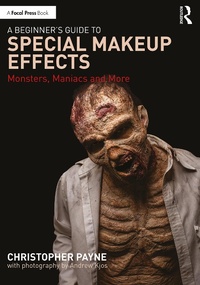
A Beginner's Guide to Special Makeup Effects
Monsters, Maniacs and More
1st Edition
Published on 11. March 2021
192 pages
978-1-000-29877-2 (ISBN)
Description

A Beginner's Guide to Special Makeup Effects: Monsters, Maniacs and More is an introduction to special effects makeup using cost-effective tools and materials that can be found in local stores.
The book is divided into three sections - Simple Makeup, Advanced Materials and Techniques and Advanced Makeup - and features tutorials to create characters such as a pirate, vampire, ghost, robot, burn victim, witch, zombie and goblin. Each character is introduced with a full-page photograph of the finished makeup and illustrated with full-color, step-by-step photographs. The book also includes instructions on how to make fake teeth, apply bald caps, create gory wounds and injuries and make simple prosthetics. Each makeup tutorial is designed to progressively build on the techniques outlined in the preceding tutorial, guiding readers from the basics of foundation, highlight and shadow to creating advanced creature makeups.
This is a beginner makeup book suited for students of Stage Makeup courses, as well as for the theatre technician working and training on their own.
The book is divided into three sections - Simple Makeup, Advanced Materials and Techniques and Advanced Makeup - and features tutorials to create characters such as a pirate, vampire, ghost, robot, burn victim, witch, zombie and goblin. Each character is introduced with a full-page photograph of the finished makeup and illustrated with full-color, step-by-step photographs. The book also includes instructions on how to make fake teeth, apply bald caps, create gory wounds and injuries and make simple prosthetics. Each makeup tutorial is designed to progressively build on the techniques outlined in the preceding tutorial, guiding readers from the basics of foundation, highlight and shadow to creating advanced creature makeups.
This is a beginner makeup book suited for students of Stage Makeup courses, as well as for the theatre technician working and training on their own.
More details
Edition
1. Auflage
Language
English
Place of publication
London
United Kingdom
Publishing group
Taylor & Francis Ltd
Target group
College/higher education
Professional and scholarly
Illustrations
1 Tables, black and white; 239 Halftones, color; 239 Illustrations, color
ISBN-13
978-1-000-29877-2 (9781000298772)
Copyright in bibliographic data and cover images is held by Nielsen Book Services Limited or by the publishers or by their respective licensors: all rights reserved.
Schweitzer Classification
Other editions
Additional editions
Book
03/2021
1st Edition
Routledge
€45.00
Shipment within 15-20 days
Book
03/2021
1st Edition
Routledge
€192.18
Shipment within 15-20 days
Book
12/2020
Routledge
Unfortunately, price unknown
Available (delivery time upon request)
Person
Christopher Payne has been a professional makeup artist for more than 15 years and an enthusiastic amateur for most of his life before that. He has an MFA in Makeup and Wig Design from the University of Cincinnati and has worked on theatrical productions, television shows and films across the country. He has also taught makeup at a number of schools, trade shows and theaters. This is Payne's second book project, having previously contributed to Makeup Artistry for Film and Television (Sciortino, 2021).
Content
Section 1: Simple Makeup 1. Pirate 2. Highlight and Shadow 3. Vampire 4. Ghost 5. Robot 6. Basic Burn 7. Basic Zombie 8. Plague Victim 9. Witch Section 2: Advanced Techniques & Materials 10. Fangs and Claws 11. Fake Teeth 12. Blood 13. Bald Caps 14. Blocking Out Hair 15. Skin Textures 16. Cotton and Latex Buildups 17. Wounds and Injuries 18. Laying Hair and Stubble 19. Making Simple Prosthetics 20. Character Design Section 3: Advanced Makeup 21. The Champ 22. Skull 23. Giggles 24. Severe Burn 25. Goblin 26. The Creature 27. Advanced Zombie 28. Pirate...again
