

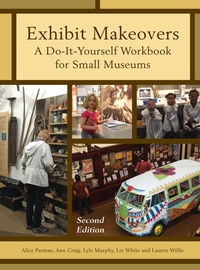
Exhibit Makeovers
A Do-it-Yourself Workbook for Small Museums
2nd Edition
Published on 15. February 2017
146 pages
978-1-4422-7867-7 (ISBN)
Description

Since its publication in 2008, Exhibit Makeovers has been a useful do-it-yourself handbook for museum staff and volunteers. Exhibit Makeovers is a workbook that provides grounding in interpretive principles, how-to-advice, step-by-step guidance, and moral support for in-house exhibit planning and design.
The revised and expanded 2nd edition preserves the supportive tone and easy-to-follow steps that make the original Exhibit Makeovers so user-friendly. Significant revisions-especially in the technology arena-and additions make this new edition a must-have addition to any museum's toolkit:
. New emphasis on visitor input, with step-by-step guidelines for evaluation studies
during planning and design.
. New text and worksheets to guide development of interactives, and ensure varied levels
of visitor participation.
. Focus on affordable software to help with exhibit planning and design, as well as low-
cost technologies that can vary and deepen the visitor experience.
. Brand-new chapters on exhibit design, production, and installation, written by the
experienced team responsible for in-house exhibits at a thriving, mid-size museum.
Following the same pattern as the 2008 original, the revised Exhibit Makeovers guides users through step-by-step processes of a single-case makeover, development of a new exhibit, and renovation/renewal of an entire gallery or museum.
The revised and expanded 2nd edition preserves the supportive tone and easy-to-follow steps that make the original Exhibit Makeovers so user-friendly. Significant revisions-especially in the technology arena-and additions make this new edition a must-have addition to any museum's toolkit:
. New emphasis on visitor input, with step-by-step guidelines for evaluation studies
during planning and design.
. New text and worksheets to guide development of interactives, and ensure varied levels
of visitor participation.
. Focus on affordable software to help with exhibit planning and design, as well as low-
cost technologies that can vary and deepen the visitor experience.
. Brand-new chapters on exhibit design, production, and installation, written by the
experienced team responsible for in-house exhibits at a thriving, mid-size museum.
Following the same pattern as the 2008 original, the revised Exhibit Makeovers guides users through step-by-step processes of a single-case makeover, development of a new exhibit, and renovation/renewal of an entire gallery or museum.
More details
Series
Edition
2nd edition
Language
English
Place of publication
New York
United States
Publishing group
Bloomsbury Publishing Plc
ISBN-13
978-1-4422-7867-7 (9781442278677)
Copyright in bibliographic data and cover images is held by Nielsen Book Services Limited or by the publishers or by their respective licensors: all rights reserved.
Schweitzer Classification
Other editions
Additional editions
Book
02/2017
2nd Edition
Rowman & Littlefield Publishers
€133.50
Shipment within 10-20 days
Book
02/2017
2nd Edition
Rowman & Littlefield Publishers
€55.60
Shipment within 10-20 days
Persons
Alice Parman, Ph.D. has worked in and around museums for more than four decades. Since 1989, she has served small to large museums nationwide as an exhibit planner.
Ann Craig is Director of Exhibitions and Public Programs at the Museum of Natural and Cultural History at the University of Oregon. She earned the M.A. in Arts Management with a focus on Museum Studies at the University of Oregon in 2006.
Lyle Murphy is an artist and folklorist working for both the Museum of Natural and Cultural History and Oregon Folklife Network. His wide skill set has allowed Lyle to create exhibits in galleries, museums, and unconventional settings for over ten years.
Elizabeth White is the exhibitions designer for the Museum of Natural and Cultural History at the University of Oregon. In 2010 she earned an M.S. in Arts Administration with a concentration in Museum Studies at the University of Oregon.
Lauren Willis has worked in education and exhibitions at the Museum of Natural and Cultural History at the University of Oregon since 2010. She earned a Ph.D. in anthropology from the University of Oregon in 2014.
Ann Craig is Director of Exhibitions and Public Programs at the Museum of Natural and Cultural History at the University of Oregon. She earned the M.A. in Arts Management with a focus on Museum Studies at the University of Oregon in 2006.
Lyle Murphy is an artist and folklorist working for both the Museum of Natural and Cultural History and Oregon Folklife Network. His wide skill set has allowed Lyle to create exhibits in galleries, museums, and unconventional settings for over ten years.
Elizabeth White is the exhibitions designer for the Museum of Natural and Cultural History at the University of Oregon. In 2010 she earned an M.S. in Arts Administration with a concentration in Museum Studies at the University of Oregon.
Lauren Willis has worked in education and exhibitions at the Museum of Natural and Cultural History at the University of Oregon since 2010. She earned a Ph.D. in anthropology from the University of Oregon in 2014.
Content
Preface
Chapter 1Exhibit Makeovers
Part 1Starting Small
Chapter 2Plan a Single-Case Exhibit Makeover
Chapter 3Design and Install Your Single-Case Exhibit Makeover
Part 2Strengthening Skills: An Exhibit Gallery Makeover
Chapter 4Expand Your Creative Team
Chapter 5Plan an Exhibit Gallery Makeover
Chapter 6Design an Exhibit Gallery Makeover
Chapter 7Fabricate and Install Exhibits
Part 3Involving Your Community
Chapter 8Do A Small Museum Makeover
Chapter 9Make the Most of Your Makeover
Appendix AResources and Further Reading
Appendix B What is Your Museum's Purpose?
Appendix CStrategic Planning: An Agenda That Works
Subject Index
Worksheets Index
Chapter 1Exhibit Makeovers
Part 1Starting Small
Chapter 2Plan a Single-Case Exhibit Makeover
Chapter 3Design and Install Your Single-Case Exhibit Makeover
Part 2Strengthening Skills: An Exhibit Gallery Makeover
Chapter 4Expand Your Creative Team
Chapter 5Plan an Exhibit Gallery Makeover
Chapter 6Design an Exhibit Gallery Makeover
Chapter 7Fabricate and Install Exhibits
Part 3Involving Your Community
Chapter 8Do A Small Museum Makeover
Chapter 9Make the Most of Your Makeover
Appendix AResources and Further Reading
Appendix B What is Your Museum's Purpose?
Appendix CStrategic Planning: An Agenda That Works
Subject Index
Worksheets Index
