

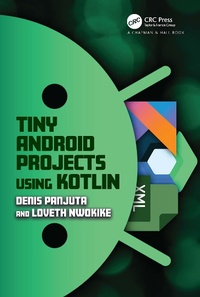
Tiny Android Projects Using Kotlin
1st Edition
Published on 2. February 2024
384 pages
978-1-003-82940-9 (ISBN)
Description

In today's fast-paced world, Android development is a rapidly evolving field that requires regular updates to keep up with the latest trends and technologies. Tiny Android Projects Using Kotlin is an excellent resource for developers who want to learn to build Android applications using the latest tools and frameworks.
KEY FEATURES
Teaches building Android apps using Kotlin, XML, and Jetpack Compose
Includes saving data on the device using the Room database library
Teaches communication between an Android device and data on the internet using REST API
Shows how to create different Android menu navigations using Jetpack Compose
Introduces the most architectures used in Android Projects and implements MVVM
With Kotlin being the most preferred language for Android development, this book provides a practical, hands-on approach to learning the language and building high-quality Android apps using Kotlin, XML, and Jetpack Compose.
KEY FEATURES
Teaches building Android apps using Kotlin, XML, and Jetpack Compose
Includes saving data on the device using the Room database library
Teaches communication between an Android device and data on the internet using REST API
Shows how to create different Android menu navigations using Jetpack Compose
Introduces the most architectures used in Android Projects and implements MVVM
With Kotlin being the most preferred language for Android development, this book provides a practical, hands-on approach to learning the language and building high-quality Android apps using Kotlin, XML, and Jetpack Compose.
More details
Edition
1. Auflage
Language
English
Place of publication
London
United Kingdom
Publishing group
Taylor & Francis Ebooks
Target group
Professional and scholarly
Product notice
Reflowable
Illustrations
3 Tables, black and white; 2 Line drawings, black and white; 161 Halftones, black and white; 163 Illustrations, black and white
ISBN-13
978-1-003-82940-9 (9781003829409)
Copyright in bibliographic data and cover images is held by Nielsen Book Services Limited or by the publishers or by their respective licensors: all rights reserved.
Schweitzer Classification
Other editions
Additional editions
Denis Panjuta | Loveth Nwokike
Tiny Android Projects Using Kotlin
Book
02/2024
1st Edition
Chapman & Hall/CRC
€74.40
Shipment within 10-20 days

Denis Panjuta | Loveth Nwokike
Tiny Android Projects Using Kotlin
Book
02/2024
1st Edition
Chapman & Hall/CRC
€187.10
Shipment within 10-20 days
Persons
Denis Panjuta. Born in Russia and raised in Germany, Denis Panjuta's journey is a testament to the power of perseverance and the pursuit of passion. The youngest of three siblings, Denis was introduced to the world of computers at the tender age of 11. This early encounter sparked a fascination that would shape the course of his life. Despite the initial struggle to learn Java at 17, Denis was not deterred. He recognized that the outdated resources he was using were a barrier to his progress. It wasn't until he was 23, armed with a fresh mindset, up-to-date books, and the vast resources of YouTube, that he finally broke through the barriers and became a software developer. Denis pursued his higher education at the University of Applied Sciences in Konstanz, Germany. It was here that he began to merge his passion for coding with a newfound interest: teaching. His bachelor's thesis, a series of coding tutorials, not only won him the award for the best thesis of the semester but also paved the way for his career as a coding instructor. Today, Denis is a respected instructor in Android App Development and .NET Programming. His love for teaching is evident in his approach. He believes that "sharing knowledge multiplies the knowledge," a philosophy that has guided his career and his life. Outside of his professional pursuits, Denis is an avid gamer, skater, and hiker. His love for these activities is a reflection of his adventurous spirit and his constant pursuit of new challenges. (edited)
Denis's journey took a new turn when he decided to write a book. With a large audience of subscribers on YouTube and Udemy, he saw this as the next natural step in sharing his knowledge and passion for coding. His vision is ambitious yet inspiring: to teach coding to 10 million people and to improve the world through the software developed by his students. This vision, coupled with his dedication and passion, makes Denis Panjuta a beacon of inspiration in the world of coding education.
Loveth Nwokike is a software developer and a technical content creator with keen interest in mobile applications and proficiency in native Android development. She has worked on customer facing solutions serving millions of android users. She has interests in developer communities and is continuously in participation as either a volunteer or an organizer. She is enthusiastic about new technologies and loves to explore latest advancement in the IT field. When she is not on a computer she can be at the gym, playing table tennis, or taking a walk.
Denis's journey took a new turn when he decided to write a book. With a large audience of subscribers on YouTube and Udemy, he saw this as the next natural step in sharing his knowledge and passion for coding. His vision is ambitious yet inspiring: to teach coding to 10 million people and to improve the world through the software developed by his students. This vision, coupled with his dedication and passion, makes Denis Panjuta a beacon of inspiration in the world of coding education.
Loveth Nwokike is a software developer and a technical content creator with keen interest in mobile applications and proficiency in native Android development. She has worked on customer facing solutions serving millions of android users. She has interests in developer communities and is continuously in participation as either a volunteer or an organizer. She is enthusiastic about new technologies and loves to explore latest advancement in the IT field. When she is not on a computer she can be at the gym, playing table tennis, or taking a walk.
Content
Chapter 1 ? Introduction and Getting Started
Chapter 2 ? Basic XML Widgets in Android
Chapter 3 ? More on Android XML Views: Project 2 - Quiz App: Part 1
Chapter 4 ? Intents in Android: Project 2 - Quiz App - Part 2
Chapter 5 ? Android Fragments and ViewPager2
Chapter 6 ? Networking in Android Using Retrofit
Chapter 7 ? Google Firebase Services: Project 5 - Tour Guide App
Chapter 8 ? Android MVVM Architecture: Project 5 - Tour Guide Part 2
Chapter 9 ? Basic Jetpack Compose Elements
Chapter 10 ? More on Compose Elements
Chapter 11 ? Room Database with Jetpack Compose
Chapter 12 ? Menus and Navigation in Jetpack Compose
APPENDIX
Chapter 2 ? Basic XML Widgets in Android
Chapter 3 ? More on Android XML Views: Project 2 - Quiz App: Part 1
Chapter 4 ? Intents in Android: Project 2 - Quiz App - Part 2
Chapter 5 ? Android Fragments and ViewPager2
Chapter 6 ? Networking in Android Using Retrofit
Chapter 7 ? Google Firebase Services: Project 5 - Tour Guide App
Chapter 8 ? Android MVVM Architecture: Project 5 - Tour Guide Part 2
Chapter 9 ? Basic Jetpack Compose Elements
Chapter 10 ? More on Compose Elements
Chapter 11 ? Room Database with Jetpack Compose
Chapter 12 ? Menus and Navigation in Jetpack Compose
APPENDIX
