

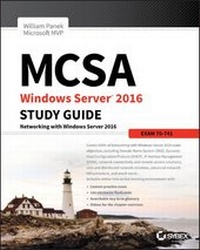
MCSA Windows Server 2016 Study Guide
Exam 70-741
2nd Edition
Published on 24. August 2017
504 pages
978-1-119-35942-5 (ISBN)
Description

Ultimate coverage and hands-on practice for the second MCSA Windows Server 2016 exam
MCSA Windows Server 2016 Study Guide: Exam 70-741 offers complete preparation for the second exam in the MCSA series. With comprehensive coverage of all exam objectives led by a four-time Microsoft MVP winner, this book is your ideal companion for thorough preparation. Optimize your study time with hundreds of practice questions that pinpoint your weak spots, and try your hand at real-world application with exercises that reflect the MCSA skill set. Access to the Sybex interactive online practice test environment provides electronic flashcards, a glossary, practice exams and more, so you can study anywhere, any time; this invaluable study guide goes beyond mere review to help you enter the exam with full confidence in your abilities.
The Microsoft Certified Solutions Associate certification puts your skills in demand--but first you must pass a series of three exams; exam 70-741 is the second step, testing your Windows 2016 networking knowledge and skills. This book covers everything you need to know, giving you the exam-day advantage of comprehensive prep.
* Master 100 percent of the exam objective domains
* Learn how these skills are applied in real-world scenarios
* Solidify your understanding with hands-on exercises
* Access electronic flashcards, practice exams, and more!
How well do you deploy, manage, and maintain a server? Can you expertly configure file and print servers, network access and services, and network policy server infrastructure? Have you configured and managed Active Directory and Group Policy? Don't leave anything to chance--MCSA Windows Server 2016 Study Guide: Exam 70-741 tells you all you need to know to pass with flying colors.
More details
Other editions
Additional editions
William Panek
MCSA Windows Server 2016 Study Guide: Exam 70-741
Book
11/2017
2nd Edition
Sybex Inc.,U.S.
€38.37
Article exhausted; check different version
Person
William Panek, MCP, MCSE, MCSA, MCTS, MCITP, CCNA, is a four-time Microsoft MVP winner. He has taught at Boston University, Clark University, and the University of Maryland, and presently conducts live online classes for StormWind Studios (www.stormwind.com). Will has been a consultant and trainer for the United States Secret Service, Cisco, the United States Air Force, and the United States Army. He also creates training videos to help students prepare for various Microsoft exams.
Content
1 - MCSA Windows Server® 2016 Study Guide Exam 70-741: Networking with Windows Server 2016 [Seite 3]
2 - Acknowledgments [Seite 6]
3 - About the Author [Seite 7]
4 - Contents [Seite 9]
5 - Table of Exercises [Seite 17]
6 - Introduction [Seite 19]
7 - Assessment Test [Seite 29]
8 - Answers to Assessment Test [Seite 33]
9 - Chapter 1 Configuring TCP/IP [Seite 35]
9.1 - Understanding TCP/IP [Seite 36]
9.1.1 - Details of the TCP/IP Model [Seite 36]
9.1.2 - How TCP/IP Layers Communicate [Seite 37]
9.1.3 - Understanding Port Numbers [Seite 38]
9.2 - Understanding IP Addressing [Seite 39]
9.2.1 - The Hierarchical IP Addressing Scheme [Seite 39]
9.2.2 - Understanding Network Classes [Seite 40]
9.3 - Subnetting a Network [Seite 44]
9.3.1 - Implementing Subnetting [Seite 45]
9.3.2 - An Easier Way to Apply Subnetting [Seite 52]
9.3.3 - Applying Subnetting the Traditional Way [Seite 56]
9.3.4 - Working with Classless Inter-Domain Routing [Seite 63]
9.3.5 - Supernetting [Seite 66]
9.4 - Understanding IPv6 [Seite 67]
9.4.1 - IPv6 History and Need [Seite 67]
9.4.2 - New and Improved IPv6 Concepts [Seite 68]
9.4.3 - IPv6 Addressing Concepts [Seite 70]
9.4.4 - IPv6 Integration/Migration [Seite 75]
9.5 - Summary [Seite 79]
9.6 - Exam Essentials [Seite 79]
9.7 - Review Questions [Seite 81]
10 - Chapter 2 Configuring DNS [Seite 85]
10.1 - Introducing DNS [Seite 86]
10.1.1 - The Form of an IP Address [Seite 87]
10.1.2 - Understanding Servers, Clients, and Resolvers [Seite 92]
10.1.3 - Understanding the DNS Process [Seite 93]
10.2 - Introducing DNS Database Zones [Seite 99]
10.2.1 - Understanding Primary Zones [Seite 99]
10.2.2 - Understanding Secondary Zones [Seite 100]
10.2.3 - Understanding Active Directory Integrated DNS [Seite 101]
10.2.4 - Understanding Stub Zones [Seite 103]
10.2.5 - GlobalName Zones [Seite 104]
10.2.6 - Zone Transfers and Replication [Seite 105]
10.3 - Advantages of DNS in Windows Server 2016 [Seite 108]
10.3.1 - Background Zone Loading [Seite 108]
10.3.2 - Support for IPv6 Addresses [Seite 109]
10.3.3 - Support for Read-Only Domain Controllers [Seite 109]
10.3.4 - DNS Socket Pools [Seite 109]
10.3.5 - DNS Cache Locking [Seite 110]
10.3.6 - Response Rate Limiting [Seite 110]
10.3.7 - Unknown Record Support [Seite 111]
10.3.8 - IPv6 Root Hints [Seite 111]
10.3.9 - DNS Security Extensions [Seite 111]
10.3.10 - DNS Devolution [Seite 112]
10.3.11 - Record Weighting [Seite 113]
10.3.12 - Netmask Ordering [Seite 113]
10.3.13 - DnsUpdateProxy Group [Seite 113]
10.3.14 - DNS Policies [Seite 113]
10.4 - Introducing DNS Record Types [Seite 114]
10.4.1 - Start of Authority (SOA) Records [Seite 115]
10.4.2 - Name Server Records [Seite 116]
10.4.3 - Host Record [Seite 117]
10.4.4 - Alias Record [Seite 117]
10.4.5 - Pointer Record [Seite 117]
10.4.6 - Mail Exchanger Record [Seite 118]
10.4.7 - Service Record [Seite 118]
10.5 - Configuring DNS [Seite 119]
10.5.1 - Installing DNS [Seite 120]
10.5.2 - Load Balancing with Round Robin [Seite 120]
10.5.3 - Configuring a Caching-Only Server [Seite 121]
10.5.4 - Setting Zone Properties [Seite 122]
10.5.5 - Configuring Zones for Dynamic Updates [Seite 125]
10.5.6 - Delegating Zones for DNS [Seite 126]
10.5.7 - DNS Forwarding [Seite 127]
10.5.8 - Manually Creating DNS Records [Seite 128]
10.5.9 - DNS Aging and Scavenging [Seite 129]
10.6 - Monitoring and Troubleshooting DNS [Seite 129]
10.6.1 - Monitoring DNS with the DNS Snap-In [Seite 130]
10.6.2 - Troubleshooting DNS [Seite 132]
10.6.3 - Integrating Dynamic DNS and IPv4 DHCP [Seite 141]
10.7 - DNS PowerShell Commands [Seite 142]
10.8 - Summary [Seite 145]
10.9 - Exam Essentials [Seite 146]
10.10 - Review Questions [Seite 148]
11 - Chapter 3 Configuring DHCP [Seite 151]
11.1 - Understanding DHCP [Seite 152]
11.1.1 - Introducing the DORA Process [Seite 153]
11.1.2 - Advantages and Disadvantages of DHCP [Seite 154]
11.1.3 - Ipconfig Lease Options [Seite 155]
11.1.4 - Understanding Scope Details [Seite 156]
11.2 - Installing and Authorizing DHCP [Seite 158]
11.2.1 - Installing DHCP [Seite 158]
11.2.2 - Introducing the DHCP Snap-In [Seite 159]
11.2.3 - Authorizing DHCP for Active Directory [Seite 160]
11.3 - Creating and Managing DHCP Scopes [Seite 162]
11.3.1 - Creating a New Scope in IPv4 [Seite 163]
11.3.2 - Creating a New Scope in IPv6 [Seite 170]
11.3.3 - Changing Scope Properties (IPv4 and IPv6) [Seite 173]
11.3.4 - Changing Server Properties [Seite 174]
11.3.5 - Managing Reservations and Exclusions [Seite 175]
11.3.6 - Setting Scope Options for IPv4 [Seite 177]
11.3.7 - Activating and Deactivating Scopes [Seite 180]
11.3.8 - Creating a Superscope for IPv4 [Seite 180]
11.3.9 - Creating IPv4 Multicast Scopes [Seite 181]
11.3.10 - Integrating Dynamic DNS and IPv4 DHCP [Seite 183]
11.3.11 - Using DHCP Failover Architecture [Seite 185]
11.3.12 - Working with the DHCP Database Files [Seite 186]
11.4 - Working with Advanced DHCP Configuration Options [Seite 187]
11.4.1 - Implement DHCPv6 [Seite 188]
11.4.2 - Configure High Availability for DHCP, Including DHCP Failover and Split Scopes [Seite 189]
11.4.3 - Configure DHCP Name Protection [Seite 191]
11.5 - PowerShell Commands [Seite 192]
11.6 - Summary [Seite 194]
11.7 - Exam Essentials [Seite 195]
11.8 - Review Questions [Seite 196]
12 - Chapter 4 Implement IP Address Management [Seite 199]
12.1 - Understanding IPAM [Seite 200]
12.1.1 - Installing IPAM [Seite 201]
12.1.2 - Provision IPAM Manually or by Using Group Policy [Seite 204]
12.1.3 - Configure Server Discovery [Seite 210]
12.1.4 - Create and Manage IP Blocks and Ranges [Seite 211]
12.2 - Managing Services [Seite 212]
12.2.1 - Managing DNS [Seite 213]
12.2.2 - Managing DHCP [Seite 218]
12.3 - IPAM Access and Auditing [Seite 223]
12.3.1 - Migrate to IPAM [Seite 225]
12.3.2 - Delegate IPAM Administration [Seite 225]
12.3.3 - Manage IPAM Collections [Seite 229]
12.3.4 - Virtual Machine Manager and IPAM [Seite 229]
12.3.5 - Auditing IPAM [Seite 231]
12.4 - PowerShell Commands for IPAM [Seite 234]
12.5 - Summary [Seite 237]
12.6 - Exam Essentials [Seite 237]
12.7 - Video Resources [Seite 237]
12.8 - Review Questions [Seite 238]
13 - Chapter 5 Configuring Network Access [Seite 241]
13.1 - Overview of Dial-Up Networking [Seite 242]
13.1.1 - What DUN Does [Seite 243]
13.1.2 - How DUN Works [Seite 243]
13.2 - Overview of Virtual Private Networks [Seite 246]
13.2.1 - What VPNs Do [Seite 247]
13.2.2 - VPNs and Windows Server 2016 [Seite 247]
13.2.3 - How VPNs Work [Seite 248]
13.3 - Configuring Your Remote Access Server [Seite 251]
13.3.1 - Configuring PPP Options [Seite 251]
13.4 - Understanding a VPN [Seite 258]
13.4.1 - How a VPN Works [Seite 258]
13.4.2 - Enabling RRAS as a VPN [Seite 259]
13.5 - Configuring a VPN [Seite 259]
13.5.1 - Configuring VPN Ports [Seite 259]
13.5.2 - Troubleshooting VPNs [Seite 260]
13.6 - Managing Your Remote Access Server [Seite 263]
13.6.1 - Managing Remote Users with a RADIUS Server [Seite 263]
13.6.2 - Monitoring Overall Activity [Seite 263]
13.6.3 - Controlling Remote Access Logging [Seite 263]
13.6.4 - Reviewing the Remote Access Event Log [Seite 267]
13.6.5 - Monitoring Ports and Port Activity [Seite 267]
13.6.6 - Network Address Translation [Seite 268]
13.6.7 - Configuring Routes [Seite 268]
13.6.8 - RAS Gateway [Seite 270]
13.7 - Configuring a VPN Client [Seite 270]
13.7.1 - The General Tab [Seite 271]
13.7.2 - The Options Tab [Seite 272]
13.7.3 - The Security Tab [Seite 273]
13.7.4 - The Networking Tab [Seite 275]
13.7.5 - The Sharing Tab [Seite 276]
13.8 - Configuring a Web Application Proxy [Seite 277]
13.8.1 - Publishing Applications [Seite 277]
13.8.2 - Configuring Pass-Through Authentication [Seite 278]
13.9 - Understanding DirectAccess [Seite 279]
13.9.1 - DirectAccess vs. VPNs [Seite 279]
13.9.2 - Understanding the DirectAccess Process [Seite 279]
13.9.3 - Knowing the DirectAccess Infrastructure Requirements [Seite 281]
13.10 - Overview of Wireless Access [Seite 282]
13.10.1 - Configuring Wireless Access [Seite 283]
13.11 - Remote Access Security [Seite 284]
13.11.1 - User Authentication [Seite 284]
13.11.2 - Connection Security [Seite 286]
13.11.3 - Access Control [Seite 287]
13.12 - Configuring User Access [Seite 287]
13.12.1 - Setting Up User Profiles [Seite 288]
13.12.2 - Using Network Access Policies [Seite 290]
13.12.3 - NPS as a RADIUS Proxy Server [Seite 293]
13.12.4 - Importing and Exporting NPS Policies [Seite 295]
13.12.5 - Using Remote Access Profiles [Seite 297]
13.12.6 - Setting Up a VPN Network Access Policy [Seite 300]
13.13 - Configuring Security [Seite 302]
13.13.1 - Controlling Server Security [Seite 302]
13.13.2 - Configuring Network Access Protection [Seite 304]
13.14 - PowerShell for Remote Access [Seite 306]
13.15 - Summary [Seite 307]
13.16 - Exam Essentials [Seite 308]
13.17 - Video Resources [Seite 308]
13.18 - Review Questions [Seite 309]
14 - Chapter 6 Understanding File Services [Seite 311]
14.1 - Configuring File Server Resource Manager [Seite 312]
14.1.1 - FSRM Features [Seite 312]
14.1.2 - Installing the FSRM Role Service [Seite 313]
14.2 - Configure File and Disk Encryption [Seite 314]
14.2.1 - Using BitLocker Drive Encryption [Seite 314]
14.2.2 - Features of BitLocker [Seite 315]
14.2.3 - Windows 7 and 2008 R2 vs. Windows 10 and 2016 [Seite 317]
14.2.4 - Using EFS Drive Encryption [Seite 319]
14.3 - Configuring Distributed File System [Seite 321]
14.3.1 - Advantages of DFS [Seite 321]
14.3.2 - Types of DFS [Seite 322]
14.3.3 - What's New in Windows Server 2016 [Seite 324]
14.3.4 - Remote Differential Compression [Seite 326]
14.4 - Configure Advanced File Services [Seite 329]
14.4.1 - Configure the NFS Data Store [Seite 329]
14.4.2 - Configure BranchCache [Seite 330]
14.5 - Implementing an Audit Policy [Seite 337]
14.5.1 - Overview of Auditing [Seite 337]
14.5.2 - Implementing Auditing [Seite 338]
14.5.3 - Viewing Auditing Information [Seite 339]
14.5.4 - Using the Auditpol.exe Command [Seite 340]
14.5.5 - Windows Server 2016 Auditing Features [Seite 341]
14.6 - Configure and Optimize Storage [Seite 342]
14.6.1 - Configure iSCSI Target and Initiator [Seite 342]
14.6.2 - Configure Internet Storage Name Server [Seite 343]
14.6.3 - Implement Thin Provisioning and Trim [Seite 345]
14.6.4 - Manage Server Free Space Using Features on Demand [Seite 345]
14.6.5 - Configure Tiered Storage [Seite 346]
14.7 - Summary [Seite 346]
14.8 - Exam Essentials [Seite 346]
14.9 - Review Questions [Seite 348]
15 - Chapter 7 Configuring High Availability [Seite 351]
15.1 - Components of High Availability [Seite 352]
15.2 - Achieving High Availability [Seite 353]
15.2.1 - High Availability Foundation [Seite 354]
15.3 - Understanding Network Load Balancing [Seite 355]
15.3.1 - NLB Requirements [Seite 357]
15.3.2 - Installing NLB Nodes [Seite 357]
15.3.3 - Upgrading an NLB Cluster [Seite 362]
15.3.4 - Setting the Affinity [Seite 362]
15.3.5 - PowerShell Commands for a NLB Cluster [Seite 363]
15.4 - Achieving High Availability with Failover Clustering [Seite 364]
15.4.1 - Failover Clustering Requirements [Seite 366]
15.4.2 - Workgroup and Multi-domain Clusters [Seite 368]
15.4.3 - Site-Aware, Stretched, or Geographically Dispersed Clusters (Geoclustering) [Seite 368]
15.4.4 - Cluster Quorum [Seite 369]
15.4.5 - Validating a Cluster Configuration [Seite 371]
15.4.6 - Creating a Cluster [Seite 376]
15.4.7 - Clustered Application Settings [Seite 379]
15.4.8 - Resource Properties [Seite 381]
15.5 - Windows Server 2016 Clustering Features [Seite 384]
15.6 - PowerShell Commands for Clustering [Seite 388]
15.7 - Implementing Storage Spaces Direct [Seite 389]
15.7.1 - The Benefits of Storage Spaces Direct [Seite 391]
15.7.2 - Deployment Options [Seite 392]
15.7.3 - Requirements to Setup Storage Spaces Direct [Seite 392]
15.7.4 - Storage Spaces Direct using Windows PowerShell [Seite 393]
15.8 - Achieving High Availability with Hyper-V [Seite 395]
15.8.1 - Implementing a Hyper-V Replica [Seite 395]
15.8.2 - Understanding Live Migration [Seite 403]
15.8.3 - Implementing Storage Migration [Seite 406]
15.8.4 - PowerShell Commands for Hyper-V High Availability [Seite 408]
15.9 - Summary [Seite 409]
15.10 - Exam Essentials [Seite 410]
15.11 - Video Resources [Seite 410]
15.12 - Review Questions [Seite 411]
16 - Chapter 8 Implementing Software Defined Networking [Seite 413]
16.1 - Understanding Software Defined Networking [Seite 414]
16.1.1 - Network Controllers [Seite 415]
16.1.2 - Internal DNS Service (iDNS) [Seite 415]
16.1.3 - Remote Direct Memory Access and Switch Embedded Teaming [Seite 418]
16.1.4 - Windows Server Containers [Seite 419]
16.1.5 - Hyper-V Components [Seite 421]
16.2 - Hyper-V Overview [Seite 421]
16.2.1 - What Is Virtualization? [Seite 421]
16.2.2 - Hyper-V Features [Seite 422]
16.2.3 - Hyper-V Architecture [Seite 427]
16.2.4 - Hyper-V Requirements [Seite 428]
16.3 - Hyper-V Installation and Configuration [Seite 430]
16.3.1 - Install the Hyper-V Role [Seite 430]
16.3.2 - Hyper-V in Server Manager [Seite 433]
16.3.3 - Using Hyper-V Manager [Seite 433]
16.3.4 - Configure Hyper-V Settings [Seite 435]
16.3.5 - Manage Virtual Switches [Seite 436]
16.3.6 - Managing Virtual Hard Disks [Seite 439]
16.4 - Configuring Virtual Machines [Seite 444]
16.4.1 - Creating and Managing Virtual Machines [Seite 444]
16.4.2 - Linux and FreeBSD Image Deployments [Seite 456]
16.5 - PowerShell Commands [Seite 460]
16.6 - Summary [Seite 464]
16.7 - Exam Essentials [Seite 464]
16.8 - Review Questions [Seite 465]
17 - Appendix Answers to the Review Questions [Seite 467]
17.1 - Chapter 1: Configuring TCP/IP [Seite 468]
17.2 - Chapter 2: Configuring DNS [Seite 469]
17.3 - Chapter 3: Configuring DHCP [Seite 470]
17.4 - Chapter 4: Implement IP Address Management [Seite 471]
17.5 - Chapter 5: Implement IP Address Management [Seite 472]
17.6 - Chapter 6: Understanding File Services [Seite 473]
17.7 - Chapter 7: Configuring High Availability [Seite 474]
17.8 - Chapter 8: Implementing Software Defined Networking [Seite 474]
18 - Index [Seite 477]
19 - Advert [Seite 506]
20 - EULA [Seite 507]
2 - Acknowledgments [Seite 6]
3 - About the Author [Seite 7]
4 - Contents [Seite 9]
5 - Table of Exercises [Seite 17]
6 - Introduction [Seite 19]
7 - Assessment Test [Seite 29]
8 - Answers to Assessment Test [Seite 33]
9 - Chapter 1 Configuring TCP/IP [Seite 35]
9.1 - Understanding TCP/IP [Seite 36]
9.1.1 - Details of the TCP/IP Model [Seite 36]
9.1.2 - How TCP/IP Layers Communicate [Seite 37]
9.1.3 - Understanding Port Numbers [Seite 38]
9.2 - Understanding IP Addressing [Seite 39]
9.2.1 - The Hierarchical IP Addressing Scheme [Seite 39]
9.2.2 - Understanding Network Classes [Seite 40]
9.3 - Subnetting a Network [Seite 44]
9.3.1 - Implementing Subnetting [Seite 45]
9.3.2 - An Easier Way to Apply Subnetting [Seite 52]
9.3.3 - Applying Subnetting the Traditional Way [Seite 56]
9.3.4 - Working with Classless Inter-Domain Routing [Seite 63]
9.3.5 - Supernetting [Seite 66]
9.4 - Understanding IPv6 [Seite 67]
9.4.1 - IPv6 History and Need [Seite 67]
9.4.2 - New and Improved IPv6 Concepts [Seite 68]
9.4.3 - IPv6 Addressing Concepts [Seite 70]
9.4.4 - IPv6 Integration/Migration [Seite 75]
9.5 - Summary [Seite 79]
9.6 - Exam Essentials [Seite 79]
9.7 - Review Questions [Seite 81]
10 - Chapter 2 Configuring DNS [Seite 85]
10.1 - Introducing DNS [Seite 86]
10.1.1 - The Form of an IP Address [Seite 87]
10.1.2 - Understanding Servers, Clients, and Resolvers [Seite 92]
10.1.3 - Understanding the DNS Process [Seite 93]
10.2 - Introducing DNS Database Zones [Seite 99]
10.2.1 - Understanding Primary Zones [Seite 99]
10.2.2 - Understanding Secondary Zones [Seite 100]
10.2.3 - Understanding Active Directory Integrated DNS [Seite 101]
10.2.4 - Understanding Stub Zones [Seite 103]
10.2.5 - GlobalName Zones [Seite 104]
10.2.6 - Zone Transfers and Replication [Seite 105]
10.3 - Advantages of DNS in Windows Server 2016 [Seite 108]
10.3.1 - Background Zone Loading [Seite 108]
10.3.2 - Support for IPv6 Addresses [Seite 109]
10.3.3 - Support for Read-Only Domain Controllers [Seite 109]
10.3.4 - DNS Socket Pools [Seite 109]
10.3.5 - DNS Cache Locking [Seite 110]
10.3.6 - Response Rate Limiting [Seite 110]
10.3.7 - Unknown Record Support [Seite 111]
10.3.8 - IPv6 Root Hints [Seite 111]
10.3.9 - DNS Security Extensions [Seite 111]
10.3.10 - DNS Devolution [Seite 112]
10.3.11 - Record Weighting [Seite 113]
10.3.12 - Netmask Ordering [Seite 113]
10.3.13 - DnsUpdateProxy Group [Seite 113]
10.3.14 - DNS Policies [Seite 113]
10.4 - Introducing DNS Record Types [Seite 114]
10.4.1 - Start of Authority (SOA) Records [Seite 115]
10.4.2 - Name Server Records [Seite 116]
10.4.3 - Host Record [Seite 117]
10.4.4 - Alias Record [Seite 117]
10.4.5 - Pointer Record [Seite 117]
10.4.6 - Mail Exchanger Record [Seite 118]
10.4.7 - Service Record [Seite 118]
10.5 - Configuring DNS [Seite 119]
10.5.1 - Installing DNS [Seite 120]
10.5.2 - Load Balancing with Round Robin [Seite 120]
10.5.3 - Configuring a Caching-Only Server [Seite 121]
10.5.4 - Setting Zone Properties [Seite 122]
10.5.5 - Configuring Zones for Dynamic Updates [Seite 125]
10.5.6 - Delegating Zones for DNS [Seite 126]
10.5.7 - DNS Forwarding [Seite 127]
10.5.8 - Manually Creating DNS Records [Seite 128]
10.5.9 - DNS Aging and Scavenging [Seite 129]
10.6 - Monitoring and Troubleshooting DNS [Seite 129]
10.6.1 - Monitoring DNS with the DNS Snap-In [Seite 130]
10.6.2 - Troubleshooting DNS [Seite 132]
10.6.3 - Integrating Dynamic DNS and IPv4 DHCP [Seite 141]
10.7 - DNS PowerShell Commands [Seite 142]
10.8 - Summary [Seite 145]
10.9 - Exam Essentials [Seite 146]
10.10 - Review Questions [Seite 148]
11 - Chapter 3 Configuring DHCP [Seite 151]
11.1 - Understanding DHCP [Seite 152]
11.1.1 - Introducing the DORA Process [Seite 153]
11.1.2 - Advantages and Disadvantages of DHCP [Seite 154]
11.1.3 - Ipconfig Lease Options [Seite 155]
11.1.4 - Understanding Scope Details [Seite 156]
11.2 - Installing and Authorizing DHCP [Seite 158]
11.2.1 - Installing DHCP [Seite 158]
11.2.2 - Introducing the DHCP Snap-In [Seite 159]
11.2.3 - Authorizing DHCP for Active Directory [Seite 160]
11.3 - Creating and Managing DHCP Scopes [Seite 162]
11.3.1 - Creating a New Scope in IPv4 [Seite 163]
11.3.2 - Creating a New Scope in IPv6 [Seite 170]
11.3.3 - Changing Scope Properties (IPv4 and IPv6) [Seite 173]
11.3.4 - Changing Server Properties [Seite 174]
11.3.5 - Managing Reservations and Exclusions [Seite 175]
11.3.6 - Setting Scope Options for IPv4 [Seite 177]
11.3.7 - Activating and Deactivating Scopes [Seite 180]
11.3.8 - Creating a Superscope for IPv4 [Seite 180]
11.3.9 - Creating IPv4 Multicast Scopes [Seite 181]
11.3.10 - Integrating Dynamic DNS and IPv4 DHCP [Seite 183]
11.3.11 - Using DHCP Failover Architecture [Seite 185]
11.3.12 - Working with the DHCP Database Files [Seite 186]
11.4 - Working with Advanced DHCP Configuration Options [Seite 187]
11.4.1 - Implement DHCPv6 [Seite 188]
11.4.2 - Configure High Availability for DHCP, Including DHCP Failover and Split Scopes [Seite 189]
11.4.3 - Configure DHCP Name Protection [Seite 191]
11.5 - PowerShell Commands [Seite 192]
11.6 - Summary [Seite 194]
11.7 - Exam Essentials [Seite 195]
11.8 - Review Questions [Seite 196]
12 - Chapter 4 Implement IP Address Management [Seite 199]
12.1 - Understanding IPAM [Seite 200]
12.1.1 - Installing IPAM [Seite 201]
12.1.2 - Provision IPAM Manually or by Using Group Policy [Seite 204]
12.1.3 - Configure Server Discovery [Seite 210]
12.1.4 - Create and Manage IP Blocks and Ranges [Seite 211]
12.2 - Managing Services [Seite 212]
12.2.1 - Managing DNS [Seite 213]
12.2.2 - Managing DHCP [Seite 218]
12.3 - IPAM Access and Auditing [Seite 223]
12.3.1 - Migrate to IPAM [Seite 225]
12.3.2 - Delegate IPAM Administration [Seite 225]
12.3.3 - Manage IPAM Collections [Seite 229]
12.3.4 - Virtual Machine Manager and IPAM [Seite 229]
12.3.5 - Auditing IPAM [Seite 231]
12.4 - PowerShell Commands for IPAM [Seite 234]
12.5 - Summary [Seite 237]
12.6 - Exam Essentials [Seite 237]
12.7 - Video Resources [Seite 237]
12.8 - Review Questions [Seite 238]
13 - Chapter 5 Configuring Network Access [Seite 241]
13.1 - Overview of Dial-Up Networking [Seite 242]
13.1.1 - What DUN Does [Seite 243]
13.1.2 - How DUN Works [Seite 243]
13.2 - Overview of Virtual Private Networks [Seite 246]
13.2.1 - What VPNs Do [Seite 247]
13.2.2 - VPNs and Windows Server 2016 [Seite 247]
13.2.3 - How VPNs Work [Seite 248]
13.3 - Configuring Your Remote Access Server [Seite 251]
13.3.1 - Configuring PPP Options [Seite 251]
13.4 - Understanding a VPN [Seite 258]
13.4.1 - How a VPN Works [Seite 258]
13.4.2 - Enabling RRAS as a VPN [Seite 259]
13.5 - Configuring a VPN [Seite 259]
13.5.1 - Configuring VPN Ports [Seite 259]
13.5.2 - Troubleshooting VPNs [Seite 260]
13.6 - Managing Your Remote Access Server [Seite 263]
13.6.1 - Managing Remote Users with a RADIUS Server [Seite 263]
13.6.2 - Monitoring Overall Activity [Seite 263]
13.6.3 - Controlling Remote Access Logging [Seite 263]
13.6.4 - Reviewing the Remote Access Event Log [Seite 267]
13.6.5 - Monitoring Ports and Port Activity [Seite 267]
13.6.6 - Network Address Translation [Seite 268]
13.6.7 - Configuring Routes [Seite 268]
13.6.8 - RAS Gateway [Seite 270]
13.7 - Configuring a VPN Client [Seite 270]
13.7.1 - The General Tab [Seite 271]
13.7.2 - The Options Tab [Seite 272]
13.7.3 - The Security Tab [Seite 273]
13.7.4 - The Networking Tab [Seite 275]
13.7.5 - The Sharing Tab [Seite 276]
13.8 - Configuring a Web Application Proxy [Seite 277]
13.8.1 - Publishing Applications [Seite 277]
13.8.2 - Configuring Pass-Through Authentication [Seite 278]
13.9 - Understanding DirectAccess [Seite 279]
13.9.1 - DirectAccess vs. VPNs [Seite 279]
13.9.2 - Understanding the DirectAccess Process [Seite 279]
13.9.3 - Knowing the DirectAccess Infrastructure Requirements [Seite 281]
13.10 - Overview of Wireless Access [Seite 282]
13.10.1 - Configuring Wireless Access [Seite 283]
13.11 - Remote Access Security [Seite 284]
13.11.1 - User Authentication [Seite 284]
13.11.2 - Connection Security [Seite 286]
13.11.3 - Access Control [Seite 287]
13.12 - Configuring User Access [Seite 287]
13.12.1 - Setting Up User Profiles [Seite 288]
13.12.2 - Using Network Access Policies [Seite 290]
13.12.3 - NPS as a RADIUS Proxy Server [Seite 293]
13.12.4 - Importing and Exporting NPS Policies [Seite 295]
13.12.5 - Using Remote Access Profiles [Seite 297]
13.12.6 - Setting Up a VPN Network Access Policy [Seite 300]
13.13 - Configuring Security [Seite 302]
13.13.1 - Controlling Server Security [Seite 302]
13.13.2 - Configuring Network Access Protection [Seite 304]
13.14 - PowerShell for Remote Access [Seite 306]
13.15 - Summary [Seite 307]
13.16 - Exam Essentials [Seite 308]
13.17 - Video Resources [Seite 308]
13.18 - Review Questions [Seite 309]
14 - Chapter 6 Understanding File Services [Seite 311]
14.1 - Configuring File Server Resource Manager [Seite 312]
14.1.1 - FSRM Features [Seite 312]
14.1.2 - Installing the FSRM Role Service [Seite 313]
14.2 - Configure File and Disk Encryption [Seite 314]
14.2.1 - Using BitLocker Drive Encryption [Seite 314]
14.2.2 - Features of BitLocker [Seite 315]
14.2.3 - Windows 7 and 2008 R2 vs. Windows 10 and 2016 [Seite 317]
14.2.4 - Using EFS Drive Encryption [Seite 319]
14.3 - Configuring Distributed File System [Seite 321]
14.3.1 - Advantages of DFS [Seite 321]
14.3.2 - Types of DFS [Seite 322]
14.3.3 - What's New in Windows Server 2016 [Seite 324]
14.3.4 - Remote Differential Compression [Seite 326]
14.4 - Configure Advanced File Services [Seite 329]
14.4.1 - Configure the NFS Data Store [Seite 329]
14.4.2 - Configure BranchCache [Seite 330]
14.5 - Implementing an Audit Policy [Seite 337]
14.5.1 - Overview of Auditing [Seite 337]
14.5.2 - Implementing Auditing [Seite 338]
14.5.3 - Viewing Auditing Information [Seite 339]
14.5.4 - Using the Auditpol.exe Command [Seite 340]
14.5.5 - Windows Server 2016 Auditing Features [Seite 341]
14.6 - Configure and Optimize Storage [Seite 342]
14.6.1 - Configure iSCSI Target and Initiator [Seite 342]
14.6.2 - Configure Internet Storage Name Server [Seite 343]
14.6.3 - Implement Thin Provisioning and Trim [Seite 345]
14.6.4 - Manage Server Free Space Using Features on Demand [Seite 345]
14.6.5 - Configure Tiered Storage [Seite 346]
14.7 - Summary [Seite 346]
14.8 - Exam Essentials [Seite 346]
14.9 - Review Questions [Seite 348]
15 - Chapter 7 Configuring High Availability [Seite 351]
15.1 - Components of High Availability [Seite 352]
15.2 - Achieving High Availability [Seite 353]
15.2.1 - High Availability Foundation [Seite 354]
15.3 - Understanding Network Load Balancing [Seite 355]
15.3.1 - NLB Requirements [Seite 357]
15.3.2 - Installing NLB Nodes [Seite 357]
15.3.3 - Upgrading an NLB Cluster [Seite 362]
15.3.4 - Setting the Affinity [Seite 362]
15.3.5 - PowerShell Commands for a NLB Cluster [Seite 363]
15.4 - Achieving High Availability with Failover Clustering [Seite 364]
15.4.1 - Failover Clustering Requirements [Seite 366]
15.4.2 - Workgroup and Multi-domain Clusters [Seite 368]
15.4.3 - Site-Aware, Stretched, or Geographically Dispersed Clusters (Geoclustering) [Seite 368]
15.4.4 - Cluster Quorum [Seite 369]
15.4.5 - Validating a Cluster Configuration [Seite 371]
15.4.6 - Creating a Cluster [Seite 376]
15.4.7 - Clustered Application Settings [Seite 379]
15.4.8 - Resource Properties [Seite 381]
15.5 - Windows Server 2016 Clustering Features [Seite 384]
15.6 - PowerShell Commands for Clustering [Seite 388]
15.7 - Implementing Storage Spaces Direct [Seite 389]
15.7.1 - The Benefits of Storage Spaces Direct [Seite 391]
15.7.2 - Deployment Options [Seite 392]
15.7.3 - Requirements to Setup Storage Spaces Direct [Seite 392]
15.7.4 - Storage Spaces Direct using Windows PowerShell [Seite 393]
15.8 - Achieving High Availability with Hyper-V [Seite 395]
15.8.1 - Implementing a Hyper-V Replica [Seite 395]
15.8.2 - Understanding Live Migration [Seite 403]
15.8.3 - Implementing Storage Migration [Seite 406]
15.8.4 - PowerShell Commands for Hyper-V High Availability [Seite 408]
15.9 - Summary [Seite 409]
15.10 - Exam Essentials [Seite 410]
15.11 - Video Resources [Seite 410]
15.12 - Review Questions [Seite 411]
16 - Chapter 8 Implementing Software Defined Networking [Seite 413]
16.1 - Understanding Software Defined Networking [Seite 414]
16.1.1 - Network Controllers [Seite 415]
16.1.2 - Internal DNS Service (iDNS) [Seite 415]
16.1.3 - Remote Direct Memory Access and Switch Embedded Teaming [Seite 418]
16.1.4 - Windows Server Containers [Seite 419]
16.1.5 - Hyper-V Components [Seite 421]
16.2 - Hyper-V Overview [Seite 421]
16.2.1 - What Is Virtualization? [Seite 421]
16.2.2 - Hyper-V Features [Seite 422]
16.2.3 - Hyper-V Architecture [Seite 427]
16.2.4 - Hyper-V Requirements [Seite 428]
16.3 - Hyper-V Installation and Configuration [Seite 430]
16.3.1 - Install the Hyper-V Role [Seite 430]
16.3.2 - Hyper-V in Server Manager [Seite 433]
16.3.3 - Using Hyper-V Manager [Seite 433]
16.3.4 - Configure Hyper-V Settings [Seite 435]
16.3.5 - Manage Virtual Switches [Seite 436]
16.3.6 - Managing Virtual Hard Disks [Seite 439]
16.4 - Configuring Virtual Machines [Seite 444]
16.4.1 - Creating and Managing Virtual Machines [Seite 444]
16.4.2 - Linux and FreeBSD Image Deployments [Seite 456]
16.5 - PowerShell Commands [Seite 460]
16.6 - Summary [Seite 464]
16.7 - Exam Essentials [Seite 464]
16.8 - Review Questions [Seite 465]
17 - Appendix Answers to the Review Questions [Seite 467]
17.1 - Chapter 1: Configuring TCP/IP [Seite 468]
17.2 - Chapter 2: Configuring DNS [Seite 469]
17.3 - Chapter 3: Configuring DHCP [Seite 470]
17.4 - Chapter 4: Implement IP Address Management [Seite 471]
17.5 - Chapter 5: Implement IP Address Management [Seite 472]
17.6 - Chapter 6: Understanding File Services [Seite 473]
17.7 - Chapter 7: Configuring High Availability [Seite 474]
17.8 - Chapter 8: Implementing Software Defined Networking [Seite 474]
18 - Index [Seite 477]
19 - Advert [Seite 506]
20 - EULA [Seite 507]
