

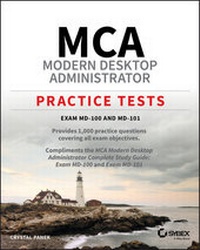
MCA Modern Desktop Administrator Practice Tests
Exam MD-100 and MD-101
1st Edition
Published on 4. September 2020
528 pages
978-1-119-71300-5 (ISBN)
Description

EXAM MD-100 AND MD-101
* Provides 1,000 practice questions covering all exam objectives.
* Compliments the MCA Modern Desktop Administrator Complete Study Guide: Exam MD-100 and Exam MD-101
Quick, focused review for MD-100 and MD-101
Microsoft's new Certified Associate Modern Desktop qualification verifies your skill as an administrator of Windows 10 technologies and modern desktop management. With a focus on the intricacies of Microsoft 365, this certification is in high demand. The 2 practice exams PLUS domain-by-domain questions in this book will help you target your study and sharpen your focus--1000 questions total! So now tackle the certification exam with confidence. Expertly crafted questions cover 100% of the objectives for both the MD-100 and MD-101 exams, enabling you to be fully prepared.
Coverage of 100% of all exam objectives in these practice tests means you'll be ready for:
* Desktop and Device Deployment
* Windows Management and Monitoring
* OS Updates and Upgrades
* Core Services Support
* Data Access and Usage
* Networking Security
* Driver and Device Installation
* Remote Access Configuration
* System Backup and Restore
Interactive learning environment
Take your exam prep to the next level with Sybex's superior interactive online study tools. To access our learning environment, simply visit www.wiley.com/go/sybextestprep, register to receive your unique PIN, and instantly gain one year of FREE access to the interactive test bank with two practice exams and domain-by-domain questions. 1000 questions total!
* Interactive test bank Use the interactive online version of the book's 2 practice exams to help you identify areas where further review is needed. Get more than 90% of the answers correct, and you're ready to take the certification exam. 100 questions total!
ABOUT THE MCA PROGRAM
The MCA Microsoft 365 Certified: Modern Desktop Administrator Associate certification helps Modern Desktop Administrators deploy, configure, secure, manage, and monitor devices and client applications in an enterprise environment. Exam MD-100, Windows 10, measures your ability to accomplish the following technical tasks: deploy Windows; manage devices and data; configure connectivity; and maintain Windows. Exam MD-101, Managing Modern Desktops, measures your ability to accomplish the following technical tasks: deploy and update operating systems; manage policies and profiles; manage and protect devices; and manage apps and data. Visit www.microsoft.com/en-us/ learning/modern-desktop.aspx for more information.
* Provides 1,000 practice questions covering all exam objectives.
* Compliments the MCA Modern Desktop Administrator Complete Study Guide: Exam MD-100 and Exam MD-101
Quick, focused review for MD-100 and MD-101
Microsoft's new Certified Associate Modern Desktop qualification verifies your skill as an administrator of Windows 10 technologies and modern desktop management. With a focus on the intricacies of Microsoft 365, this certification is in high demand. The 2 practice exams PLUS domain-by-domain questions in this book will help you target your study and sharpen your focus--1000 questions total! So now tackle the certification exam with confidence. Expertly crafted questions cover 100% of the objectives for both the MD-100 and MD-101 exams, enabling you to be fully prepared.
Coverage of 100% of all exam objectives in these practice tests means you'll be ready for:
* Desktop and Device Deployment
* Windows Management and Monitoring
* OS Updates and Upgrades
* Core Services Support
* Data Access and Usage
* Networking Security
* Driver and Device Installation
* Remote Access Configuration
* System Backup and Restore
Interactive learning environment
Take your exam prep to the next level with Sybex's superior interactive online study tools. To access our learning environment, simply visit www.wiley.com/go/sybextestprep, register to receive your unique PIN, and instantly gain one year of FREE access to the interactive test bank with two practice exams and domain-by-domain questions. 1000 questions total!
* Interactive test bank Use the interactive online version of the book's 2 practice exams to help you identify areas where further review is needed. Get more than 90% of the answers correct, and you're ready to take the certification exam. 100 questions total!
ABOUT THE MCA PROGRAM
The MCA Microsoft 365 Certified: Modern Desktop Administrator Associate certification helps Modern Desktop Administrators deploy, configure, secure, manage, and monitor devices and client applications in an enterprise environment. Exam MD-100, Windows 10, measures your ability to accomplish the following technical tasks: deploy Windows; manage devices and data; configure connectivity; and maintain Windows. Exam MD-101, Managing Modern Desktops, measures your ability to accomplish the following technical tasks: deploy and update operating systems; manage policies and profiles; manage and protect devices; and manage apps and data. Visit www.microsoft.com/en-us/ learning/modern-desktop.aspx for more information.
More details
Other editions
Additional editions
Crystal Panek
MCA Modern Desktop Administrator Practice Tests: Exam MD-100 and MD-101
Exam MD-100 and MD-101
Book
10/2020
1st Edition
Sybex Inc.,U.S.
€37.50
Shipment within 15-20 days
Person
ABOUT THE AUTHOR
CRYSTAL PANEK, MCP, MCP+I, MCSA, MCSE, MCTS, MCDBA. For many years, Crystal trained as a contract instructor teaching at such locations as MicroC, Stellacon Corporation, and the University of New Hampshire. She then became the vice-president for a large IT training company and for 15 years she developed training materials and courseware to help 1000's of students get through their certification exams. She currently works on a contract basis creating courseware for several large IT training facilities.
CRYSTAL PANEK, MCP, MCP+I, MCSA, MCSE, MCTS, MCDBA. For many years, Crystal trained as a contract instructor teaching at such locations as MicroC, Stellacon Corporation, and the University of New Hampshire. She then became the vice-president for a large IT training company and for 15 years she developed training materials and courseware to help 1000's of students get through their certification exams. She currently works on a contract basis creating courseware for several large IT training facilities.
Content
Introduction xvii
Part I Modern Desktop Admin, Exam MD-100 1
Chapter 1 Deploy Windows 3
Chapter 2 Manage Devices and Data 25
Chapter 3 Configure Connectivity 57
Chapter 4 Maintain Windows 83
Part II Modern Desktop Admin, Exam MD-101 115
Chapter 5 Deploy and Update Operating Systems 117
Chapter 6 Manage Policies and Profiles 151
Chapter 7 Manage and Protect Devices 183
Chapter 8 Manage Apps and Data 211
Chapter 9 Practice Exam 1: MD-100 237
Chapter 10 Practice Exam 2: MD-101 249
Appendix Answers and Explanations 261
Chapter 1: Deploy Windows 262
Chapter 2: Manage Devices and Data 280
Chapter 3: Configure Connectivity 303
Chapter 4: Maintain Windows 323
Chapter 5: Deploy and Update Operating Systems 349
Chapter 6: Manage Policies and Profiles 375
Chapter 7: Manage and Protect Devices 402
Chapter 8: Manage Apps and Data 432
Chapter 9: Practice Exam 1: MD-100 460
Chapter 10: Practice Exam 2: MD-101 468
Index 479
Part I Modern Desktop Admin, Exam MD-100 1
Chapter 1 Deploy Windows 3
Chapter 2 Manage Devices and Data 25
Chapter 3 Configure Connectivity 57
Chapter 4 Maintain Windows 83
Part II Modern Desktop Admin, Exam MD-101 115
Chapter 5 Deploy and Update Operating Systems 117
Chapter 6 Manage Policies and Profiles 151
Chapter 7 Manage and Protect Devices 183
Chapter 8 Manage Apps and Data 211
Chapter 9 Practice Exam 1: MD-100 237
Chapter 10 Practice Exam 2: MD-101 249
Appendix Answers and Explanations 261
Chapter 1: Deploy Windows 262
Chapter 2: Manage Devices and Data 280
Chapter 3: Configure Connectivity 303
Chapter 4: Maintain Windows 323
Chapter 5: Deploy and Update Operating Systems 349
Chapter 6: Manage Policies and Profiles 375
Chapter 7: Manage and Protect Devices 402
Chapter 8: Manage Apps and Data 432
Chapter 9: Practice Exam 1: MD-100 460
Chapter 10: Practice Exam 2: MD-101 468
Index 479
