

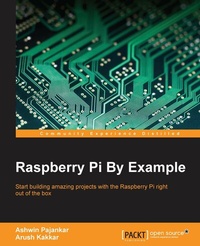
Raspberry Pi By Example
Start building amazing projects with the Raspberry Pi right out of the box
Published on 8. July 2025
294 pages
978-1-78528-674-2 (ISBN)
Description

Start building amazing projects with the Raspberry Pi right out of the box
Key Features
* Explore the vast range of opportunities provided by Raspberry Pi and other hardware components such as a webcam, the Pi camera, and sensors
* Get hands-on experience with coding, networking, and hardware with the Raspberry Pi platform
* Learn through ample screenshots that offer a play-by-play account of how to implement Raspberry-Pi-based real-life projects
Book DescriptionWant to put your Raspberry Pi through its paces right out of the box? This tutorial guide is designed to get you learning all the tricks of the Raspberry Pi through building complete, hands-on hardware projects. Speed through the basics and then dive right in to development! Discover that you can do almost anything with your Raspberry Pi with a taste of almost everything. Get started with Pi Gaming as you learn how to set up Minecraft, and then program your own game with the help of Pygame. Turn the Pi into your own home security system with complete guidance on setting up a webcam spy camera and OpenCV computer vision for image recognition capabilities. Get to grips with GPIO programming to make a Pi-based glowing LED system, build a complete functioning motion tracker, and more. Finally, get ready to tackle projects that push your Pi to its limits. Construct a complete Internet of Things home automation system with the Raspberry Pi to control your house via Twitter; turn your Pi into a super-computer through linking multiple boards into a cluster and then add in advanced network capabilities for super speedy processing!What you will learn
* Set up your Raspberry Pi and get it ready for some interesting real-life projects
* Work with images, videos, webcams, and the Pi camera and create amazing time-lapse videos
* Explore the amazing world of Minecraft Pi
* Get to know how to use PiGlow for GPIO programming
* Interface your Pi with Grove Sensors and implement IoT applications
* Build your own cluster with Raspberry Pi
* Understand the networking and network programming fundamentals
Who this book is forWhat's the best way to learn how to use your Raspberry Pi? By example! If you want something exciting to do whilst getting to grips with what your Pi can offer, this is the book for you. With both simple and complex projects, you'll create a wide variety of cool toys and functions with your Raspberry Pi - all with minimal coding experience necessary.
Key Features
* Explore the vast range of opportunities provided by Raspberry Pi and other hardware components such as a webcam, the Pi camera, and sensors
* Get hands-on experience with coding, networking, and hardware with the Raspberry Pi platform
* Learn through ample screenshots that offer a play-by-play account of how to implement Raspberry-Pi-based real-life projects
Book DescriptionWant to put your Raspberry Pi through its paces right out of the box? This tutorial guide is designed to get you learning all the tricks of the Raspberry Pi through building complete, hands-on hardware projects. Speed through the basics and then dive right in to development! Discover that you can do almost anything with your Raspberry Pi with a taste of almost everything. Get started with Pi Gaming as you learn how to set up Minecraft, and then program your own game with the help of Pygame. Turn the Pi into your own home security system with complete guidance on setting up a webcam spy camera and OpenCV computer vision for image recognition capabilities. Get to grips with GPIO programming to make a Pi-based glowing LED system, build a complete functioning motion tracker, and more. Finally, get ready to tackle projects that push your Pi to its limits. Construct a complete Internet of Things home automation system with the Raspberry Pi to control your house via Twitter; turn your Pi into a super-computer through linking multiple boards into a cluster and then add in advanced network capabilities for super speedy processing!What you will learn
* Set up your Raspberry Pi and get it ready for some interesting real-life projects
* Work with images, videos, webcams, and the Pi camera and create amazing time-lapse videos
* Explore the amazing world of Minecraft Pi
* Get to know how to use PiGlow for GPIO programming
* Interface your Pi with Grove Sensors and implement IoT applications
* Build your own cluster with Raspberry Pi
* Understand the networking and network programming fundamentals
Who this book is forWhat's the best way to learn how to use your Raspberry Pi? By example! If you want something exciting to do whilst getting to grips with what your Pi can offer, this is the book for you. With both simple and complex projects, you'll create a wide variety of cool toys and functions with your Raspberry Pi - all with minimal coding experience necessary.
All prices
More details
Edition
Digital original
Language
English
Place of publication
Birmingham
United Kingdom
Target group
US School Grade: College Graduate Student
Edition type
Digital original
File size
21,71 MB
ISBN-13
978-1-78528-674-2 (9781785286742)
Copyright in bibliographic data and cover images is held by Nielsen Book Services Limited or by the publishers or by their respective licensors: all rights reserved.
Schweitzer Classification
Other editions
Additional editions
Ashwin Pajankar | Arush Kakkar
Raspberry Pi By Example
Book
04/2016
Packt Publishing
€50.90
Shipment within 3-4 weeks
Persons
Kakkar Arush :
Arush Kakkar is a computer vision and deep learning researcher and an undergraduate at Delhi Technological University. His primary focus is on autonomous robotics, which includes drones and self-driving cars, and he has been involved in building such systems in different capacities, such as navigation, localization, path planning. He has also leveraged state-of-the art computer vision and deep learning technologies for them. He is the electrical systems head of the Solar Car team of his university, Solaris DTU. He is currently working on his own driverless car company, CruiseX, which uses deep learning to drive more smoothly and with fewer errors.
Arush Kakkar is a computer vision and deep learning researcher and an undergraduate at Delhi Technological University. His primary focus is on autonomous robotics, which includes drones and self-driving cars, and he has been involved in building such systems in different capacities, such as navigation, localization, path planning. He has also leveraged state-of-the art computer vision and deep learning technologies for them. He is the electrical systems head of the Solar Car team of his university, Solaris DTU. He is currently working on his own driverless car company, CruiseX, which uses deep learning to drive more smoothly and with fewer errors.
Content
Table of Contents
Let
Gaming with Raspberry Pi
Build your own Game with Pygame
Using WebCam and PiCamera
GPIO and It
Create your own animated movie with Raspberry Pi
Introduction to Computer Vision
Create your own Motion Detection and Tracking System
Grove Sensors and Shield for Raspberry Pi
Internet of Things with Raspberry Pi
Build your own Supercomputer with Raspberry Pis
Advanced Networking with Raspberry Pi
Setting up a Webserver on the Raspberry Pi
Network Programming in Python with Pi
Appendix : Raspberry Pi New Models
Let
Gaming with Raspberry Pi
Build your own Game with Pygame
Using WebCam and PiCamera
GPIO and It
Create your own animated movie with Raspberry Pi
Introduction to Computer Vision
Create your own Motion Detection and Tracking System
Grove Sensors and Shield for Raspberry Pi
Internet of Things with Raspberry Pi
Build your own Supercomputer with Raspberry Pis
Advanced Networking with Raspberry Pi
Setting up a Webserver on the Raspberry Pi
Network Programming in Python with Pi
Appendix : Raspberry Pi New Models

