

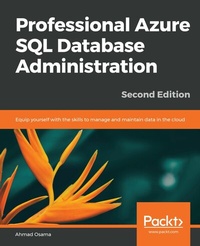
Professional Azure SQL Database Administration
Equip yourself with the skills to manage and maintain data in the cloud
2nd Edition
Published on 23. September 2024
562 pages
978-1-78980-418-8 (ISBN)
Description

Leverage the features of Azure SQL database and become an expert in data management
Key Features
Explore ways to create shards and elastic pools to scale Azure SQL databases
Automate common management tasks with PowerShell
Implement over 40 practical activities and exercises to reinforce your learning
Book DescriptionDespite being the cloud version of SQL Server, Azure SQL Database differs in key ways when it comes to management, maintenance, and administration. This book shows you how to administer Azure SQL Database to fully benefit from its wide range of features and functionalities. Professional Azure SQL Database Administration begins by covering the architecture and explaining the difference between Azure SQL Database and the on-premise SQL Server to help you get comfortable with Azure SQL Database. You'll perform common tasks such as migrating, backing up and restoring a SQL Server database to an Azure database. As you progress, you'll understand how you can reduce costs, and manage and scale multiple SQL databases using elastic pools. You'll also implement a disaster recovery solution using standard and active geo-replication. Whether it is learning different techniques to monitor and tune an Azure SQL Database or improving performance using in-memory technology, this book will enable you to make the most out of Azure SQL database features and functionality for data management solutions. By the end of this book, you'll be well-versed with key aspects of an Azure SQL Database instance, such as migration, backup restorations, performance optimization, high availability, and disaster recovery.What you will learn
Understand Azure SQL Database configuration and pricing options
Provision a new SQL database or migrate an existing on-premise SQL Server database to Azure SQL Database
Backup and restore Azure SQL Database
Secure an Azure SQL database
Scale an Azure SQL database
Monitor and tune an Azure SQL database
Implement high availability and disaster recovery with Azure SQL Database
Automate common management tasks with PowerShell
Develop a scalable cloud solution with Azure SQL Database
Manage, maintain, and secure managed instances
Who this book is forIf you're a database administrator, database developer, or an application developer interested in developing new applications or migrating existing ones with Azure SQL database, this book is for you. Prior experience of working with an on-premise SQL Server or Azure SQL database along with a basic understanding of PowerShell scripts and C# code is necessary to grasp the concepts covered in this book.
Key Features
Explore ways to create shards and elastic pools to scale Azure SQL databases
Automate common management tasks with PowerShell
Implement over 40 practical activities and exercises to reinforce your learning
Book DescriptionDespite being the cloud version of SQL Server, Azure SQL Database differs in key ways when it comes to management, maintenance, and administration. This book shows you how to administer Azure SQL Database to fully benefit from its wide range of features and functionalities. Professional Azure SQL Database Administration begins by covering the architecture and explaining the difference between Azure SQL Database and the on-premise SQL Server to help you get comfortable with Azure SQL Database. You'll perform common tasks such as migrating, backing up and restoring a SQL Server database to an Azure database. As you progress, you'll understand how you can reduce costs, and manage and scale multiple SQL databases using elastic pools. You'll also implement a disaster recovery solution using standard and active geo-replication. Whether it is learning different techniques to monitor and tune an Azure SQL Database or improving performance using in-memory technology, this book will enable you to make the most out of Azure SQL database features and functionality for data management solutions. By the end of this book, you'll be well-versed with key aspects of an Azure SQL Database instance, such as migration, backup restorations, performance optimization, high availability, and disaster recovery.What you will learn
Understand Azure SQL Database configuration and pricing options
Provision a new SQL database or migrate an existing on-premise SQL Server database to Azure SQL Database
Backup and restore Azure SQL Database
Secure an Azure SQL database
Scale an Azure SQL database
Monitor and tune an Azure SQL database
Implement high availability and disaster recovery with Azure SQL Database
Automate common management tasks with PowerShell
Develop a scalable cloud solution with Azure SQL Database
Manage, maintain, and secure managed instances
Who this book is forIf you're a database administrator, database developer, or an application developer interested in developing new applications or migrating existing ones with Azure SQL database, this book is for you. Prior experience of working with an on-premise SQL Server or Azure SQL database along with a basic understanding of PowerShell scripts and C# code is necessary to grasp the concepts covered in this book.
More details
Edition
2nd Revised edition
Language
English
Place of publication
Birmingham
United Kingdom
Target group
Professional and scholarly
US School Grade: College Graduate Student
Edition type
Revised edition
File size
52,58 MB
ISBN-13
978-1-78980-418-8 (9781789804188)
Copyright in bibliographic data and cover images is held by Nielsen Book Services Limited or by the publishers or by their respective licensors: all rights reserved.
Schweitzer Classification
Other editions
Additional editions
Ahmad Osama
Professional Azure SQL Database Administration
Equip yourself with the skills to manage and maintain data in the cloud
Book
07/2019
2nd Edition
Packt Publishing
€58.10
Shipment within 3-4 weeks
Previous edition
Ahmad Osama
Professional Azure SQL Database Administration
Equip yourself with the skills you need to manage and maintain your SQL databases on the Microsoft cloud
E-Book
09/2024
Packt Publishing
€38.99
Available for download
Person
Osama Ahmad :
Ahmad Osama works for Pitney Bowes Pvt. Ltd. as a technical architect and is a former Microsoft Data Platform MVP. In his day job, he works on developing and maintaining high performant, on-premises and cloud SQL Server OLTP environments as well as deployment and automating tasks using PowerShell. When not working, Ahmad blogs at DataPlatformLabs and can be found glued to his Xbox.
Ahmad Osama works for Pitney Bowes Pvt. Ltd. as a technical architect and is a former Microsoft Data Platform MVP. In his day job, he works on developing and maintaining high performant, on-premises and cloud SQL Server OLTP environments as well as deployment and automating tasks using PowerShell. When not working, Ahmad blogs at DataPlatformLabs and can be found glued to his Xbox.
Content
Table of Contents
Microsoft Azure SQL Database Primer
Migrating a SQL Server Database to an Azure SQL Database
Backing up Azure SQL Database and Managed Instances
Restoring an Azure SQL Database And Managed Instances
Securing an Azure SQL Database
Scaling out an Azure SQL Database
Elastic Pools
High Availability and Disaster Recovery
Monitoring and Tuning an Azure SQL Database
Database Features
Microsoft Azure SQL Database Primer
Migrating a SQL Server Database to an Azure SQL Database
Backing up Azure SQL Database and Managed Instances
Restoring an Azure SQL Database And Managed Instances
Securing an Azure SQL Database
Scaling out an Azure SQL Database
Elastic Pools
High Availability and Disaster Recovery
Monitoring and Tuning an Azure SQL Database
Database Features
