

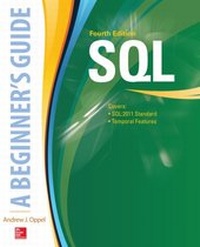
SQL: A Beginner's Guide, Fourth Edition
1st Edition
Published on 6. November 2015
700 pages
978-0-07-184257-0 (ISBN)
Available for download
Description

This fully revised, self-paced learning tool lays out all the necessary steps to quickly and easily start writing SQL programs Thoroughly updated to reflect the most recent ANSI/ISO standard, SQL: A Beginner's Guide, Fourth Edition will get you up-and-running with SQL programming right away. Clear tutorials, annotated code, and proven instructional tools guide you to easily performing queries and modifications, building databases, creating and reviewing embedded statements, troubleshooting system- and data-related problems, and much more. You will learn how to retrieve, insert, update, and delete database data, and perform management and administrative functions. The book also covers new features, including SQL/XML and the long-awaited temporal support. Code examples are provided throughout along with notes on using them with the latest RDBMS software versions such as MySQL 5.7, SQL Server 2014, and Oracle Database 12c. Platform-neutral coverage, all skills can be applied to any database product, and any SQL version Features hands-on exercises and self-tests that reinforce basic knowledge Ask the Expert sections throughout are filled with bonus information and useful tips
More details
Other editions
Additional editions
Book
11/2015
4th Edition
McGraw-Hill Inc.,US
€44.80
Shipment within 15-20 days
Content
- Cover
- Title Page
- Copyright Page
- Dedication
- Contents at a Glance
- Contents
- Acknowledgments
- Introduction
- PART I Relational Databases and SQL
- 1 Introduction to Relational Databases and SQL
- Understand Relational Databases
- The Relational Model
- Try This 1-1: Normalizing Data and Identifying Relationships
- Learn About SQL
- The SQL Evolution
- Types of SQL Statements
- Types of Execution
- SQL Standard versus Product Implementations
- Try This 1-2: Connecting to a Database
- Chapter 1 Self Test
- 2 Working with the SQL Environment
- Understand the SQL Environment
- Understand SQL Catalogs
- Schemas
- Schema Objects
- Then What Is a Database?
- Name Objects in an SQL Environment
- Qualified Names
- Create a Schema
- Create a Database
- Try This 2-1: Creating a Database and a Schema
- Chapter 2 Self Test
- 3 Creating and Altering Tables
- Create SQL Tables
- Specify Column Data Types
- String Data Types
- Numeric Data Types
- Datetime Data Types
- Interval Data Type
- Boolean Data Type
- Using SQL Data Types
- Create User-Defined Types
- Specify Column Default Values
- Specify Identity Column and Generation Options
- Maintaining Independent Sequence Generators
- Try This 3-1: Creating SQL Tables
- Alter SQL Tables
- Drop SQL Tables
- Truncate SQL Tables
- Try This 3-2: Altering and Deleting SQL Tables
- Chapter 3 Self Test
- 4 Enforcing Data Integrity
- Understand Integrity Constraints
- Use NOT NULL Constraints
- Add UNIQUE Constraints
- Add PRIMARY KEY Constraints
- Add FOREIGN KEY Constraints
- The MATCH Clause
- The &referential triggered action& Clause
- Try This 4-1: Adding NOT NULL, Unique, and Referential Constraints
- Define CHECK Constraints
- Defining Assertions
- Creating Domains and Domain Constraints
- Try This 4-2: Adding a CHECK Constraint
- Chapter 4 Self Test
- 5 Creating SQL Views
- Add Views to the Database
- Defining SQL Views
- Create Updateable Views
- Using the WITH CHECK OPTION Clause
- Drop Views from the Database
- Try This 5-1: Adding Views to Your Database
- Chapter 5 Self Test
- 6 Managing Database Security
- Understand the SQL Security Model
- SQL Sessions
- Accessing Database Objects
- Create and Delete Roles
- Grant and Revoke Privileges
- Revoking Privileges
- Grant and Revoke Roles
- Revoking Roles
- Try This 6-1: Managing Roles and Privileges
- Chapter 6 Self Test
- PART II Data Access and Modification
- 7 Querying SQL Data
- Use a SELECT Statement to Retrieve Data
- The SELECT Clause and FROM Clause
- Use the WHERE Clause to Define Search Conditions
- Defining the WHERE Clause
- Use the GROUP BY Clause to Group Query Results
- Use the HAVING Clause to Specify Group Search Conditions
- Use the ORDER BY Clause to Sort Query Results
- Try This 7-1: Querying the Inventory Database
- Chapter 7 Self Test
- 8 Modifying SQL Data
- Insert SQL Data
- Inserting Values from a SELECT Statement
- Update SQL Data
- Updating Values from a SELECT Statement
- Delete SQL Data
- Merge SQL Data
- Try This 8-1: Modifying SQL Data
- Chapter 8 Self Test
- 9 Using Predicates
- Compare SQL Data
- Using the BETWEEN Predicate
- Return Null Values
- Return Similar Values
- Try This 9-1: Using Predicates in SQL Statements
- Reference Additional Sources of Data
- Using the IN Predicate
- Using the EXISTS Predicate
- Quantify Comparison Predicates
- Using the SOME and ANY Predicates
- Using the ALL Predicate
- Try This 9-2: Using Subqueries in Predicates
- Chapter 9 Self Test
- 10 Working with Functions and Value Expressions
- Use Set Functions
- Using the COUNT Function
- Using the MAX and MIN Functions
- Using the SUM Function
- Using the AVG Function
- Use Value Functions
- Working with String Value Functions
- Working with Datetime Value Functions
- Use Value Expressions
- Working with Numeric Value Expressions
- Using the CASE Value Expression
- Using the CAST Value Expression
- Use Special Values
- Try This 10-1: Using Functions and Value Expressions
- Chapter 10 Self Test
- 11 Accessing Multiple Tables
- Perform Basic Join Operations
- Using Correlation Names
- Creating Joins with More than Two Tables
- Creating the Cross Join
- Creating the Self-Join
- Join Tables with Shared Column Names
- Creating the Natural Join
- Creating the Named Column Join
- Use the Condition Join
- Creating the Inner Join
- Creating the Outer Join
- Perform Union Operations
- Try This 11-1: Querying Multiple Tables
- Chapter 11 Self Test
- 12 Using Subqueries to Access and Modify Data
- Create Subqueries That Return Multiple Rows
- Using the IN Predicate
- Using the EXISTS Predicate
- Using Quantified Comparison Predicates
- Create Subqueries That Return One Value
- Work with Correlated Subqueries
- Use Nested Subqueries
- Use Subqueries to Modify Data
- Using Subqueries to Insert Data
- Using Subqueries to Update Data
- Using Subqueries to Delete Data
- Try This 12-1: Working with Subqueries
- Chapter 12 Self Test
- 13 Working with Temporal Data
- Create and Use System-Versioned Tables
- Changing Data in a System-Versioned Table
- Querying a System-Versioned Table
- Create and Use Application-Time Period Tables
- Inserting Data into an Application-Time Period Table
- Updating Data in an Application-Time Period Table
- Deleting Data from an Application-Time Period Table
- Try This 13-1: Working with Application-Time Period Tables
- Create and Use System-Versioned Application-Time Period Tables
- Inserting Data into a System-Versioned Application-Time Period Table
- Updating Data in a System-Versioned Application-Time Period Table
- Deleting Data from a System-Versioned Application-Time Period Table
- Chapter 13 Self Test
- PART III Advanced Data Access
- 14 Creating SQL-Invoked Routines
- Understand SQL-Invoked Routines
- SQL-Invoked Procedures and Functions
- Working with the Basic Syntax
- Create SQL-Invoked Procedures
- Invoking SQL-Invoked Procedures
- Add Input Parameters to Your Procedures
- Using Procedures to Modify Data
- Add Local Variables to Your Procedures
- Work with Control Statements
- Create Compound Statements
- Create Conditional Statements
- Create Looping Statements
- Try This 14-1: Creating SQL-Invoked Procedures
- Add Output Parameters to Your Procedures
- Create SQL-Invoked Functions
- Try This 14-2: Creating SQL-Invoked Functions
- Chapter 14 Self Test
- 15 Creating SQL Triggers
- Understand SQL Triggers
- Trigger Execution Context
- Create SQL Triggers
- Referencing Old and New Values
- Dropping SQL Triggers
- Create Insert Triggers
- Create Update Triggers
- Create Delete Triggers
- Create Instead Of Triggers
- Try This 15-1: Creating SQL Triggers
- Chapter 15 Self Test
- 16 Using SQL Cursors
- Understand SQL Cursors
- Declaring and Opening SQL Cursors
- Declare a Cursor
- Working with Optional Syntax Elements
- Creating a Cursor Declaration
- Open and Close a Cursor
- Retrieve Data from a Cursor
- Use Positioned UPDATE and DELETE Statements
- Using the Positioned UPDATE Statement
- Using the Positioned DELETE Statement
- Try This 16-1: Working with SQL Cursors
- Chapter 16 Self Test
- 17 Managing SQL Transactions
- Understand SQL Transactions
- Set Transaction Properties
- Specifying an Isolation Level
- Specifying a Diagnostics Size
- Creating a SET TRANSACTION Statement
- Start a Transaction
- Set Constraint Deferability
- Create Savepoints in a Transaction
- Releasing a Savepoint
- Terminate a Transaction
- Committing a Transaction
- Rolling Back a Transaction
- Try This 17-1: Working with Transactions
- Chapter 17 Self Test
- 18 Accessing SQL Data from Your Host Program
- Invoke SQL Directly
- Embed SQL Statements in Your Program
- Creating an Embedded SQL Statement
- Using Host Variables in Your SQL Statements
- Retrieving SQL Data
- Error Handling
- Try This 18-1: Embedding SQL Statements
- Create SQL Client Modules
- Defining SQL Client Modules
- Use an SQL Call-Level Interface
- Allocating Handles
- Executing SQL Statements
- Working with Host Variables
- Retrieving SQL Data
- Try This 18-2: Using the SQL Call-Level Interface
- Chapter 18 Self Test
- 19 Working with XML Data
- Learn the Basics of XML
- Learn About SQL/XML
- The XML Data Type
- SQL/XML Functions
- SQL/XML Mapping Rule
- Try This 19-1: Using SQL/XML Functions
- Chapter 19 Self Test
- PART IV Appendices
- A SQL Keywords
- SQL Reserved Keywords
- SQL Nonreserved Keywords
- B Answers to Self Tests
- C SQL Code Used in Try This Exercises
- Index

