

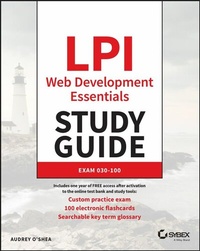
LPI Web Development Essentials Study Guide
Description

- Introductory coverage of SQL, HTML, JavaScript, CSS, and MongoDB
- A heavy emphasis on real-world job skills, as well as the technologies used every day by web developers in the field
- Complimentary access to the Sybex interactive online learning environment and test bank, complete with hundreds of practice questions, electronic flashcards, and a searchable glossary of important terms
More details
Other editions
Additional editions
Person
ABOUT THE AUTHOR
Audrey O'Shea currently teaches electronics and information technology at a technical school in upstate New York. She has been working and educating in IT since 1989 and her career has included positions of network administrator, tech support specialist, trainer and consultant.
Content
Chapter 1 Web Development Basics 1
Developer Types 2
Creating Software 3
Text Editors and IDEs 6
Compiled Languages 7
Interpreted Languages 8
Programming Paradigms 8
Maintaining Software 11
Version Control Systems 11
Software Testing 12
Summary 12
Exam Essentials 13
Review Questions 17
Chapter 2 Client/Server Computing 21
Client-Side 23
Types of Clients 24
Web Browsers 26
Server- Side 28
Types of Servers 28
Popular Server Software 29
Popular Web Page-Creating Software 29
Summary 31
Exam Essentials 31
Review Questions 34
Chapter 3 Database Management Systems 39
Database Structures and Languages 40
Database Structures 40
Database Languages 43
Relational Database Concepts 44
Content Maintenance and Delivery 45
Summary 47
Exam Essentials 47
Review Questions 51
Chapter 4 Client/Server Communication 55
HTTP 56
HTTP Client-Side 57
HTTP Server-Side 60
WebSocket API 61
Caches and Cookies 62
HTTP Security Concerns 63
Summary 63
Exam Essentials 64
Review Questions 66
Chapter 5 HTML Introduction 71
What Is HTML? 73
The HTML Skeleton 73
HTML Syntax 75
HTML Head 79
Summary 81
Exam Essentials 81
Review Questions 86
Chapter 6 Content Markup 91
The Basics 92
Block and Inline Elements 93
Block Elements 93
Inline Elements 95
Hierarchical Structure 96
Lists 97
Styles 100
Semantic and Non-Semantic Elements 100
Non-Semantic Elements 100
Semantic Structural Elements 100
Summary 101
Exam Essentials 101
Review Questions 111
Chapter 7 References and Embedded Resources 115
Page Anchors 116
External Resource Links 117
Using Images 118
The img Tag and Its Attributes 119
Inline or Background Images 120
Image Maps 122
File Formats 124
The Tag 125
Summary 126
Exam Essentials 126
Review Questions 131
Chapter 8 Creating HTML Forms 135
Anatomy of an Input Form 136
Commonly Used Attributes 137
Button Types 142
Adding Functionality 143
Radio Buttons and Check Boxes 145
A Form for Reviews 146
Summary 146
Exam Essentials 147
Review Questions 154
Chapter 9 Introducing CSS 159
Applying Styles to HTML 160
The style Attribute 160
CSS Rules and Selectors 161
The Tag 162
CSS Stored in Separate Files 164
CSS Accessibility Features 165
Summary 166
Exam Essentials 166
Review Questions 171
Chapter 10 Applying CSS Styles 175
Other Selectors 176
CSS Inheritance 180
CSS Pseudo- Classes 181
CSS Order of Precedence 182
Summary 183
Exam Essentials 183
Review Questions 188
Chapter 11 CSS Styling Fundamentals 193
Units of Measure 194
Absolute Units 194
Relative Units 195
Common Properties 196
Color 197
Background 198
Borders 200
Font 201
Text 202
List Style 204
Line Height 206
Summary 208
Exam Essentials 209
Review Questions 213
Chapter 12 CSS Layout and Box Model 217
The CSS Box Model 218
CSS Box Model Parts 219
Element Dimensions 219
CSS Website Layout 221
Elements and Their Positions 221
Text Flow 221
Document Flow 222
Other Layout Features 224
Summary 226
Exam Essentials 227
Review Questions 233
Chapter 13 JavaScript Essentials 237
JavaScript Statements and Syntax 238
Adding Comments 240
Inserting JavaScript into HTML 241
JavaScript as an External File 242
The JavaScript Console 244
Summary 245
Exam Essentials 246
Review Questions 249
Chapter 14 JavaScript Data 253
Variables, Constants, and Scope 254
Variables 254
Constants 255
Scope 255
Objects and Methods 256
Data Types 258
Primitive Types 258
Arrays 259
Strings 260
Operators and Precedence 261
Data Conversions 263
Summary 264
Exam Essentials 265
Review Questions 269
Chapter 15 Functions and Control Structures 273
Functions 274
Function Syntax 274
Starting and Stopping Functions 275
Functions and Variables 276
Conditional Statements 276
Comparison Operators 280
Data Coercion 280
Truthy and Falsy Values 281
Summary 281
Exam Essentials 281
Review Questions 285
Chapter 16 The DOM 291
DOM Structure 292
DOM Methods and Properties 296
Adding and Deleting Classes and Attributes 296
Retrieving and Setting Values 297
Changing CSS Styling Using the DOM 299
DOM Events 300
Summary 301
Exam Essentials 301
Review Questions 305
Chapter 17 NodeJS Basics 309
What Is Node.js? 310
Installing Node.js 311
Installing a Node.js Module 312
Running a Node.js App 313
Summary 313
Exam Essentials 314
Review Questions 317
Chapter 18 NodeJS Express 321
Node.js vs. Node.js Express 322
Installing Express 322
Routing and Serving Files 325
User Input and Validation 327
Templates 331
Template Engines 331
HTML Templates 331
Security Concerns 333
Cross-Site Scripting 333
Cross-Site Request Forgery 333
Summary 333
Exam Essentials 333
Review Questions 337
Chapter 19 Manipulating SQLite with NodeJS 341
Installing the SQLite Module 342
Creating a SQLite Database 342
Opening and Closing the Database 343
In Terminal 343
In NodeJS 344
Managing SQLite Data with NodeJS 345
Entering Data 346
Changing Data 346
Running Queries 347
Security Concerns 349
Summary 349
Exam Essentials 350
Review Questions 356
Appendix Answers to Review Questions 361
Chapter 1: Web Development Basics 362
Chapter 2: Client/Server Computing 363
Chapter 3: Database Management Systems 365
Chapter 4: Client/Server Communication 367
Chapter 5: HTML Introduction 369
Chapter 6: Content Markup 370
Chapter 7: References and Embedded Resources 372
Chapter 8: Creating HTML Forms 373
Chapter 9: Introducing CSS 375
Chapter 10: Applying CSS Styles 376
Chapter 11: CSS Styling Fundamentals 378
Chapter 12: CSS Layout and Box Model 380
Chapter 13: JavaScript Essentials 381
Chapter 14: JavaScript Data 383
Chapter 15: Functions and Control Structures 384
Chapter 16: The DOM 386
Chapter 17: NodeJS Basics 388
Chapter 18: NodeJS Express 389
Chapter 19: Manipulating SQLite with NodeJS 391
Index 395
Introduction
Whether on their smartphones or a desktop computer, the majority of people rely on web technologies on a daily basis for information about all sorts of things as well as connection to companies or organizations, and perhaps even friends and family. Linux powers the majority of the world's smartphones, web servers, and supercomputers. Linux is even the operating system of choice for the Space Station, so learning about Linux in any capacity is a smart move for your IT career.
The Linux Professional Institute (LPI) Web Development Essentials Study Guide: Exam 030-100 covers the knowledge that a beginner in web development will be expected to know, including how web servers and clients communicate, and front-end and back-end technologies. On the front-end, the part that the users see, the certification focuses on the following development tools:
- Hypertext Markup Language (HTML)
- JavaScript (JS)
- Cascading Style Sheets (CSS)
On the back-end, where data is stored and manipulated, the certification focuses on the following:
- Node.js
- Node.js Express
- SQLite
Together, these provide the foundation you need to get up and running with web development. So, let's get started!
What Does This Book Cover?
This book covers the topics outlined in the LPI Web Development Essentials: Exam 030-100 available at www.lpi.org/our-certifications/web-development-essentials-overview.
- Chapter 1, "Web Development Basics" This chapter begins with an outline of the types of website development and developers as well as the types of programming languages. It also explains programming editors and editing environments, along with programming paradigms and version control systems.
- Chapter 2, "Client/Server Computing" The information in this chapter explains the relationship between a web client and a web server.
- Chapter 3, "Database Management Systems" This chapter provides an overview of database management systems and relational database concepts. Databases are the backbone of an interactive web page.
- Chapter 4, "Client/Server Communication" Here you learn how the client and server communicate-the communication begins with a request from the client to the server.
- Chapter 5, "HTML Introduction" In this chapter, you learn about the skeleton of an HTML page, which is what all web pages start with.
- Chapter 6, "Content Markup" This is your introduction to "marking up" the content to provide a web page's structure.
- Chapter 7, "References and Embedded Resources" Here you learn how to include images and references to other pages in your HTML page.
- Chapter 8, "Creating HTML Forms" This chapter shows you how to create input forms that enable your web page visitors to provide information and interact with your web page.
- Chapter 9, "Introducing CSS" This chapter introduces you to Cascading Style Sheets (CSS) that provide the formatting of your web page content.
- Chapter 10, "Applying CSS Styles" Here you learn how the styles you created in Chapter 9 are applied to the page and what order they're applied in.
- Chapter 11, "CSS Styling Fundamentals" This chapter focuses on units of measure and common properties like color and font and how to use them.
- Chapter 12, "CSS Layout and Box Model" This chapter introduces you to the CSS box model and how to make text flow as you like between other elements.
- Chapter 13, "JavaScript Essentials" Here you are introduced to JavaScript and what it can do for your web page as well as how to attach your JavaScript file to an HTML file.
- Chapter 14, "JavaScript Data" In this chapter, you learn about the types of data that are used by JavaScript and the difference between variables and constants.
- Chapter 15, "Functions and Control Structures" You learn how to create functions and conditional statements in this chapter as well as examine data coercion and truthy and falsy values.
- Chapter 16, "The DOM" Here you focus entirely on the document object model (DOM), which is a method for specifying what element of the page you would like to use or have a style applied to.
- Chapter 17, "NodeJS Basics" This chapter moves us to the back-end of the website, where you learn how to use Node.js to program a server.
- Chapter 18, "NodeJS Express" Here you learn to use Node.js Express to route and serve files, use templates, and validate user input. You also explore the dangers of cross-site scripting and request forgery.
- Chapter 19, "Manipulating SQLite with NodeJS" In this final back-end chapter, you install and work with SQLite databases by entering, changing, and retrieving data.
Who Should Read This Book
As the title implies, this book is intended for people who have an interest in developing websites. Even if you're not planning to become certified (but you should consider it!), this book introduces you to the technologies that are most commonly used to build and maintain websites, and gives you some tips along the way. The topics covered are ubiquitous in the web development world. HTML, JavaScript, and CSS are the building tools for the front-end and Node.js and Node.js Express provide the runtime and framework for the back-end of websites. Regardless of your career trajectory, this book is an excellent place to start.
You don't need programming experience to work with the exercises in the book; the exercises are intended to explain the process to a novice.
The book assumes you have some experience with Linux operating systems, although even novice Linux users should be able to follow the instructions for installing and working with the tools presented. If you're typically a Microsoft Windows user, there are some suggestions in here for you as well. Working with the front-end technologies isn't much different regardless of the operating system, but you'll eventually want to have a Linux computer to practice with. Luckily Linux is free and will work on even most older computers.
Exam Tips
The LPI Web Development Essentials exam consists of 40 multiple choice/multiple answer questions. You'll have sixty minutes to complete the exam. Unlike some other certifications, this one doesn't expire, so once you've passed it, it's good for your lifetime.
Many of the questions ask you to select more than one answer, so be sure to read the questions carefully. Take your time, but remember that there is a time limit and you must submit the exam before the time runs out.
This exam is all multiple choice, but simulates the preciseness of writing code, so ensure that you know the syntax of the various commands presented in this book. Not only for the exam, but for your work as a web designer.
As with any exam, the sooner you take it after taking the course or reading the book, the more you'll remember. Devote yourself to studying in the week (or weeks) before the exam, but the night before, make sure you get a good night's sleep, and take a few minutes to relax before you go in.
Wishing you success!
Interactive Online Learning Environment and Test Bank
The author has worked hard to create some really great tools to help you with your certification process. The interactive online learning environment that accompanies the LPI Web Development Essentials Study Guide: Exam 030-100 includes a test bank with study tools to help you prepare for the certification exam-and increase your chances of passing it the first time! The test bank includes the following:
- Sample tests
All the questions in this book are included online, including the assessment test at the end of this Introduction and the review questions at the end of each chapter. In addition, there is one custom practice exam with 100 questions. Use these questions to assess how you're likely to perform on the real exam. The online test bank runs on multiple devices.
- Flashcards
The online text bank includes two sets of flashcards with over 100 questions each. They are specifically written to challenge you, so don't get discouraged if you don't ace your way through them at first. They're there to ensure that you're really ready for the exam. And no worries-armed with the review questions, practice exams, and flashcards, you'll be more than prepared when exam day comes. Questions are provided in digital flashcard format (a question followed by a single correct answer). You can use the flashcards to reinforce your learning and provide last-minute test prep before the exam.
- Glossary
A glossary of key terms from this book is available as a fully searchable PDF.
Go to www.wiley.com/go/sybextestprep to register and gain access to this interactive online learning environment and test bank with study...
