

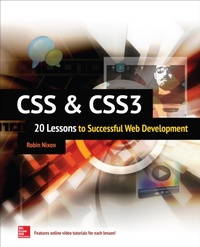
CSS & CSS3: 20 Lessons to Successful Web Development
20 Lessons to Successful Web Development [ENHANCED EBOOK]
1st Edition
Published on 30. January 2015
376 pages
978-0-07-185021-6 (ISBN)
Available for download
Description

Build real-world CSS skills in less than an hour per lesson online video tutorials included! CSS & CSS3: 20 Lessons to Successful Web Development provides easy-to-follow lessons that use text, sample exercises, and video for the entry-level CSS programmer. Each lesson is designed to take you less than an hour to complete. All the basics of CSS through to more advanced features like adding dynamic effects, animation, transitions, and web fonts are covered. This practical guide also introduces just enough of the additional technologies and techniques like HTML and JavaScript needed to complete the lessons. One-hour lessons teach practical techniques that can be applied immediately Wrap ups contain a summary, tips for further study, and self-test questions Online video accompanying each lesson offer valuable, step-by-step instruction
More details
Other editions
Additional editions
Robin Nixon
CSS & CSS3: 20 Lessons to Successful Web Development
20 Lessons to Successful Web Development: 20 Lessons to Successful Web Development [ENHANCED EBOOK]
Book
02/2015
McGraw-Hill Professional
€44.80
Article not available at the moment
Content
- Cover
- Title Page
- Copyright Page
- Dedication
- Contents at a Glance
- Contents
- Acknowledgments
- Introduction
- PART I Basic CSS
- Lesson 1 Introduction to CSS
- How the Document Object Model Works
- Correct HTML Structure and Nesting
- About Cascading Style Sheets
- Importing a Style Sheet
- Importing CSS from Within HTML
- Embedded Style Settings
- Using IDs
- Using Classes
- Summary
- Self-Test Questions
- Lesson 2 Learning the CSS Rules
- Selectors
- IDs
- Classes
- Multiple Assignments
- Comments
- Single-Line Comments
- Style Types
- Default Styles
- User Styles
- External Style Sheets
- Internal Styles
- Inline Styles
- It's All About Separation of Style and Content
- Summary
- Self-Test Questions
- Lesson 3 Applying Declarations to IDs and Classes
- Using IDs
- A Specific Case
- IDs Are Single-Use Only
- Using Classes
- Assigning Multiple Classes
- Accessing IDs and Classes with JavaScript
- The O() Function
- The S() Function
- The C() Function
- Using Hyphenated Property Names
- Why Use JavaScript?
- Summary
- Self-Test Questions
- Lesson 4 Accessing Selectors
- The Type Selector
- The Descendant Selector
- The Child Selector
- The ID Selector
- Narrowing ID Scope
- The Class Selector
- Narrowing Class Scope
- The Attribute Selector
- The Universal Selector
- Selecting by Group
- For JavaScript Programmers
- Points of Interest
- Summary
- Self-Test Questions
- Lesson 5 Working with the Cascade
- Style Sheet Creators
- Style Sheet Methods
- Style Sheet Selectors
- Calculating Specificity
- When Rules Are Particularly Important
- So What Are Divs and Spans Anyway?
- Specifying Measurements
- Pixels
- Points
- Inches
- Centimeters
- Millimeters
- Picas
- Ems
- Exs
- Percent
- Summary
- Self-Test Questions
- Lesson 6 Selecting Fonts and Typography
- Font Family
- Generic Font Families
- Font Style
- Font Size
- Font Weight
- Changing Text Styles
- Text Decoration
- Line, Word, and Letter Spacing
- Horizontal Alignment
- Managing Uppercase and Lowercase
- Text Indenting
- Summary
- Self-Test Questions
- Lesson 7 Manipulating Color and Position
- Colors
- Using rgb()
- Short Color Strings
- Gradients
- Linear Gradients
- Radial Gradients
- Controlling Color Stops
- Repeating Gradients
- An Example Document
- Alpha Transparency
- An Example Document
- CSS3 Browser Incompatibilities
- Older Browsers
- Let George Do It
- The prefixfree.js Utility
- Positioning Elements
- Absolute Positioning
- Relative Positioning
- Fixed Positioning
- An Example Document
- Summary
- Self-Test Questions
- Lesson 8 Handling Pseudo-Selectors and Using Shorthand Properties
- Introducing the Pseudo-Selectors
- Link-Related Pseudo-Classes
- Accessing Elements Numerically
- Selecting Elements by Numeric Location
- Relational Selectors
- Miscellaneous Pseudo-Selectors
- Pseudo-Elements That Add Content
- Shorthand Properties
- Border and Outline Shorthand
- Background Shorthand
- Font Shorthand
- Margin and Padding Shorthand
- List Shorthand
- Summary
- Self-Test Questions
- Lesson 9 Understanding the Box Model
- Visualizing the Box Model
- Setting Margins
- Using Borders
- Applying Padding
- Non-image Elements
- The Object Contents
- Changing the Box Model
- Summary
- Self-Test Questions
- PART II CSS
- Lesson 10 Introduction to CSS3
- Attribute Selectors
- Improved Backgrounds
- Enhanced Borders
- Box Shadows
- Element Overflow
- Multicolumn Layout
- Extended Color Handling and Opacity
- Additional Text Effects
- Box Sizing
- Resizing and Outlines
- Web Fonts
- Transitions and Transformations
- Summary
- Self-Test Questions
- Lesson 11 Using Selectors and Attribute Selectors
- Summary of Selector Types
- The Universal Selector
- Type Selectors
- Class Selectors
- ID Selectors
- Descendant Selectors
- Child Selectors
- Adjacent Sibling Selectors
- General Sibling Selectors
- Attribute Selectors
- Pseudo-Classes
- Pseudo-Elements
- Attribute Selectors
- The ^= Operator
- The $= Operator
- The *= Operator
- Summary
- Self-Test Questions
- Lesson 12 Setting Backgrounds
- The background-clip Property
- The background-origin Property
- Compatibility Issues
- The background-size Property
- Using the auto Value
- Multiple Backgrounds
- Summary
- Self-Test Questions
- Lesson 13 Attaching Borders
- The border-color Properties
- The border-style Properties
- The border-image Properties
- The border-radius Properties
- Summary
- Self-Test Questions
- Lesson 14 Controlling Box Shadows, Overflow, and Columns
- Adding Box Shadows
- The box-shadow Supported Values
- Managing Element Overflow
- Flowing Text over Multiple Columns
- Summary
- Self-Test Questions
- Lesson 15 Adding Colors and Opacity
- HSL Colors
- HSLA Colors
- RGB Colors
- RGBA Colors
- The opacity Property
- Summary
- Self-Test Questions
- Lesson 16 Creating Text Effects and Changing the Box Model
- The text-shadow Property
- The text-shadow Supported Values
- The text-overflow Property
- The word-wrap Property
- The box-sizing Property
- Browser Compatibility
- The resize Property
- The outline and outline-offset Properties
- Summary
- Self-Test Questions
- Lesson 17 Linking to Web Fonts
- Loading a Web Font
- The Main Types of Web Fonts
- Loading a Web Font
- And the Winner Is
- Google Web Fonts
- Browser Differences
- Other Font Sources
- Summary
- Self-Test Questions
- Lesson 18 Making 2D Transformations
- 2D Transformations
- The none Transformation Type
- The matrix(w,s1,s2,h,x,y) Function
- Argument 1
- Argument 2
- Argument 3
- Argument 4
- Argument 5
- Argument 6
- Internet Explorer Prior to IE9
- Summary
- Self-Test Questions
- Lesson 19 Applying Specific Transformations
- The translate(x,y) Function
- The scale(x,y) Function
- Older Versions of IE
- The rotate(n) Function
- Older Versions of IE
- The skew(x,y) Function
- Older Versions of IE
- Summary
- Self-Test Questions
- Lesson 20 Directing 3D Transformations
- The perspective Property
- The transform-origin Property
- About the Three Dimensions
- The translate3d(x,y,z) Function
- The scale3d(x,y,z) Function
- The rotate3d(x,y,z,r) Function
- The backface-visibility Property
- The transform-style Property
- Transitions
- The transition-property Property
- The transition-duration Property
- The transition-delay Property
- The transition-timing-function Property
- The cubic-bezier() Function
- Shorthand transition Property Syntax
- Summary
- Self-Test Questions
- APPENDIX Answers to the Self-Test Questions
- Lesson 1 Answers
- Lesson 2 Answers
- Lesson 3 Answers
- Lesson 4 Answers
- Lesson 5 Answers
- Lesson 6 Answers
- Lesson 7 Answers
- Lesson 8 Answers
- Lesson 9 Answers
- Lesson 10 Answers
- Lesson 11 Answers
- Lesson 12 Answers
- Lesson 13 Answers
- Lesson 14 Answers
- Lesson 15 Answers
- Lesson 16 Answers
- Lesson 17 Answers
- Lesson 18 Answers
- Lesson 19 Answers
- Lesson 20 Answers
- Index

