

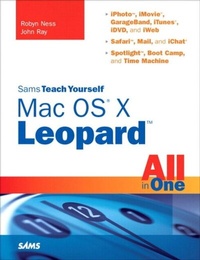
Sams Teach Yourself Mac OS X Leopard All in One
1st Edition
Published on 11. December 2003
696 pages
978-0-13-271551-5 (ISBN)
Description

You've got a Mac. You've got Leopard. And you've got iLife, Safari, Mail, iChat...and all the rest.
Now all you need to do is figure out how to get them to work together--so that you can stop thinking about your computer and start thinking about getting things done, having fun, and enjoying everything your Mac has to offer.
This one book is your answer--the answer to any questions you might have today, and the answer to all the questions about Leopard and your Mac that you're likely to have in the future.
Find out how to...
Get the most enjoyment out of iLife
Find files and documents with Spotlight
Use QuickTime and DVD Player
Use Windows software on Intel Macs
Work with peripheral devices
Surf the Web with Safari
Send email with Mail
Collaborate via iChat
Share your screen, files, and computer securely
Recover from crashes
Back up and restore files with Time Machine
Now all you need to do is figure out how to get them to work together--so that you can stop thinking about your computer and start thinking about getting things done, having fun, and enjoying everything your Mac has to offer.
This one book is your answer--the answer to any questions you might have today, and the answer to all the questions about Leopard and your Mac that you're likely to have in the future.
Find out how to...
Get the most enjoyment out of iLife
Find files and documents with Spotlight
Use QuickTime and DVD Player
Use Windows software on Intel Macs
Work with peripheral devices
Surf the Web with Safari
Send email with Mail
Collaborate via iChat
Share your screen, files, and computer securely
Recover from crashes
Back up and restore files with Time Machine
More details
Language
English
Place of publication
Boston
United States
Publishing group
Pearson Education (US)
Target group
College/higher education
ISBN-13
978-0-13-271551-5 (9780132715515)
Copyright in bibliographic data and cover images is held by Nielsen Book Services Limited or by the publishers or by their respective licensors: all rights reserved.
Schweitzer Classification
Other editions
Additional editions
Robyn Ness | John Ray
Sams Teach Yourself Mac OS X Leopard All in One
Book
12/2007
Sams Publishing
€30.99
Article exhausted; check different version
Persons
John Ray is an award-winning developer and security consultant with more than 17 years of programming and administration experience. He has worked on projects for the FCC, the National Regulatory Research Institute, The Ohio State University, Xerox, and the State of Florida. He has written or contributed to more than a dozen books, including Adobe CS3 All in One, Special Edition Using TCP/IP, Mac OS X Unleashed, and Maximum Mac OS X Security. He bought his first Macintosh in 1984 and remains a strong proponent for the operating system that revolutionized computing.
Robyn Ness holds a master's degree in psychology with a specialization in judgment and decision making from The Ohio State University. She currently works as a web developer, focusing on issues of usability, information design, and content development. In her spare time she tests the bounds of iPhoto by taking a ridiculous number of digital photographs, the best of which can be seen at www.floraphotographs.com.
Robyn Ness holds a master's degree in psychology with a specialization in judgment and decision making from The Ohio State University. She currently works as a web developer, focusing on issues of usability, information design, and content development. In her spare time she tests the bounds of iPhoto by taking a ridiculous number of digital photographs, the best of which can be seen at www.floraphotographs.com.
Content
Part I: Max OS X Basics
CHAPTER 1: Introducing Mac OS X 5
CHAPTER 2: Using the Finder 19
CHAPTER 3: Exploring the Dock 43
CHAPTER 4: Working with Folders, Files, and Applications 53
CHAPTER 5: Enhancing Your Desktop 71
CHAPTER 6: Setting System Preferences and Universal Access Options 83
Part II: Common Applications and Hardware
CHAPTER 7: Using Video Toys and Tools: Photo Booth, QuickTime, DVD Player, and Front Row 103
CHAPTER 8: Using Preview, TextEdit, Address Book, and Keychain Access 121
CHAPTER 9: Installing Additional Software 147
CHAPTER 10: Working with Windows Applications 161
CHAPTER 11: Working with Devices and Displays 171
CHAPTER 12: Printing, Faxing, and Working with Fonts 187
Part III: Internet Applications
CHAPTER 13: Connecting to the Internet 203
CHAPTER 14: Using Safari 221
CHAPTER 15: Exploring .Mac Membership 243
CHAPTER 16: Using Mail 257
CHAPTER 17: Using iChat 293
CHAPTER 18: Using iCal 327
Part IV: Apple's iLife Applications
CHAPTER 19: Introducing iLife '08 345
CHAPTER 20: Using iTunes 355
CHAPTER 21: Using iPhoto 377
CHAPTER 22: Using GarageBand 407
CHAPTER 23: Using iMovie 429
CHAPTER 24: Exploring the iDVD Interface 451
CHAPTER 25: Creating DVDs in iDVD '08 465
CHAPTER 26: Using iWeb 487
Part V: System Administration and Maintenance
CHAPTER 27: Setting Up and Managing User Accounts 507
CHAPTER 28: Sharing Files and Network Services Between Computers 521
CHAPTER 29: Securing Your Computer 547
CHAPTER 30: Maintaining Your System 563
CHAPTER 31: Recovering from Crashes, Data Loss, and Other Problems 577
Part VI: Advanced Topics
CHAPTER 32: Introducing Automator and AppleScript 589
CHAPTER 33: Using Basic UNIX Commands 621
CHAPTER 34: Exploring the Utilities Folder 637
CHAPTER 1: Introducing Mac OS X 5
CHAPTER 2: Using the Finder 19
CHAPTER 3: Exploring the Dock 43
CHAPTER 4: Working with Folders, Files, and Applications 53
CHAPTER 5: Enhancing Your Desktop 71
CHAPTER 6: Setting System Preferences and Universal Access Options 83
Part II: Common Applications and Hardware
CHAPTER 7: Using Video Toys and Tools: Photo Booth, QuickTime, DVD Player, and Front Row 103
CHAPTER 8: Using Preview, TextEdit, Address Book, and Keychain Access 121
CHAPTER 9: Installing Additional Software 147
CHAPTER 10: Working with Windows Applications 161
CHAPTER 11: Working with Devices and Displays 171
CHAPTER 12: Printing, Faxing, and Working with Fonts 187
Part III: Internet Applications
CHAPTER 13: Connecting to the Internet 203
CHAPTER 14: Using Safari 221
CHAPTER 15: Exploring .Mac Membership 243
CHAPTER 16: Using Mail 257
CHAPTER 17: Using iChat 293
CHAPTER 18: Using iCal 327
Part IV: Apple's iLife Applications
CHAPTER 19: Introducing iLife '08 345
CHAPTER 20: Using iTunes 355
CHAPTER 21: Using iPhoto 377
CHAPTER 22: Using GarageBand 407
CHAPTER 23: Using iMovie 429
CHAPTER 24: Exploring the iDVD Interface 451
CHAPTER 25: Creating DVDs in iDVD '08 465
CHAPTER 26: Using iWeb 487
Part V: System Administration and Maintenance
CHAPTER 27: Setting Up and Managing User Accounts 507
CHAPTER 28: Sharing Files and Network Services Between Computers 521
CHAPTER 29: Securing Your Computer 547
CHAPTER 30: Maintaining Your System 563
CHAPTER 31: Recovering from Crashes, Data Loss, and Other Problems 577
Part VI: Advanced Topics
CHAPTER 32: Introducing Automator and AppleScript 589
CHAPTER 33: Using Basic UNIX Commands 621
CHAPTER 34: Exploring the Utilities Folder 637
