

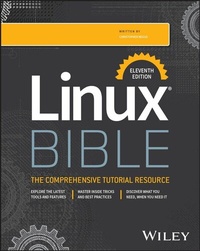
Linux Bible
Description

The industry gold standard in Linux guides, fully updated
In the newly updated eleventh edition of the Linux Bible, veteran Linux author and trainer Christopher Negus walks you through the latest and most popular Linux distributions, including Red Hat Enterprise 9, Ubuntu 24 LTS, and Fedora 41. Whether you're a brand new or power user, you'll learn hands-on ways to become skilled at the world's most important operating system.
This edition expands coverage of Linux in cloud environments, such as the AWS cloud, and on-premises environments (with enhanced data center management features). You'll learn techniques for managing storage, users, and security, while familiarizing yourself with administrative techniques using the clear explanations and step-by-step instructions that this series is known for.
Also inside:
- Get Linux up and running quickly and efficiently
- Master basic operations and tackle more advanced tasks
- Start using Git to draw on and contribute to the massive open source software world
- Set up an AI chatbot to run large language models (LLMs) in Linux
- Understand the latest tools that make administering Linux servers and networks much simpler
Linux Bible, 11th Edition is the single, comprehensive resource you need to get you on track in a flash. Grab your copy today.
More details
Other editions
Additional editions
Person
Christopher Negus has been teaching and writing about Linux and UNIX for over 25 years. He's an instructor and principal technical writer for Red Hat, Inc., and the author of dozens of Linux and UNIX books, including every edition of the Red Hat Linux Bible, CentOS Bible, Fedora Bible, Ubuntu Linux Toolbox, and more.
Content
Introduction xxxv
Part I: Getting Started 1
Chapter 1: Starting with Linux 3
Chapter 2: Creating the Perfect Linux Desktop 27
Part II: Becoming a Linux Power User 57
Chapter 3: Using the Shell 59
Chapter 4: Moving Around the Filesystem 91
Chapter 5: Working with Text Files 111
Chapter 6: Managing Running Processes 129
Chapter 7: Writing Simple Shell Scripts 145
Part III: Becoming a Linux System Administrator 163
Chapter 8: Learning System Administration 165
Chapter 9: Installing Linux 191
Chapter 10: Getting and Managing Software 217
Chapter 11: Managing User Accounts 247
Chapter 12: Managing Disks and Filesystems 271
Part IV: Becoming a Linux Server Administrator 303
Chapter 13: Understanding Server Administration 305
Chapter 14: Administering Networking 339
Chapter 15: Starting and Stopping Services 367
Chapter 16: Configuring a Print Server. 387
Chapter 17: Configuring a Web Server 409
Chapter 18: Configuring an FTP Server 439
Chapter 19: Configuring a Windows File Sharing (Samba) Server 459
Chapter 20: Configuring an NFS File Server 483
Chapter 21: Troubleshooting Linux 505
Chapter 22: Configuring an Artificial Intelligence Chatbot 535
Part V: Learning Linux Security Techniques 545
Chapter 23: Understanding Basic Linux Security 547
Chapter 24: Understanding Advanced Linux Security 579
Chapter 25: Enhancing Linux Security with SELinux 613
Chapter 26: Securing Linux on a Network 641
Part VI: Engaging with Cloud Computing 661
Chapter 27: Shifting to Clouds and Containers 663
Chapter 28: Using Linux for Cloud Computing 679
Chapter 29: Deploying Linux to the Cloud 699
Chapter 30: Automating Apps and Infrastructure with Ansible 713
Chapter 31: Deploying Applications as Containers with Kubernetes 729
Summary 746
Exercises 747
Appendix A: Media 749
Appendix B: Exercise Answers 759
Index 821
