

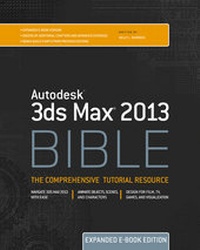
Autodesk 3ds Max 2013 Bible, Expanded Edition
Published on 27. September 2012
1746 pages
978-1-118-39403-8 (ISBN)
Description

The most comprehensive e-book reference on Autodesk 3ds Max2013!
Autodesk 3ds Max is used to create 80 percent of commerciallyavailable games and is also a key tool for visual effects artistsand graphic designers in film and television. This conveniente-book covers the 2013 version in expanded detail, including 12chapter-length quick-start projects and 39 additional chapters notfound in the print version. Along with complete referencesdetailing all Primitives, Modifiers, Materials, Maps, andControllers, it covers advanced topics such as Patches, NURBS,Radiosity, Network Rendering, and MAXScript. It's the perfectresource for both novices and pros.
* 3ds Max is the tool of choice for game developers as well asvisual effects artists and graphic designers in the film and TVindustries
* This comprehensive e-book includes complete coverage of 3ds Max2013, and is well suited for beginners and experts alike, as wellas for educational markets teaching beginning to advanced coursesusing 3ds Max.
* Features a complete reference for all Primitives, Modifiers,Materials, Maps, and Controllers
* Covers Patches, NURBS, Radiosity, Network Rendering, MAXScript,and other advanced topics
* Includes 12 chapter-length quick-start projects as well as 39chapters not found in the print version, all packed with timesavingtips and expert advice
* Third-party models and bonus tutorials are available on CD andcan be obtained by readers by emailing a request to3dsmax13cd@wiley.com
Autodesk 3ds Max 2013 Bible, Expanded Edition by veterancomputer graphics author Kelly Murdock is the comprehensive e-bookguide for every 3ds Max user.
More details
Person
Kelly L. Murdock has been writing computer books for many years. His credits include eleven editions of the bestselling 3ds Max Bible, five editions of Adobe Creative Suite Bible, Edgeloop Character Modeling For 3D Professionals Only, and many other books. He holds a degree in engineering with an emphasis on computer graphics.
Content
- Intro
- Table of Contents
- Title Page
- Part I: Getting Started with Autodesk 3ds Max 2013
- Quick Start: Falling from a Tightrope
- Chapter 1: Exploring the Interface
- Chapter 2: Controlling the Viewports
- Chapter 3: Working with Files
- Part II: Manipulating Objects
- Chapter 4: Creating and Editing Primitive Objects
- Chapter 5: Selecting Objects and Using Layers
- Chapter 6: Transforming Objects, Pivoting, Aligning, and Snapping
- Chapter 7: Cloning Objects and Creating Object Arrays
- Chapter 8: Grouping, Linking, and Parenting Objects
- Part III: Modeling 3D Assets
- Chapter 9: Introducing Subobjects and Modifiers and Using the Modifier Stack
- Chapter 10: Drawing and Editing 2D Splines and Shapes
- Chapter 11: Modeling with Polygons
- Chapter 12: Using the Graphite Modeling Tools
- Chapter 13: Working with Compound Objects
- Part IV: Applying Materials and Textures
- Chapter 14: Creating and Applying Standard Materials with the Slate Material Editor
- Chapter 15: Adding Material Details with Maps
- Chapter 16: Creating Compound Materials and Using Material Modifiers
- Chapter 17: Unwrapping UVs
- Part V: Working with Cameras, Lighting, and Rendering
- Chapter 18: Configuring and Aiming Cameras
- Chapter 19: Using Lights and Basic Lighting Techniques
- Chapter 20: Rendering a Scene and Enabling Quicksilver
- Chapter 21: Using Atmospheric and Render Effects
- Chapter 22: Rendering with mental ray and iray
- Chapter 23: Compositing with Render Elements and the Video Post Interface
- Part VI: Animating Objects and Scenes
- Chapter 24: Understanding Animation and Keyframes
- Chapter 25: Animating with Constraints and Simple Controllers
- Chapter 26: Using Animation Layers and Animation Modifiers
- Chapter 27: Wiring Parameters
- Chapter 28: Editing Animation Curves in the Track View
- Part VII: Working with Characters
- Chapter 29: Understanding Rigging, Kinematics, and Working with Bones
- Chapter 30: Skinning Characters
- Chapter 31: Animating Characters with CAT
- Part VIII: Dynamic Animation
- Chapter 32: Creating Particles
- Chapter 33: Using Space Warps
- Chapter 34: Simulating Physics-Based Motion with MassFX
- Chapter 35: Working with Hair and Cloth
- Part IX: Configuring the Interface
- Chapter 36: Configuring the Viewports
- Chapter 37: Setting Preferences
- Chapter 38: Customizing the Interface
- Part X: Advanced Modeling
- Chapter 39: Using Asset Tracking
- Chapter 40: Building Complex Scenes with Containers and XRefs
- Chapter 41: Working with Loft Objects
- Chapter 42: Modeling with Patches
- Chapter 43: Working with NURBS
- Chapter 44: Working with Solids and Body Objects
- Chapter 45: Working with More Compound Objects
- Chapter 46: Using the Schematic View
- Part XI: Advanced Materials
- Chapter 47: Using the Compact Material Editor
- Chapter 48: Working with Material Libraries
- Chapter 49: Working with Procedural Substance Textures
- Chapter 50: Painting in the Viewport Canvas
- Chapter 51: Using Peel, Pelt, and Spline Unwrapping
- Chapter 52: Creating Baked Textures and Normal Maps
- Part XII: Advanced Animation and Character Animation
- Chapter 53: Using the Motion Mixer
- Chapter 54: Working with Legacy Inverse Kinematics Systems
- Chapter 55: Creating and Animating Bipeds
- Chapter 56: Creating Character Crowds
- Chapter 57: Working with Muscles in a CAT Rig
- Part XIII: Advanced Lighting and Rendering
- Chapter 58: Using the Sunlight and Daylight Systems
- Chapter 59: Working with Advanced Lighting, Light Tracing, and Radiosity
- Chapter 60: Rendering Surface Maps
- Chapter 61: Printing and Creating Panoramic Images
- Chapter 62: Batch and Network Rendering
- Part XIV: Advanced Effects
- Chapter 63: Creating Effects with Volume Lights
- Chapter 64: Adding Lens Effects
- Chapter 65: Controlling Particles with the Particle Flow Interface
- Part XV: Adding Functionality
- Chapter 66: Automating with MAXScript
- Chapter 67: Expanding the Software with Third-Party Plug-Ins
- Part XVI: Extended Reference
- Chapter 68: Importing and Exporting Files
- Chapter 69: Understanding Object Properties
- Chapter 70: Exploring the Available Primitive Objects
- Chapter 71: Discovering Additional Modeling and Animation Modifiers
- Chapter 72: Using Specialized Material Types
- Chapter 73: Exploring the Various Map Types
- Chapter 74: Examining the Animation Controllers
- Part XVII: Jumping into Projects
- Chapter 75: Quick Start-3ds Max 4 Bible: Animating a Fighter Jet Fly-By
- Chapter 76: Quick Start-3ds Max 5 Bible: Animating a Spaceship Re-Entry
- Chapter 77: Quick Start-3ds Max 7 Bible: Creating and Animating a Three-Fingered Gaaboot
- Chapter 78: Quick Start-3ds Max 8 Bible: Creating a Furry Creature
- Chapter 79: Quick Start-3ds Max 9 Bible: Animating a Dancing Cartoon Moose
- Chapter 80: Quick Start-3ds Max 10 Bible: Creating and Flying Through a Greek Temple
- Chapter 81: Quick Start-3ds Max 2009 Bible: Firing a Cannonball
- Chapter 82: Quick Start-3ds Max 2010 Bible: Landing a Space Vehicle
- Chapter 83: Quick Start-3ds Max 2011 Bible: Animating a Walking Dinosaur
- Chapter 84: Quick Start-3ds Max 2012 Bible: Laying Siege to a Castle Wall
- Appendix A: What's New with Autodesk 3ds Max 2013
- Appendix B: What's on the CD-ROM
- Appendix C: Installing and Configuring Autodesk 3ds Max 2013
- Appendix D: Keyboard Shortcuts
