


The Mueller Report
The Final Report of the Special Counsel into Donald Trump, Russia, and Collusion
Published on 19. April 2019
480 pages
978-1-5107-5017-3 (ISBN)
Description

NOW A NEW YORK TIMES, WASHINGTON POST, WALL STREET JOURNAL, USA TODAY, AND PUBLISHERS WEEKLY BESTSELLER.
There has never been a more important political investigation than Robert S. Mueller III's into President Donald Trump's possible collusion with Russia. His momentous findings can be found here, complete with:
- The 300+ pages of the historic report, as released by the Justice Department
- An introduction by constitutional scholar, eminent civil libertarian, and New York Times bestselling author Alan Dershowitz.
- The relevant portions of Title 28 of the Code of Federal Regulations, the 1999 provisions written by former acting Solicitor General Neal Katyal, which establish and regulate the powers of the special counsel.
- Rod Rosenstein's 2016 order appointing Robert Mueller III as special counsel and outlining the scope of his investigation.
- Attorney General William Barr's four-page summary of the report, as sent to Congress.
- Barr's explanation of the four reasons for redacting the report, and a key for identifying them in the color-coded report
More details
Other editions
Additional editions
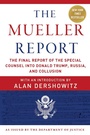
Robert S. Mueller | Special Counsel's Office U.S. Department of Justice | Alan Dershowitz
The Mueller Report
The Final Report of the Special Counsel into Donald Trump, Russia, and Collusion
Book
04/2019
Skyhorse Publishing
€13.00
No shipping information available
Persons
Robert S. Mueller III, Special Counsel's Office, US Department of Justice; Introduction by Alan Dershowitz
Content
- Intro
- Title Page
- Contents Overview
- Introduction by Alan Dershowitz
- Report Volume I of II
- Contents - Report Volume I of II
- Volume I Notes
- Report Volume II of II
- Contents - Report Volume II of II
- Volume II Notes
