

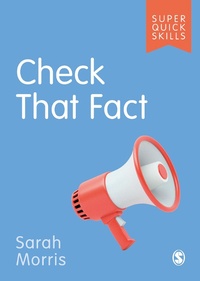
Check That Fact
1st Edition
Published on 28. April 2021
104 pages
978-1-5297-6040-8 (ISBN)
Description

Knowing how to check and challenge information is essential for academic study - and our everyday lives. This practical guide shows you how to be savvy about using sources and improve your information literacy.
Learn techniques for efficient and effective fact-checking
Find out how to evaluate whether a source is credible
Identify and challenge misinformation in academia and beyond.
Super Quick Skills provide the essential building blocks you need to succeed at university - fast. Packed with practical, positive advice on core academic and life skills, you'll discover focused tips and strategies to use straight away. Whether it's writing great essays, understanding referencing or managing your wellbeing, find out how to build good habits and progress your skills throughout your studies.
Learn core skills quickly
Apply right away and see results
Succeed in your studies and life.
Super Quick Skills give you the foundations you need to confidently navigate the ups and downs of university life.
Learn techniques for efficient and effective fact-checking
Find out how to evaluate whether a source is credible
Identify and challenge misinformation in academia and beyond.
Super Quick Skills provide the essential building blocks you need to succeed at university - fast. Packed with practical, positive advice on core academic and life skills, you'll discover focused tips and strategies to use straight away. Whether it's writing great essays, understanding referencing or managing your wellbeing, find out how to build good habits and progress your skills throughout your studies.
Learn core skills quickly
Apply right away and see results
Succeed in your studies and life.
Super Quick Skills give you the foundations you need to confidently navigate the ups and downs of university life.
More details
Series
Edition
1. Auflage
Language
English
Place of publication
London
United Kingdom
Publishing group
Sage Publications Ltd (Digital)
Target group
College/higher education
ISBN-13
978-1-5297-6040-8 (9781529760408)
Copyright in bibliographic data and cover images is held by Nielsen Book Services Limited or by the publishers or by their respective licensors: all rights reserved.
Schweitzer Classification
Other editions
Additional editions
Person
Sarah Morris is the Head of Instruction and Engagement at Emory Libraries, Emory University. In this role, she plans library educational programs and engagement initiatives and works with librarians, faculty, and other campus partners to support student learning and student success. She also works with the English Department and offers support around information literacy instruction, outreach and events, research, and library collection development.
Prior to joining the Emory Libraries, Sarah worked as an assessment librarian at the University of Texas at Austin and as a first-year experience librarian at Loyola University Chicago. Sarah also has a background in museum education and educational consulting and is the co-founder of an educational nonprofit called Nucleus Learning Network.
Sarah's current research interests revolve around media literacy education and misinformation. She has worked on a number of collaborative media literacy education projects with partners including the Mozilla Foundation, ACRL, and Global Voices NewsFrames. She is currently active with the Credibility Coalition and EveryLibrary. Aside from her interests in media literacy education, Sarah is also interested in high school to college student transitions, digital citizenship, and interdisciplinary approaches to information literacy education.
Prior to joining the Emory Libraries, Sarah worked as an assessment librarian at the University of Texas at Austin and as a first-year experience librarian at Loyola University Chicago. Sarah also has a background in museum education and educational consulting and is the co-founder of an educational nonprofit called Nucleus Learning Network.
Sarah's current research interests revolve around media literacy education and misinformation. She has worked on a number of collaborative media literacy education projects with partners including the Mozilla Foundation, ACRL, and Global Voices NewsFrames. She is currently active with the Credibility Coalition and EveryLibrary. Aside from her interests in media literacy education, Sarah is also interested in high school to college student transitions, digital citizenship, and interdisciplinary approaches to information literacy education.
Content
Why do I need to use sources?
Why do I need to evaluate sources?
How do I know if a source is credible?
How can I tell what type of source I am looking at?
How can I learn more about who created my source?
How can I fact-check a claim?
How can I identify the purpose of a source?
How do I know if a source is worth using?
Why do I need to evaluate sources?
How do I know if a source is credible?
How can I tell what type of source I am looking at?
How can I learn more about who created my source?
How can I fact-check a claim?
How can I identify the purpose of a source?
How do I know if a source is worth using?
